EN 30
POSTPONING A PREPARATION TIME
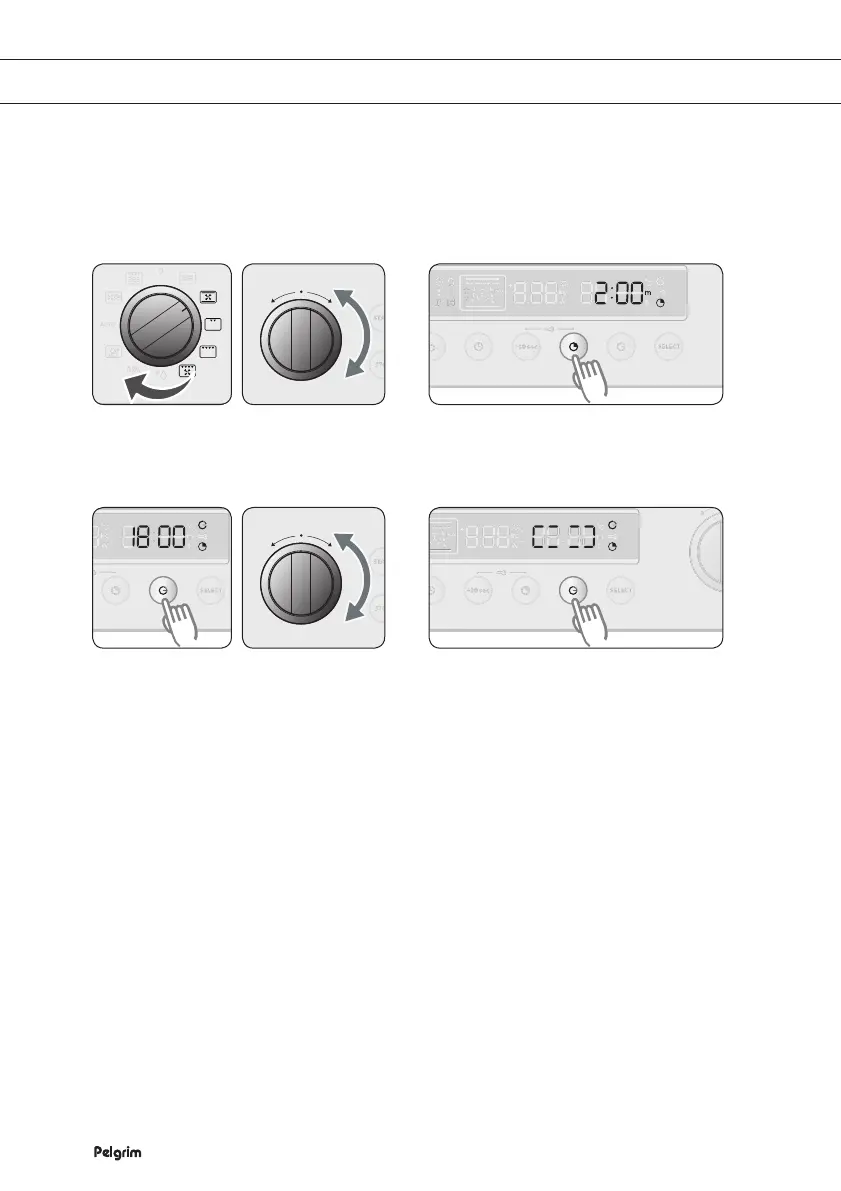
When you set a preparation time and an end time, you can have the oven switch on and off
automatically at the set times.
Example with the hot air setting: Current time: 12:00 o'clock / Preparation time: 2 hours
End time: You want the preparation to end at 18:00 o’clock
Select the function you want and if
desired, set the temperature.
Press PREPARATION TIME and turn
the FUNCTION SELECTOR KNOB to
the desired preparation time (2 hours).
Press END TIME.
The preparation time is added
to the current time and '14:00' is
displayed.
Turn the FUNCTION SELECTOR
KNOB to set the end time (18:00) you
want.
Press END TIME.
The display shows a figure which
indicates that the postpone
function has been activated.
The oven starts automatically
at the set time (16:00) and the
preparation time is shown.
Note
•
The preparation time and the end time can be changed before the set time.
•
Please note! Do not leave the dish too long in the oven; the food could spoil.
1
2
3
4


 To Next Page