1x
MOD
/OK
1s
OFF
ON
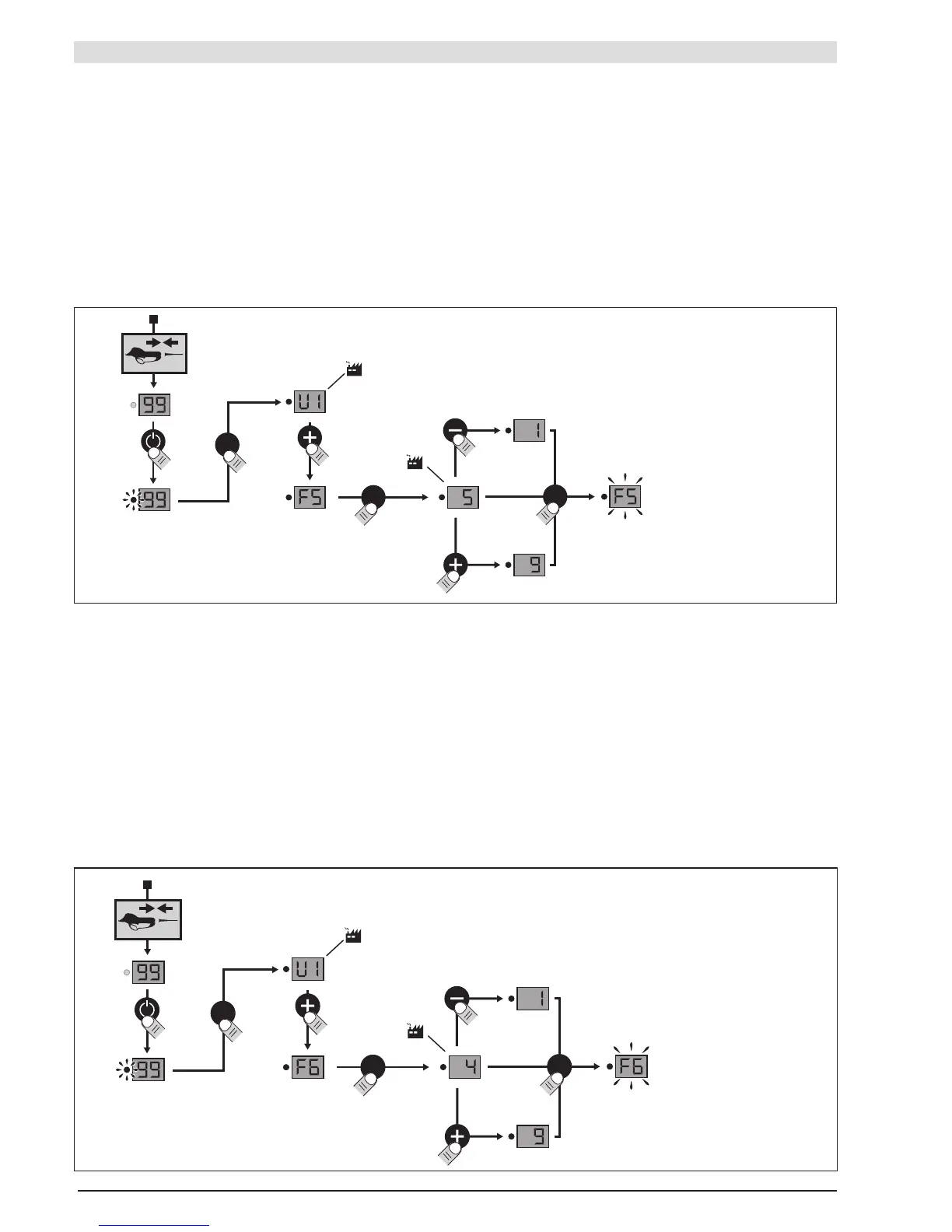
"FUNCTIONAL" SETTING MODES
F5 MODE: BLADE CROSSING ADJUSTMENT
Adjustment range:
- 9 = maximum value
- 1 = minimum value
- Factory setting = 5
1– Turn the battery on, with the tool connected
2– Press the "mode" button
3– Select function F5, by pressing + or -.
4– Press the "mode" button
5– Press + or - to adjust the blade crossing
6– Press the "mode" button
F6 MODE: HALF-OPENING SETTING
Adjustment range:
- 9 = maximum value
- 1 = minimum value
- Factory setting = 4
1– Turn the battery on, with the tool connected
2– Press the "mode" button
3– Select function F6, by pressing + or -.
4– Press the "mode" button
5– Press + or - to adjust the half-opening of the blade
6– Press the "mode" button


 To Next Page