21
%%
1x
MOD
/OK
1x
MOD
/OK
1x
MOD
/OK
1x
MOD
/OK
1x
1x
1x
1x
1s
56_14_021F
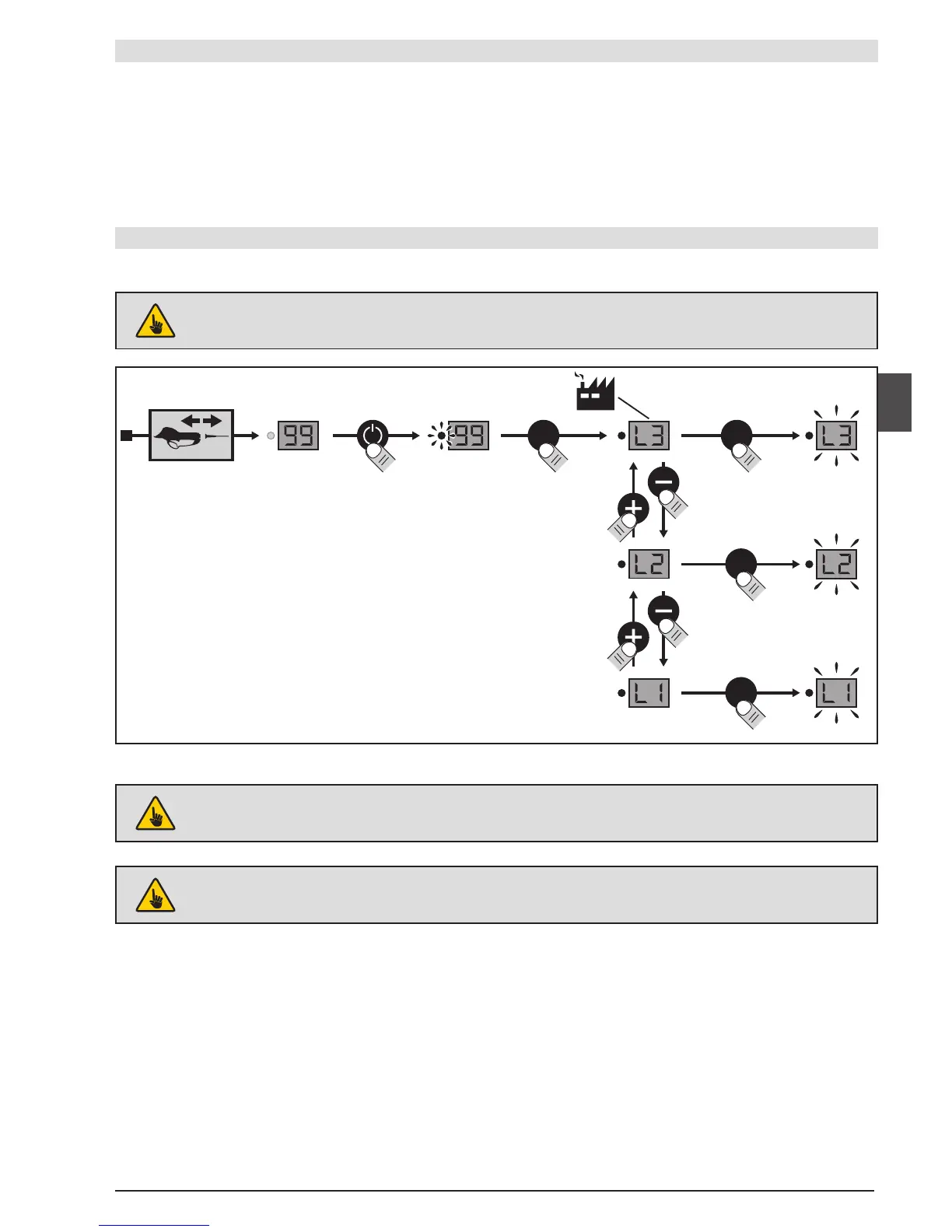
PARAMETER SETTING MODES
• You can set the parameters for the tool's adjustment level to make it easier to use.
L1: "Display" Mode: The tool can only be used in the preset conguration.
L2: "Normal" mode: The user has access to 4 operating modes, U1 to U4, but these cannot be adjusted.
L3: "Expert" mode: The user has access to 4 operating modes U1 to U4 and two settings (blade crossing
= F5 and half opening = F6).
The tool's parameter setting modes can be altered as follows:
PARAMETER SETTING
AFTER CONFIGURING THE USAGE MODE ALLOWED FOR THE USER, TURN THE BATTERY OFF,
THEN RECONNECT THE TOOL.
DISCONNECT THE PRUNING SHEARS AND TURN ON THE BATTERY
IF YOU NEED TO CHANGE MODES, SIMPLY REPEAT THE ABOVE OPERATION.


 To Next Page