100
4
Taking Pictures
You can set the autofocus area and focusing method.
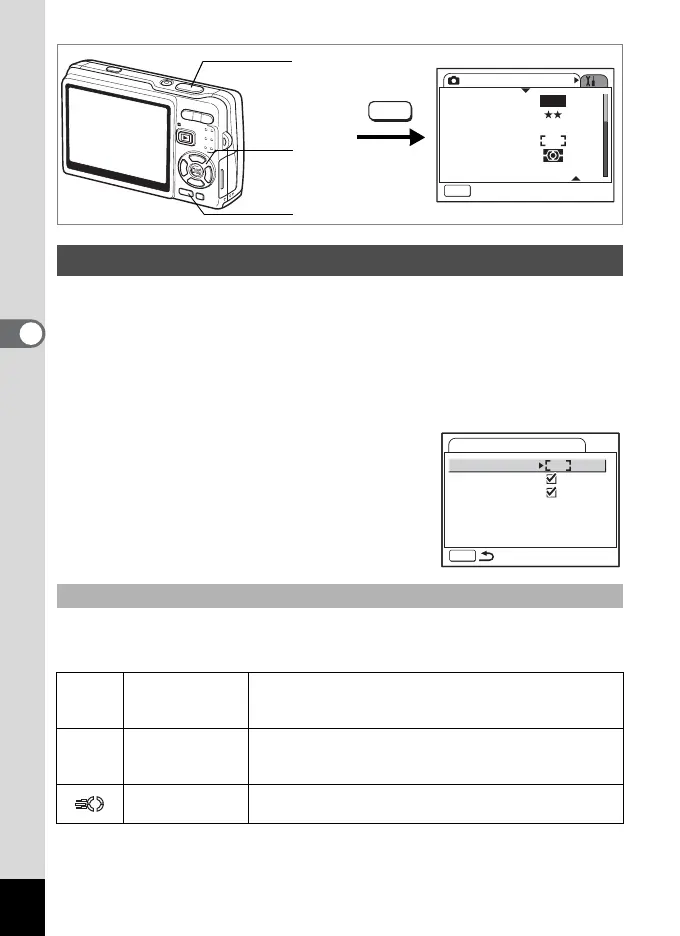
1 Press the MENU button in Capture mode.
The [ARec. Mode] menu appears.
2 Use the four-way controller (23) to select
[AF Setting].
3 Press the four-way controller (5).
The AF Setting screen appears.
You can change the autofocus area (Focusing Area).
Focusing Area
Selecting the Autofocus Settings
Changing the Focusing Area
J Multiple
The camera measures a wide range in the center of the
monitor (within the focusing area) and focuses on the
nearest subject.
K Spot
The camera measures a narrow range in the center of the
monitor (the spot focusing area) making easier for you to
focus on a specific subject.
Automatic tracking
AF
The camera continues to focus on the moving subject
while you are pressing the shutter release button halfway.
Rec. Mode
MENU
Exit
Recorded Pixels
Quality Level
White Balance
AF Setting
AE Metering
Sensitivity
AWB
12M
AUTO 800
MENU
Shutter release
button
MENU button
Four-way
controller
AF Setting
Focusing Area
Focus Limiter
Aux. AF Light
MENU








 To Next Page