31
1
Getting Started
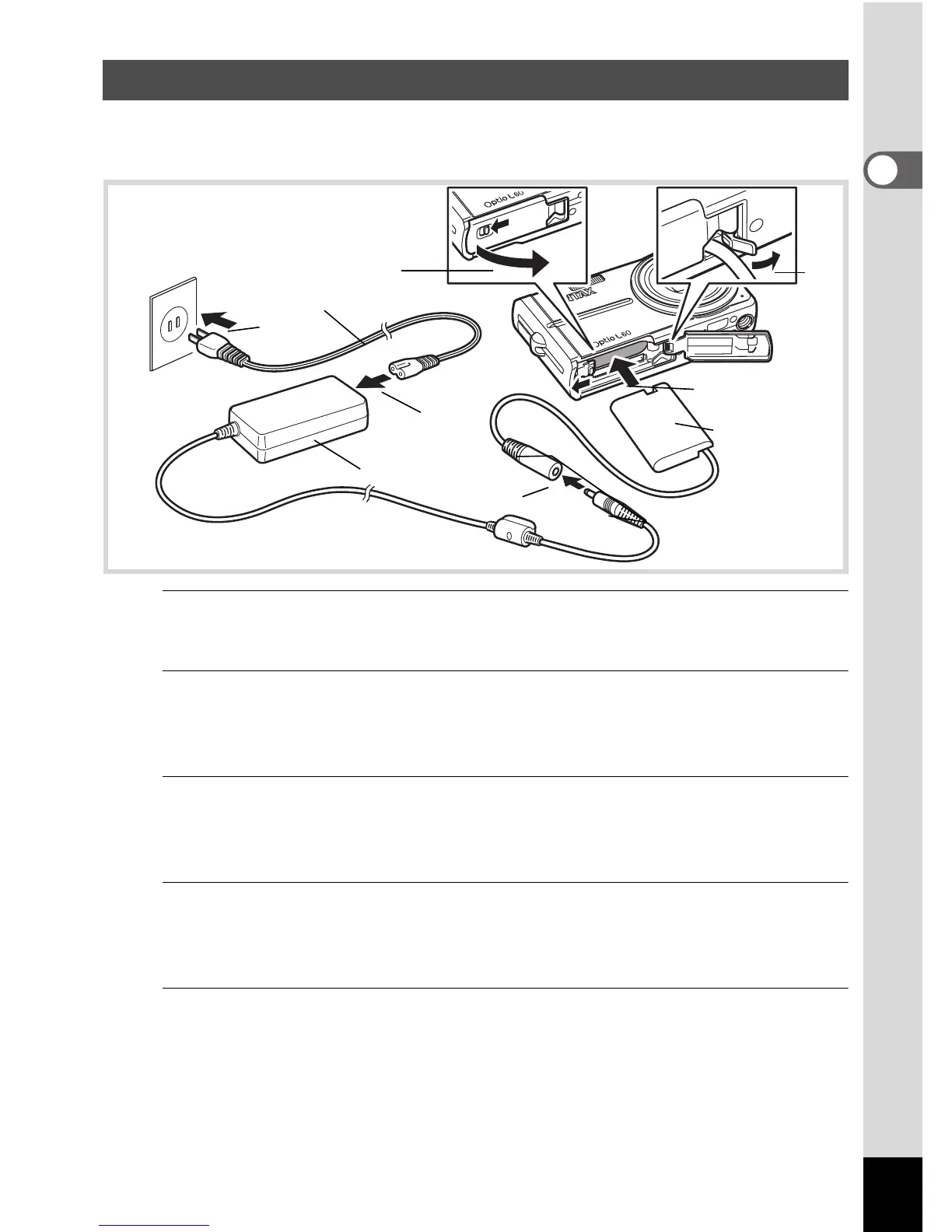
Use of the optional AC adapter kit (K-AC78) is recommended if you
intend to use the camera for a long time or connect it to a computer.
1
Make sure that the camera is turned off and open the
battery/card cover.
2
Remove the Battery.
Refer to p.28 - p.29 on how to open/close the battery/card cover and
remove the battery.
3
Insert the DC coupler.
Using the side of the DC coupler to press the battery/card cover lock
lever, insert the DC coupler. Confirm the DC coupler is locked in place.
4
Extract the DC coupler cord.
Pull out the tab at the joint of the camera and the battery/card cover so
that the DC coupler cord extracts from there.
5
Close the battery/card cover.
Using the AC Adapter
3
1
6
4
8
7
AC plug cord
DC terminal
DC coupler
AC adapter



 To Next Page