24
support@ionodes.com | www.ionodes.com | 450-696-1060
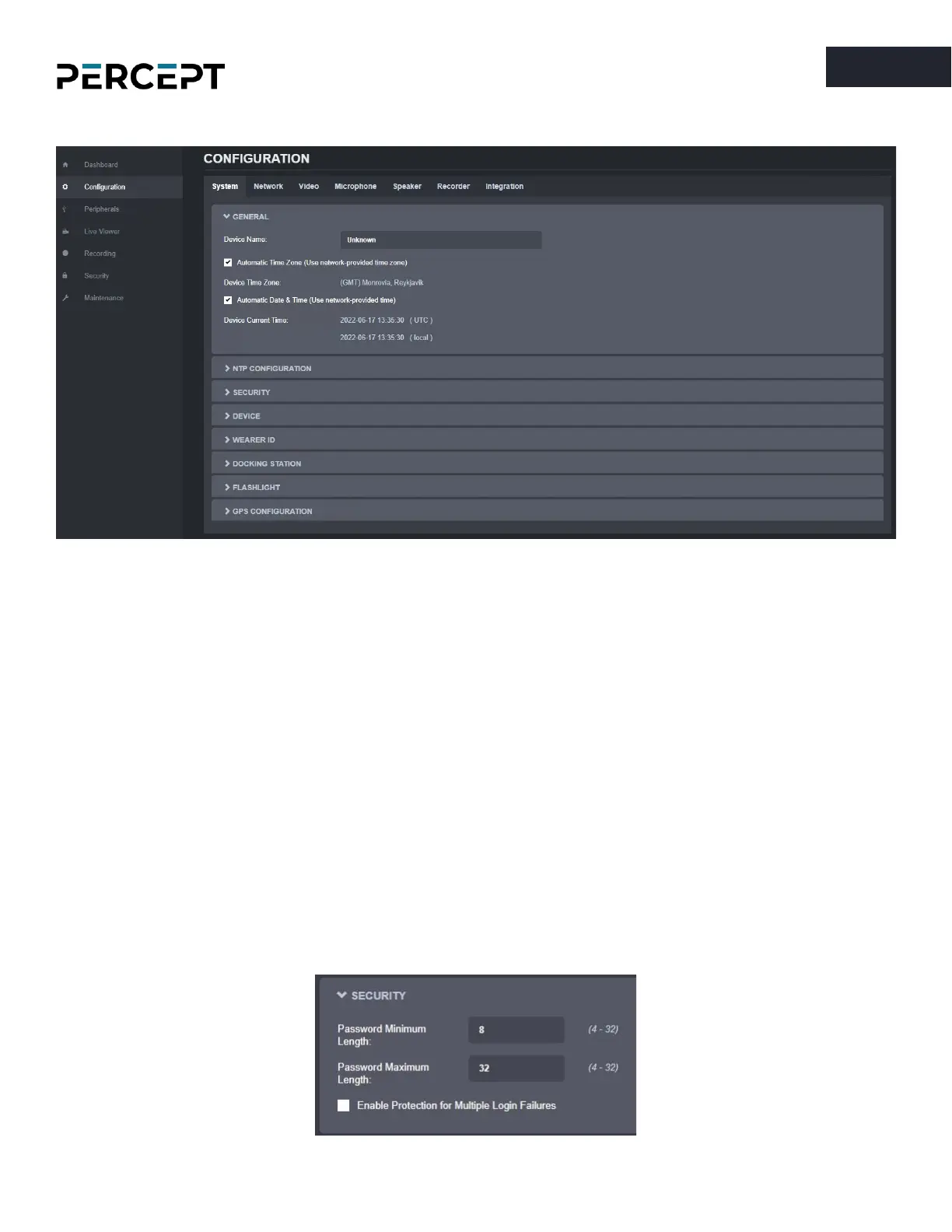
7.3.2 Configuration/System
Under the
Configuration
section, select the
System
tab to perform the following operations:
• Specify a
Device Name
; this custom name can be used by third-party software to display a friendly
name for the device
• Set the device’s
Time Zone
and
Date/Time
; these can also be automatically configured by the
body camera using information received from the GPS or from the network (Wi-Fi or Cellular) if
the corresponding connection is present. Based on this setting, as well as the current UTC time, a
local time is calculated and displayed.
• Configure an
NTP
server for real-time clock synchronization. This option is only available when
the “
Automatic Date & Time (Use network provided time)
” is enabled.
• Set the device’s
Security
policy. Here the user can define the minimum & maximum length of the
password for all user accounts. By validating the option “Enable Protection for Multiple Login
Failures”, the device is instructed to block all login attempts after
X
failed ones, until the timeout
of
Y
seconds runs out (
X
and
Y
are user-configurable).



 To Next Page