G
B
Important: Installation and electrical connections of devices and appli-
ances must be carried out by skilled people and in compliance with cur-
rent regulations. The manufacturer declines all responsibility for the
use of products that must conform to specific environmental and/or in-
stallation standards.
Note for the installer: If surface mounting (e.g. on a wall), have suitable
raceways for the cables in compliance with current standards. Check
that the relay load does not exceed the figure given in the technical data.
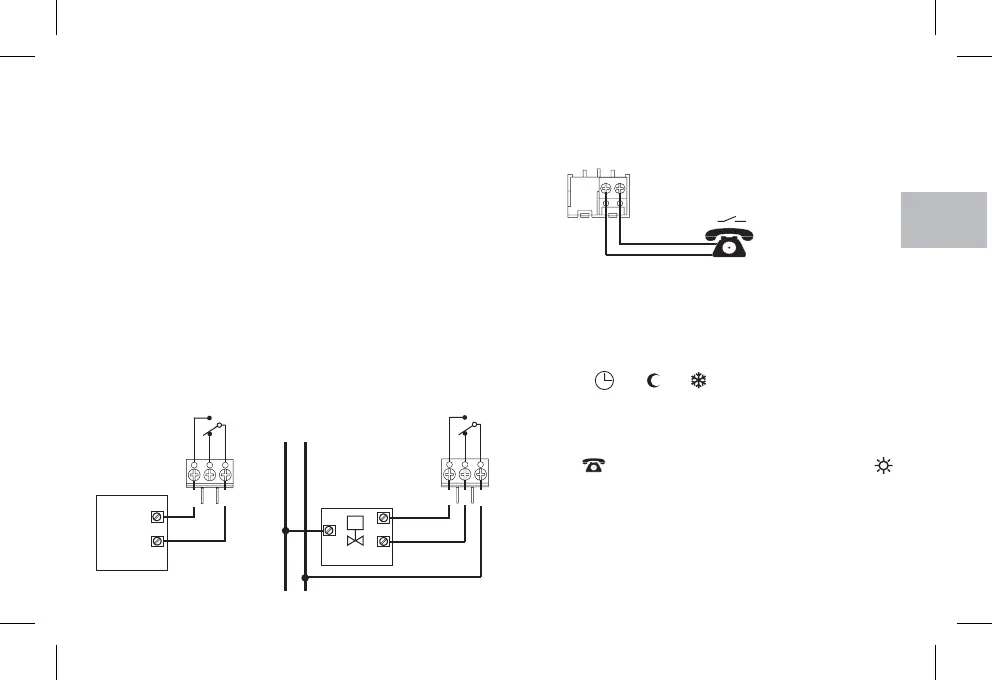
Examples of electrical connections
5 - ELECTRICAL CONNECTIONS
Switch off mains power to the device.
Connect the device to be controlled to the terminals:
1-common
2-
3-
normally closed contact
normally open contact
Functioning with the telephone programmer
The phone programmer governs the chronothermostat closing
the contact connected to terminals 8 and 9.
2
3
1
C
NO
NC
2
3
1
C
N
NC
CLOSE
OPEN
L
230V~
NO
Connecting a phone programmer for remote control
The terminals and of the chronothermostat are fitted for
connecting a phone programmer with a normally open contact.
89
To turn on the chronothermostat with the phone programmer you
need to set the switch onto one of the following types of operation:
AUTOMATIC or or .
When the programmer is turned on (contact on terminals 8 and 9
closed) the chronothermostat passes from one of the conditions
set with the switch to
operation: besides showing all 48 indices on, the display will show
the symbol for the phone programmer turned on and the
Comfort symbol blinking.
always on comfort temperature
6789
Turning off forcing with the phone programmer
Open the phone programmer contact (see programmer
instructions) showing the chronothermostat in the current mode of
operation at the time of switching on.
Note: The on and off controls are operative within 1 minute.
t
t
15
Connection to a motorized valve
WATER
HEATER
LOAD
M
Connection to a water heater


 To Next Page