G
B
Note: when you finish making your changes, 5 seconds after last
pressing the buttons, the chronothermostat will automatically go
into the operating state (index of the current blinking).½h
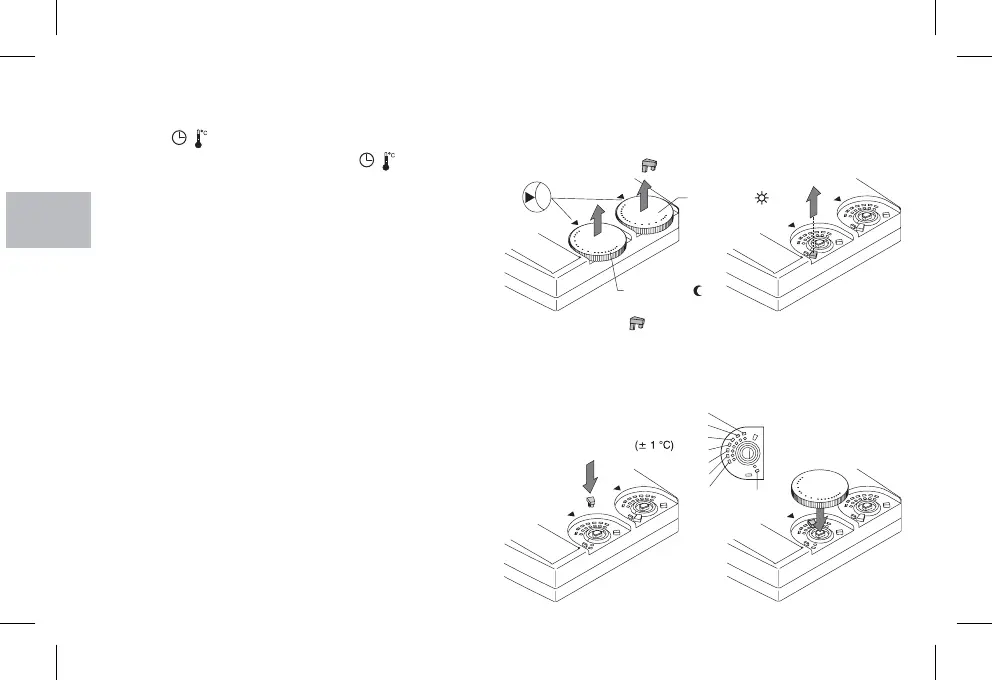
It is possible to limit the highest setting for both temperature sets as
follows:
Turn the knob onto 5 °C; and extract it;!
! extract the JUMPER from its housing;
12 - AMBIENT TEMPERATURE LIMIT
!
!
!
insert the JUMPER into the holes corresponding to the desired
temperature;
reposition the knob, taking care you put it back into the same
position it had before; 5 °C position corresponding to the index on
the front of the chronothermostat.
20
CHANGING SETTINGS
Changing the current time
Press the button until the current time blinks
Change the hour and/or minutes with the button as
described above.
/
/
Changing the current day
Changing the entered programmes
(weekly model only)
Press the button until the number corresponding
to the current day blinks.
Set the new current day by pressing the button
Change the programme by using the key (tappet) as
describet above
Change the programme for the current day by using the key
(tappet) as describet above
key (tappet) as
describet above
Day
Day
Daily model
Weekly model
To change the program for the others day of the week select the
desired day with the button and use theDay
17
19
15
5
10
12
30
22°C
Neutral
20°C
18°C
16°C
14°C
24°C
12°C
17
19
15
5
10
12
30
16
18
30
5
24
22
20
5
Red color ( )
Blue color ( )
t
t


 To Next Page