ENG
Operating Manual | Attachment and Installation Cooling Units | Standard Controller (SC) – 230 V | 086100113 53/66
6.4.1.1 Removing/assembling the unit cover
Danger of crushing when removing/assembling the unit cover
Hands and other body parts may be crushed when removing and reinserting the unit cover.
• Do not place any body parts between the frame, springs and the unit cut-out.
• Work carefully and wear cut-proof gloves.
Removing the unit cover
Prerequisite
DANGER – Danger to life due to electric shock. Make sure that the
unit is voltage-free.
Wait for a discharge phase of 10 minutes for the electrical components.
The unit should only be opened afterwards.
Procedure
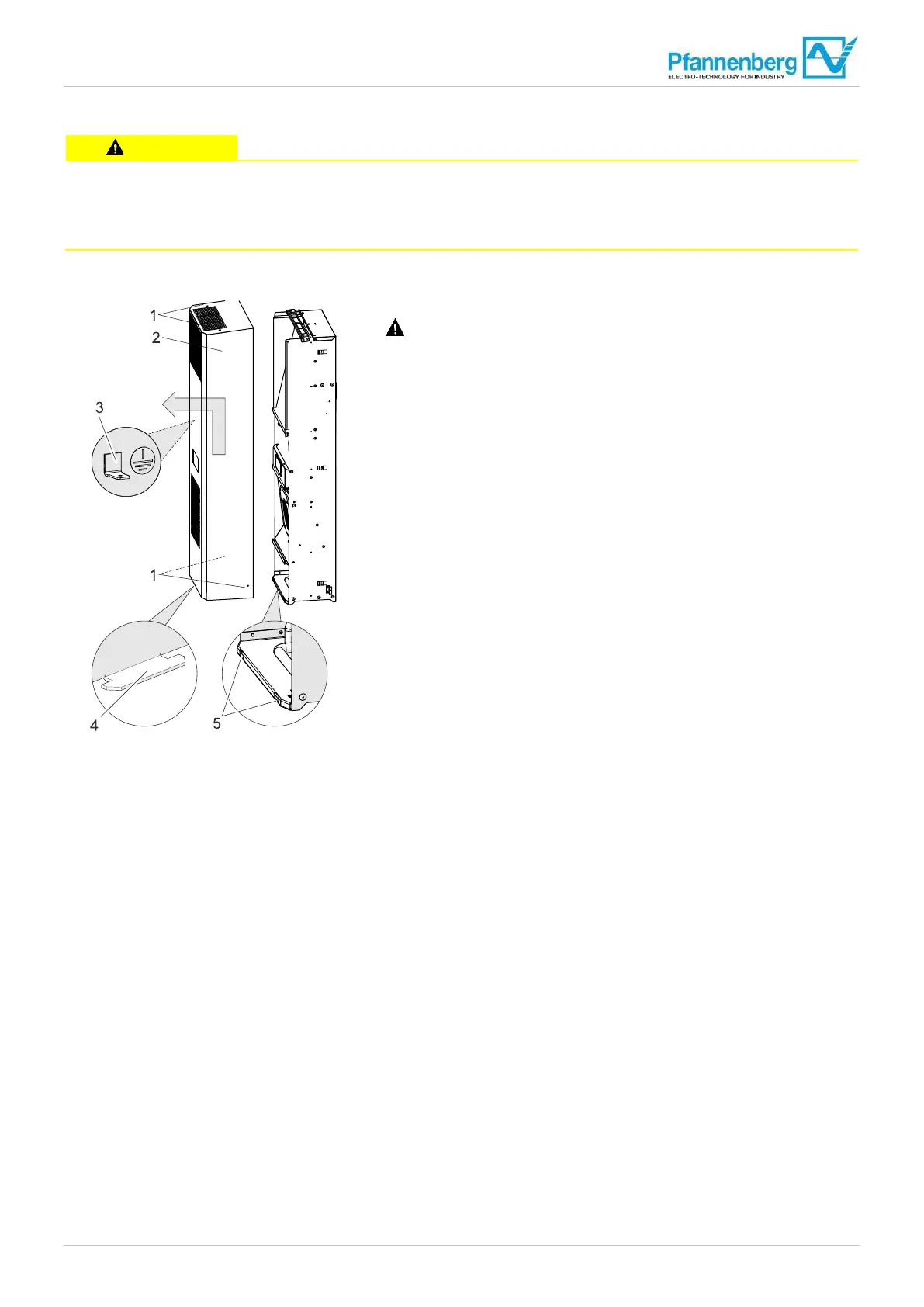
1. Remove the four screws (1) of the unit cover (2).
2. Tip the unit cover forward by 20°.
ATTENTION – Damage to the unit.
Always pull off the earthing cable (3) from the inside of the unit
cover before removing the unit cover.
3. Lift the unit cover (2) about 15 mm and pull the lugs (4) out of the
slits (5) in the floor plate.
The unit cover is removed.
Fig. 23: Removing the unit cover


 To Next Page