
 Need help?
Do you have a question about the PFREUNDT WK60 Series and is the answer not in the manual?
Explains symbols indicating danger points or hazardous situations.
Details symbols and illustrations used in the manual for clarity.
Specifies the intended applications for the scale, focusing on legal-for-trade use.
Details FCC and IC certification compliance for the device.
Highlights life-threatening situations arising from incorrect scale operation.
Instructions for positioning the scale horizontally for accurate weighing.
Guidance on operating the scale within specified temperature limits.
Step-by-step instructions for powering on the weighing unit.
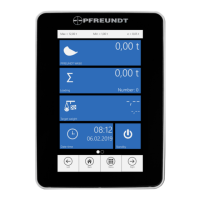
Explains the layout and elements of the main weighing program interface.
Details available functions and options within the scale's menu system.
Defines the meaning of various symbols shown on the weight display.
Procedure for performing dynamic zeroing of the scale.
Procedure for performing static zeroing of the scale.
Explains forced zeroing and warm-up procedures required by the system.
Step-by-step guide for conducting a dynamic weighing operation.
Step-by-step guide for conducting a static weighing operation.
Procedure for dynamic weighing specifically for forklift applications.
Details options available in the Loading menu, such as favorites, cash sales, and settings.
Guide on selecting and managing master data for weighing processes.
Instructions for connecting a USB stick to transfer data.
Guide to transferring data using the PFREUNDT Web Portal.
Accessing information about software version and hardware.
Viewing general messages, error messages, and calibration events.
Configuration and use of the printer function within applications.
Viewing and printing tamper-proof load and weighing data.
Installing or uninstalling additional functions or applications.
Creating evaluations of loading, order, and summary documents.
Managing and editing information for weighing in the master data application.
Creating and managing users and changing the current user.
Entering or copying target weights to avoid overloading vehicles.
Assigning materials to a delivery note and managing summary documents.
Configuring the date and time settings for the scale.
Configuring standby functions, including automatic scale shutdown.
Configuring the WLAN network connection for the scale.
Configuring the mobile network connection for the scale.
Accessing and configuring various settings for the WK60.
Selecting protocols for transferring weighing data to external computers.
Configuring hardware interfaces like Bluetooth and GPS.
Selecting and processing loading orders, often with the Web Portal.
Completing loadings, orders, and summary documents as cash sales.
Storing loading information on RFID chips.
Extending voucher numbers with a customizable prefix.
Connecting and using external relays with the weighing unit's MIO connections.
Details supply voltage, power consumption, protection class, and interfaces.
Covers position determination, data memory, weight, and environmental conditions.
Instructions for cleaning the WK60 weighing unit, pPrinter matrix, and touchscreen.
Advice on cleaning the mechanical components of the scale.
The PFREUNDT WK60 series is a sophisticated weighing system designed for wheel loaders, telescopic handlers, and forklifts, aiming to provide easy, better, and accurate weighing. This operating manual outlines the essential aspects of using, maintaining, and understanding the WK60 scale, ensuring safe and efficient operation.
The WK60 scale is primarily designed for dynamic and static weighing of bulk goods and raw materials. It integrates seamlessly into the operation of various loading vehicles, allowing for on-the-go weight measurement. The system's core function is to accurately determine the weight of material in a loading bucket or on lifting forks, providing real-time data to the operator. This is crucial for managing loads, preventing overloading of transport vehicles, and ensuring compliance with national regulations, especially for legal-for-trade applications.
The scale operates by measuring the weight of the load as the lifting arm moves through a defined weighing position. For dynamic weighing, the system captures the weight during the lifting movement, while static weighing involves stopping the lifting arm briefly within the weighing area. The WK60 automatically adds fixed weights to a running total, allowing operators to track the cumulative load. It also supports target weight management, enabling operators to pre-set a desired load amount and monitor the remaining weight to be loaded.
Beyond basic weighing, the WK60 offers a range of advanced functions. It can store and manage master data, including information on customers, materials, delivery locations, and vehicles, streamlining the loading process. The system also supports data transfer via USB sticks or the PFREUNDT Web Portal, facilitating the export of weighing data, master data, and custom weighing cards for external analysis or record-keeping. For enhanced accountability, an alibi memory function stores loads and weighings in a tamper-proof manner, crucial for legal-for-trade operations.
The WK60 scale is designed for user-friendliness, featuring a clear display and intuitive menu navigation. The main page of the weighing program provides a comprehensive overview of the current status, including the gross weight, total weight, and number of completed weighings. Operators can easily access additional information such as accuracy class, approval details, sensor data, and software version directly from the display.
Key usage features include:
Maintaining the WK60 scale is straightforward, focusing on regular cleaning and adherence to operational guidelines to ensure longevity and accuracy.
By following these guidelines, operators can ensure the WK60 scale remains a reliable and accurate tool for their weighing needs.
 General
| Protection Class | IP69K |
|---|---|
| Housing material | Aluminum |
| Interfaces | RS232, Ethernet |
| Display | 7" Touchscreen |
| Weight | 1.5 kg |
| Power Supply | 10 - 30 V DC |
| Operating voltage | 10 - 30 V DC |

 To Next Page