14
INSTALLING FANS
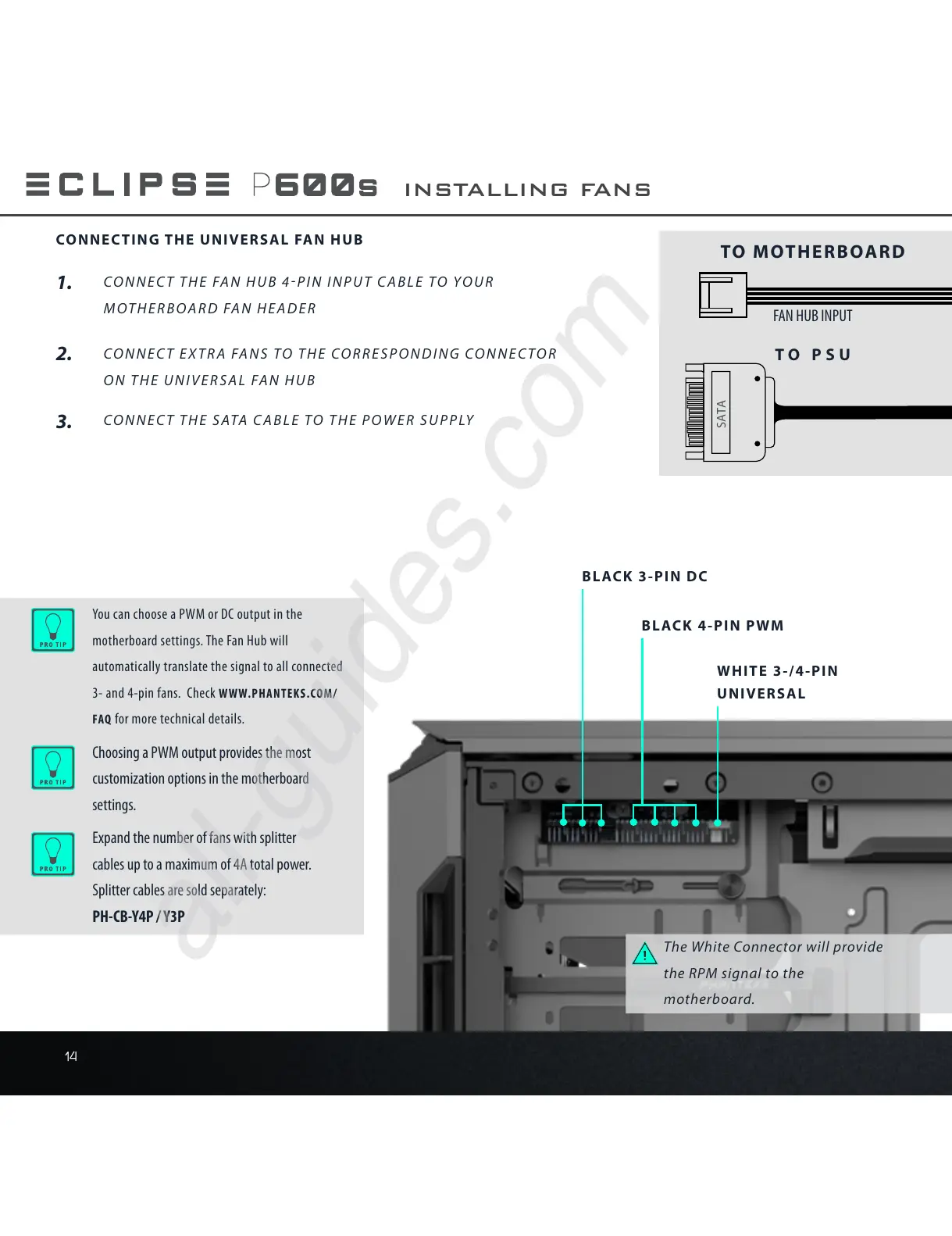
SATA
The White Connector will provide
the RPM signal to the
motherboard.
WHITE 3-/4-PIN
UNIVERSAL
BLACK 4-PIN PWM
BLACK 3-PIN DC
Choosing a PWM output provides the most
customization options in the motherboard
settings.
You can choose a PWM or DC output in the
motherboard settings. The Fan Hub will
automatically translate the signal to all connected
3- and 4-pin fans. Check WWW.PHANTEKS.COM/
FAQ for more technical details.
Expand the number of fans with splitter
cables up to a maximum of 4A total power.
Splitter cables are sold separately:
PH-CB-Y4P / Y3P
1.
2.
CONNECT THE FAN HUB 4PIN INPUT CABLE TO YOUR
MOTHERBOARD FAN HEADER
CONNECT EXTRA FANS TO THE CORRESPONDING CONNECTOR
ON THE UNIVERSAL FAN HUB
3.
CONNECT THE SATA CABLE TO THE POWER SUPPLY
CONNECTING THE UNIVERSAL FAN HUB
TO PSU
FAN HUB INPUT
TO MOTHERBOARD











 To Next Page