35 | P a g e
Fine Tuning With PI Control
When operating in constant pressure mode, if the parameter PROPORTIONAL GAIN is set
to a value less than 1, the keypad displays SIMPLE MODE and the controller uses an
algorithm that is not PI control. Simple Mode requires less fine tuning than PI control, but in
some applications may not provide the control and stability desired. The stability of the
constant pressure system (i.e., its tendency not to exhibit pressure oscillations) is
determined by parameters set on the keypad, the flow rate of the pump, and the volume of
the pressure tank. Stability of a system with a large maximum flow rate and a small
pressure tank will be more difficult to control and may require de-tuning the system to
accept larger variations in the system pressure and longer response times. Analog constant
pressure systems with PI (proportional integral) control provide more options to fine tune
pressure control than Simple Mode. Systems that are not adequately controlled with the
Simple Mode may require fine tuning by switching to PI control. Increasing the value of
PROPORTIONAL GAIN to any value greater than SIMPLE MODE will initiate PI control.
Pressure control is achieved by adjusting the values of PROPORTIONAL GAIN and
INTEGRAL GAIN. Larger values for PROPORTIONAL GAIN and INTEGRAL GAIN give
smaller error in the pressure, but also make the system more susceptible to oscillation. The
following pages of this Section will provide more information on tuning PI control.
Emergency Over-Pressure Limit Switch
Constant pressure systems have the option of connecting an emergency over-pressure
limit switch to the AUX2 terminals in case the main pressure control system fails. The
emergency over-pressure set-point should be at least 10 psi higher than the system control
pressure to prevent nuisance tripping.
CAUTION: By default, AUX1 is programmed such that OPEN=STOP, CLOSED=RUN
and AUX2 is programmed such that OPEN=RUN, CLOSED=STOP. When SYSTEM
CONFIG = 2 (Analog CP), AUX1 and AUX2 are programmed such that OPEN=RUN,
CLOSED=STOP. See parameters AUX1 SELECT and AUX2 SELECT to change this
setting.
7.2 Digital Pressure Switch
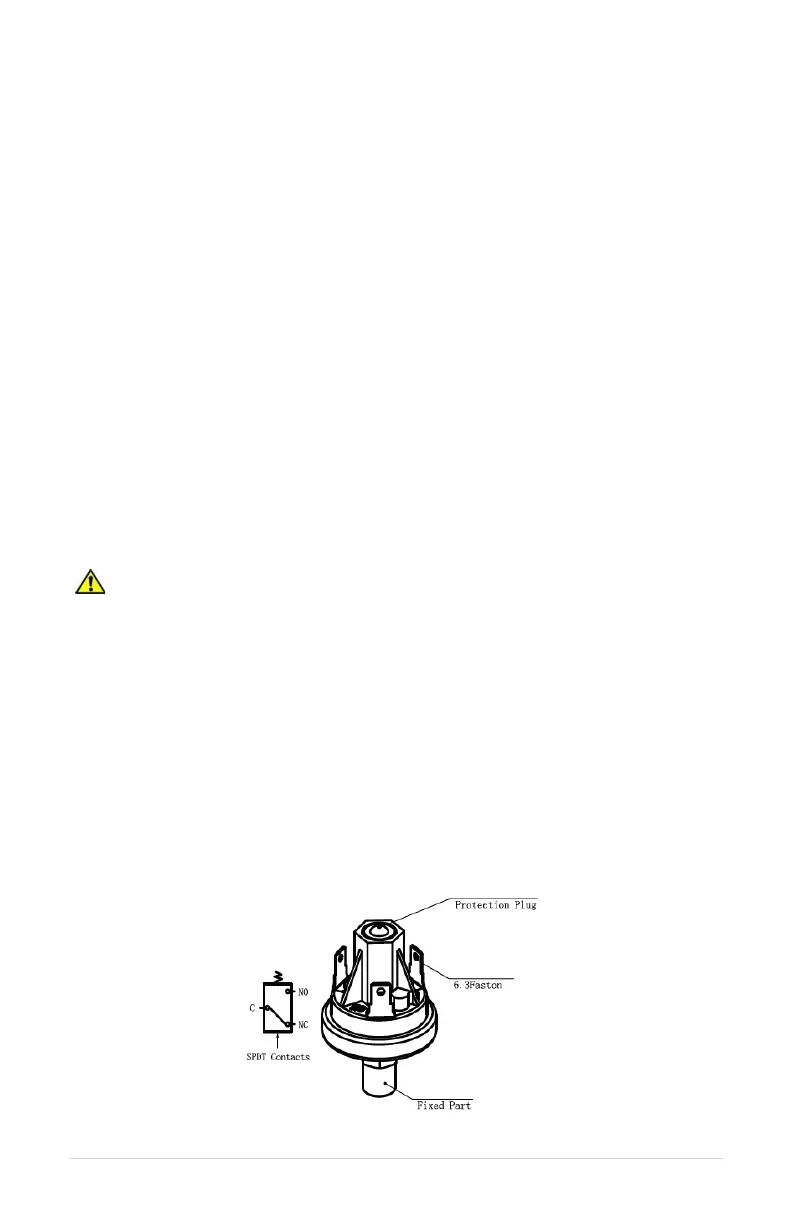
Each Essential Drive comes standard with a pressure switch set to 60 psi. The pressure set
point can be adjusted by removing the protection plug and using a 5mm Allen wrench to
turn the screw. See Figure 18 to identify the protection plug. Turning the screw clockwise
will increase the pressure set point and turning the screw counterclockwise will decrease
the pressure set point. The operating pressure range is 25 psi – 150 psi. Run the pump in
AUTO mode, and observe the pressure gauge, turning the Allen screw to adjust the
pressure set point.
Figure 18 – Pressure Switch



 To Next Page