Alignments
EN 25LC9.3L LA 6.
2010-Mar-26
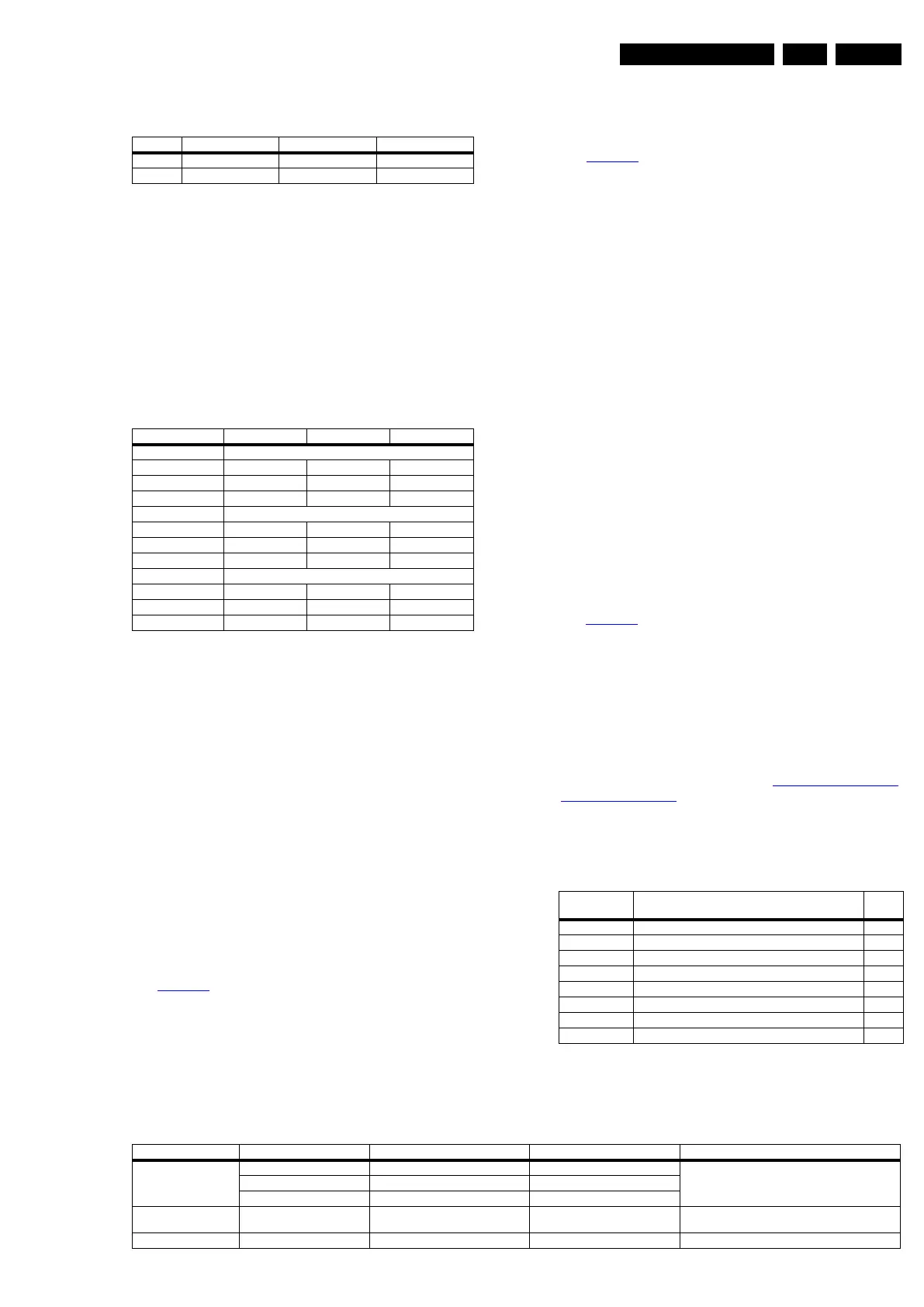
Table 6-3 White D alignment values, CA-210 color analyzer
LED panel (panel codes 233/234/236)
Without a color analyzer, you can use below default values.
This is the next best solution. The default values are average
values coming from production (statistics).
• Select a “Color Temperature” (e.g. “Cool”, “Normal”, or
“Warm”).
• Set the “Whitepoint Red”, “- Green” and “- Blue” default
values according to the values in the “Tint settings” table.
• When finished press “OK” on the RC, then press “Store” (in
the SAM root menu) to store the aligned values into the
NVM.
• Restore the initial picture settings after the alignments.
Table 6-4 Tint settings (default values)
6.4 Option Settings
6.4.1 Introduction
The microprocessor communicates with a large number of I
2
C
ICs in the set. To ensure good communication and to make
digital diagnosis possible, the microprocessor has to know
which ICs to address. The presence/absence of these specific
ICs (or functions) is made known by the option codes.
Notes:
• After changing the option(s), save them with the STORE
command.
• The new option setting becomes active after the TV is
switched “off” and “on” again with the mains switch (the
EAROM is then read again).
6.4.2 Dealer Options
For dealer options, in SAM select “Dealer options”.
See Table 6-6
.
6.4.3 (Service) Options
Select the sub menu's to set the initialization codes (options) of
the model number via text menus.
See Table 6-6
.
6.4.4 Opt. No. (Option numbers)
Select this sub menu to set all options at once (expressed in
two long strings of numbers).
An option number (or “option byte”) represents a number of
different options. When you change these numbers directly,
you can set all options very quickly. All options are controlled
via eight option numbers.
When the NVM is replaced, all options will require resetting. To
be certain that the factory settings are reproduced exactly, you
must set both option number lines. You can find the correct
option numbers on a sticker inside the TV set and in Table
“Option code overview”.
Example: The options sticker gives the following option
numbers:
• 25604 00386 00235 56068
• 08395 05120 00000 00000
The first line (group 1) indicates hardware options 1 to 4.
Example: option no. “2” contains the “cabinet type”.
The second line (group 2) indicates software options 5 to 8.
Example: option no. “5” contains the “display code”.
Every 5-digit number represents 16 bits (so the maximum value
will be 65536 if all options are set).
When all the correct options are set, the sum of the decimal
values of each Option Byte (OB) will give the option number.
See Table 6-5
for the options. Always refer to the sticker in the
TV-set as leading.
Diversity
Not all sets with the same Commercial Type Number (CTN)
necessarily have the same option code!
Use of Alternative BOM
An alternative BOM number usually indicates the use of an
alternative display. This results in another Display Code thus in
another Option code. Refer to chapter 3. Precautions, Notes,
and Abbreviation List.
6.4.5 Option code overview
Table 6-5 Option code overview (subject to change)
6.5 Total Overview SAM modes
Table 6-6 SAM mode overview (usage is model dependent)
Value Cool (9330 K) Normal (7940 K) Warm (6060 K)
x 0.282 0.293 0.320
y 0.298 0.313 0.346
Colour Temp. R G B
32-inch
Cool tbf tbf tbf
Normal tbf tbf tbf
Warm tbf tbf tbf
40-inch
Cool tbf tbf tbf
Normal tbf tbf tbf
Warm tbf tbf tbf
46-inch
Cool tbf tbf tbf
Normal tbf tbf tbf
Warm tbf tbf tbf
Model Number Option Codes Displ.
Code
32PFL3805D/78 01028 00385 00171 56068 08423 04096 00000 00000 231
32PFL5605D/78 09220 08578 00171 56068 08425 04096 00000 00000 233
32PFL6605D/78 09252 08578 00171 56068 08425 04096 00000 00000 233
40PFL3805D/78 01028 00385 00171 56068 08424 04096 00000 00000 232
40PFL5605D/78 09220 08579 00171 56068 08426 04096 00000 00000 234
40PFL6605D/78 09268 08579 00171 56068 08426 04096 00000 00000 234
46PFL5605D/78 09220 08579 00171 56068 08428 04096 00000 00000 236
46PFL6605D/78 09284 08579 00171 56068 08428 04096 00000 00000 236
Main Menu Sub-menu 1 Sub-menu 2 Sub-menu 3 Description
Hardware Info A. SW VERSION e.g. “QL92L_1.33.0.0” Displays TV & Standby SW version and CTN serial
number.
B. Standby processor version e.g. “STDBY_88.68.0.0”
C. Production code e.g. “VN010935123456”
Operation hours Displays the accumulated total of operation hours.TV
switched “on/off” & every 0.5 hours is increase one
Errors Displayed the most recent errors.








 To Next Page