switch into standby status.
In OSD menu, press key to
confirm the operation.
Press joystick key up/down/left/right
In OSD menu: operation the menu.
In TV mode: Press joystick key
up/down to switch the channel.
Press joystick key left/right to adjust
the volume.
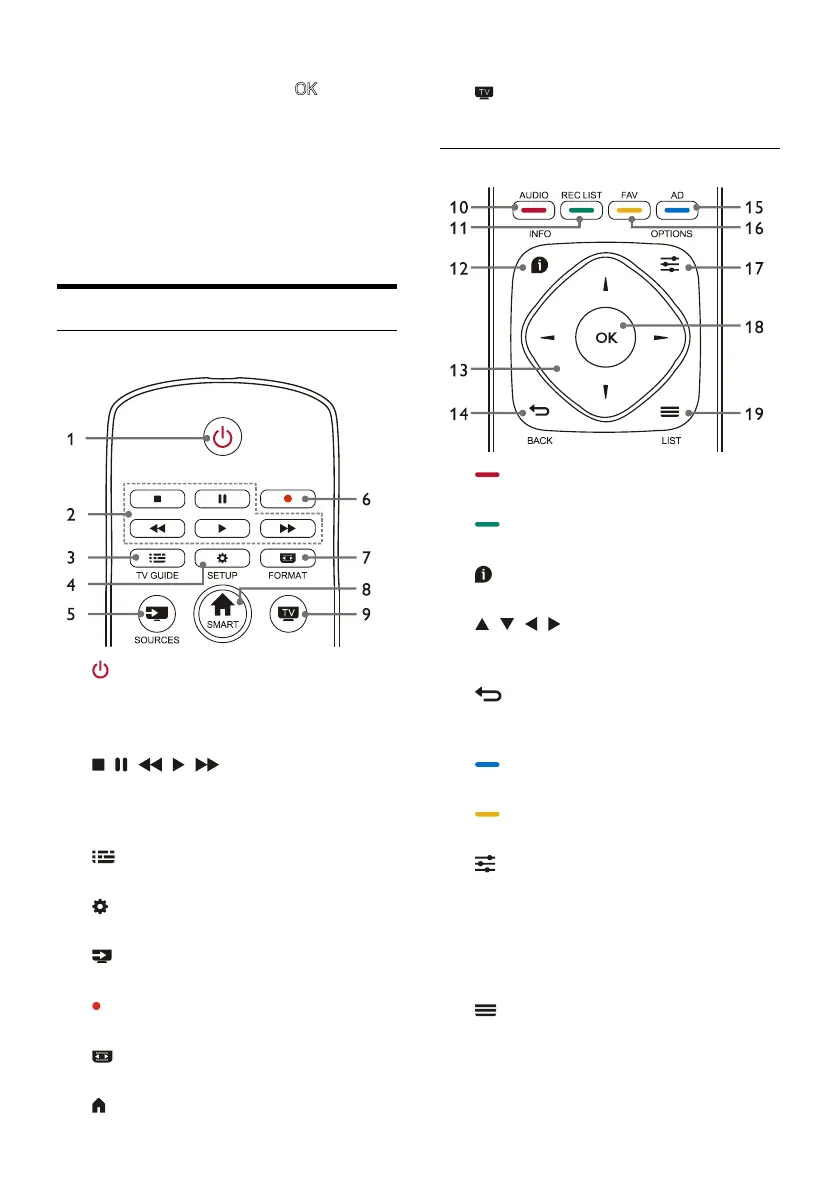
Remote Control
Top
1.
Standby-Power on
Switch the TV to standby if it is on.
Power on the TV if it is in standby
state.
2.
, , , , Multimedia play
buttons
Control multimedia playback: Stop, Pause,
Fast Backward, Play, Fast Forward.
3.
TV GUIDE
Program guide.
4.
SETUP
Open or close the setup menu.
5.
SOURCES
Select the input source of TV.
6.
Record program in DTV mode.
7.
FORMAT
Adjust the image display ratio.
8.
SMART
Enter the smart homepage.
9.
Switch to the TV function.
Middle
10.
AUDIO
Adjust audio option function.
11.
REC LIST
Show the record list..
12.
INFO
View current program information.
13.
, , ,
Navigation key: you can select the items in
the setting function list.
14.
BACK
Return to the previous channel or exit the
current menu.
15.
AD
Audio description hotkey.
16.
FAV
Display the favorite list.
17.
OPTIONS
Show menu functions.
Access to the options related to the
current activities or selection.
18.
OK
Confirm an operation.
19.
LIST
Show channel list.












 To Next Page