- 33 -
o
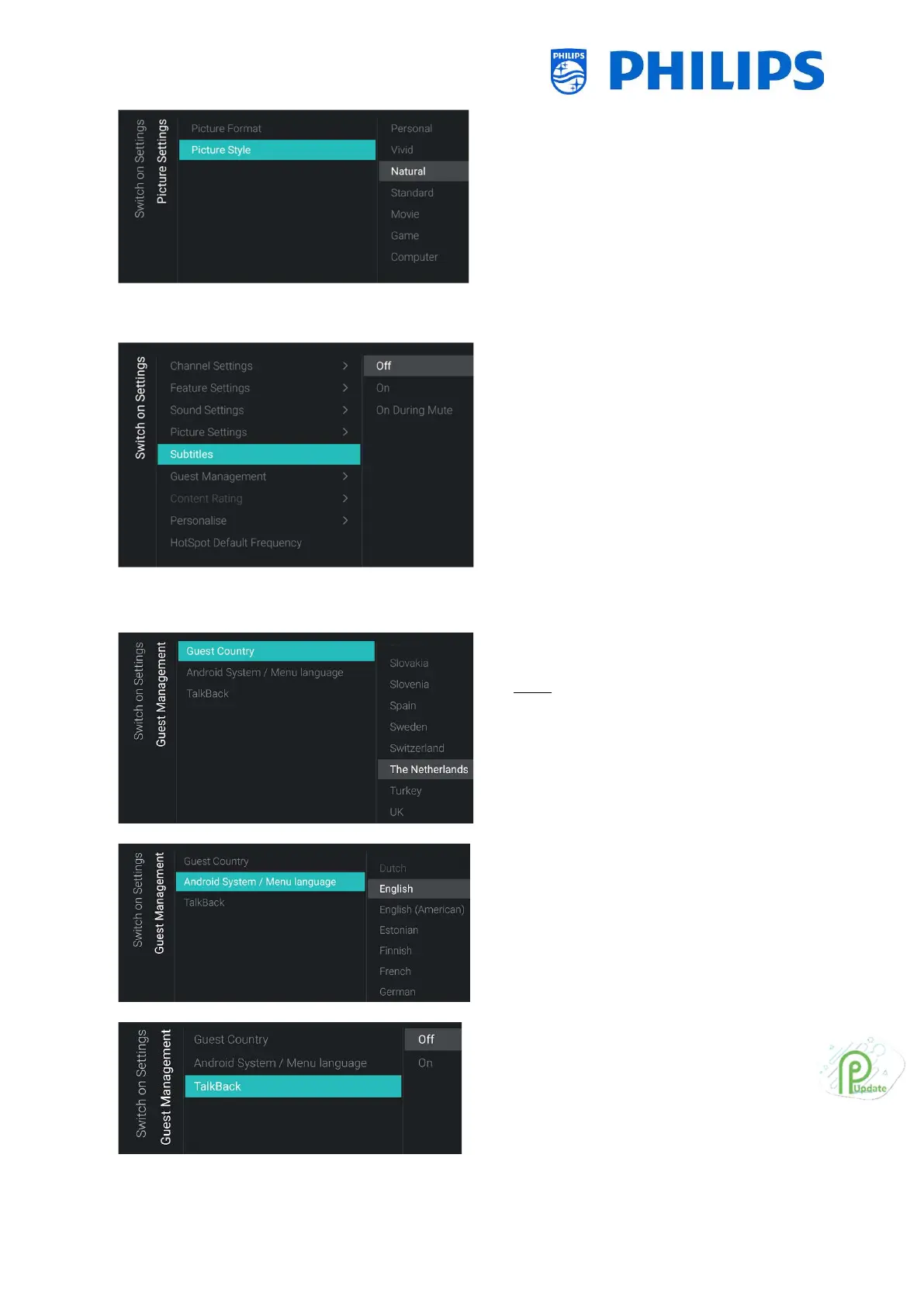
Style] menu
o Change the default Picture Style to your
preference, [Natural] gives the best
picture settings
6.4.5 Subtitles
o
o You will see below items:
o [Off]: Change the default subtitles
setting to Off
o [On]: Change the default subtitles
setting to On
o [On During Mute]: Change the default
subtitles setting to On During Mute,
this means that the subtitles will be
shown if the TV is muted and if
subtitles are available
6.4.6 Guest Management
o
[Guest Country] menu
Note: If you select a language where text
is from right to left, also the menu will be
shown on the right side
o You will see a list of countries. You need to
select the country where most of the
guests are coming from. This will have
impact on the apps
o
[Android System / Menu language] menu
o You will see a list of languages. This is to
select the default language for the menu
o
o You will see below items:
o [Off]: Disable talkback function by
default
o [On]: You can enable talkback by
default to help visual-impaired users
interact with the TV by using spoken







 To Next Page