- 64 -
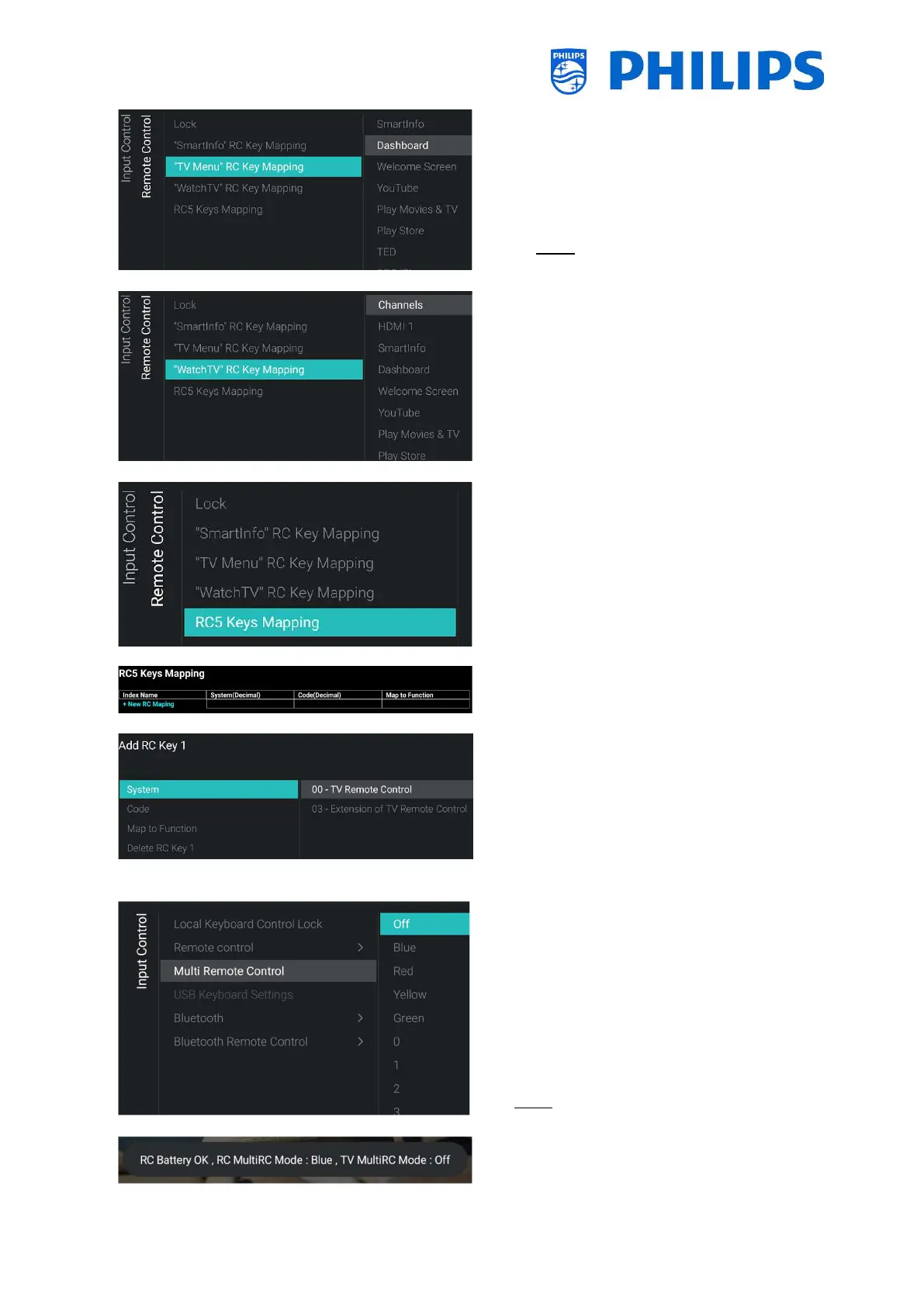
o [Watch TV RC Key Mapping]: You can map the
“Watch TV” button on the RC to different
sources and to different apps installed on the
TV
Note: The list will be depending on
enabling/disabling of features/sources and
installed apps
o [RC5 Keys Mapping]: You can map an RC5
command to an existing support RC key
o When you open this action you will see a new
screen and you will be able to [+ New RC
Mapping].
o If you open this menu you will be able to:
add the RC key by setting the [System]
to [00] or [03]
You can choose the [Code], this needs
to be a digit
You can select the [Map to Function]
to any existing RC function
You can [Delete RC Key x] again
o
Control] menu
o This function allows that up to 14 televisions can
be installed in a room whereas each TV will react
to its own RC
o You will see a list of options (‘Off’, the 4 color keys
and all digits)
o The TV will only react on the RC that is
programmed linked to your selection
Note: The TV will still respond to the master RC
o Once the TV is set to some value other than [Off],
also the RC should be programmed to the same
selection to still work with the TV
o How to program the RC:







 To Next Page