Mechanical Instructions
EN 19QM16.3A LA 4.
2016-Jun-08
Table 2-1
4.4.2 Rear Cover
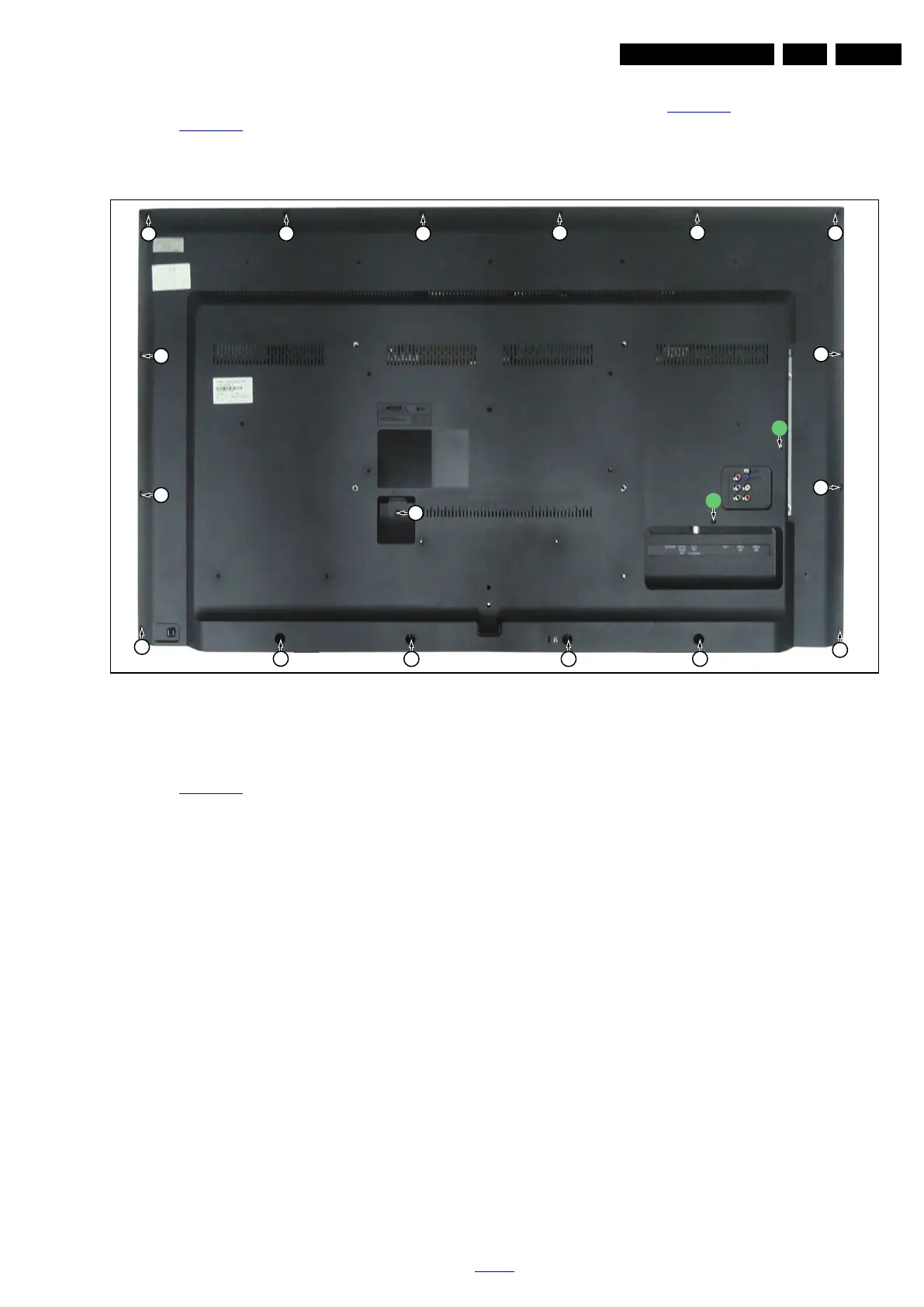
Refer to Figure 4-16
for details.
Warning: Disconnect the mains power cord before removing
the rear cover.
1. Remove the fixation screws [2] and [3] that secure the rear
cover. Refer to Figure 4-16
for details.
2. Gently lift the rear cover from the TV. Make sure that wires
and cables are not damaged while lifting the rear cover
from the set.
Figure 4-16 Rear cover removal
4.4.3 Keyboard Control Unit
Refer to Figure 4-17
for details.
1. Release the connector [2] from the SSB Board.
Caution: be careful, as these are very fragile connectors!
2. Remove all the fixation screws from the keyboard control
panel [1] and take it out from the Back cover.
When defective, replace the whole unit.
20151_104.eps
2
2
2
2
2
2
2
2
2
2
2
2
2
2
22
2
3
3




 To Next Page