BDL4988XC/49BDL3005X
27
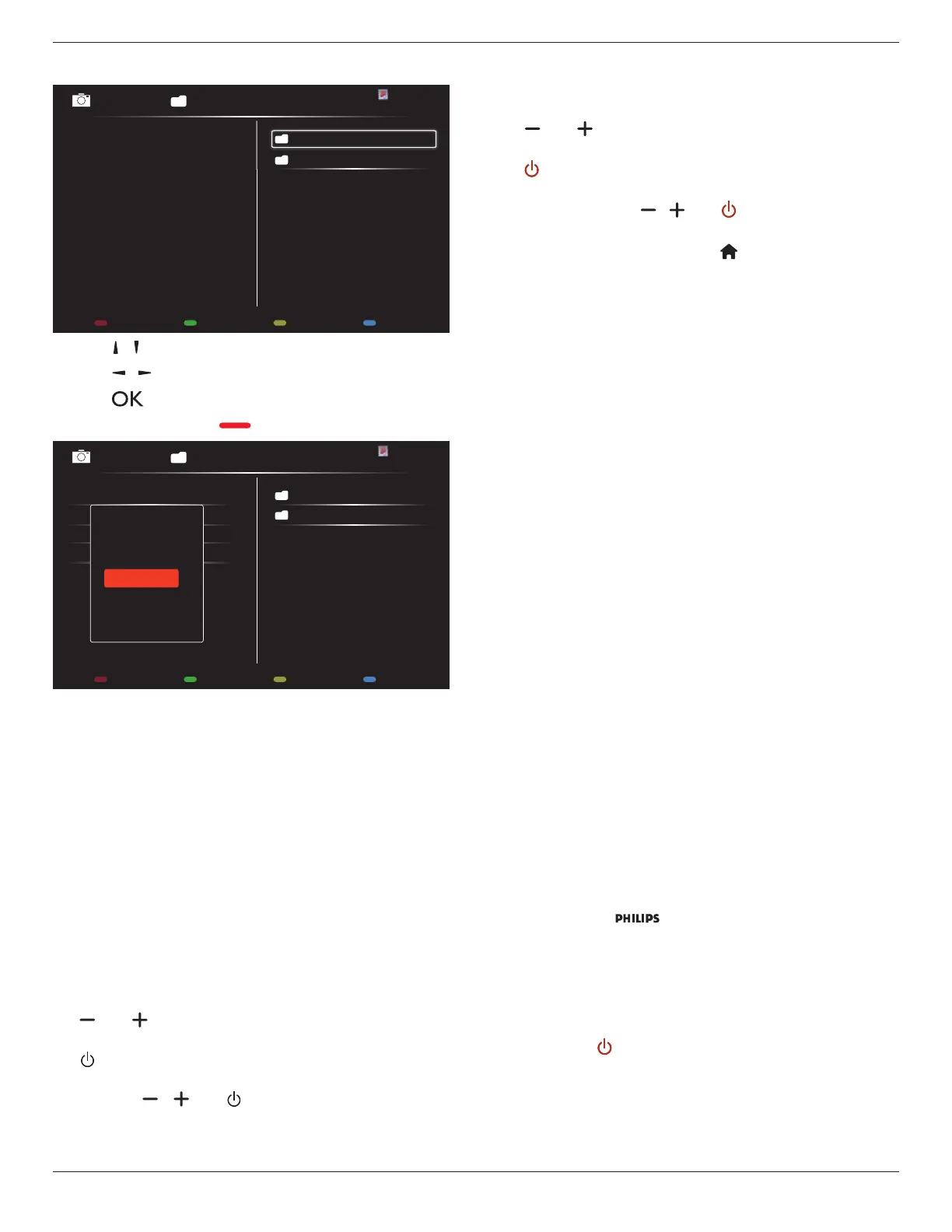
6. If{Source}
{USB}isselected,goto
Playlist setting
.
0001/0002
Options Exit
Photo
Photo
Video
- Press[ ] [ ] buttonstoselectale.
- Press[ ] [ ]buttonstoswitchbetweenPlaylistandFileManager.
- Press[ ]buttontosetorcleartheplaylist.
7. Tosavetheplaylist,press[ ] andselect
Save list
.
0004/0004
Options Exit
Photo
Photo
[..]
Movie.avi
\media\photo
Photo1.jpg
Photo2.jpg
Photo3.jpg
Sort
Recursive Parser
Media Type
Save list
NOTES:
• EachPlaylistsupportsupto30les.
• Playlistwillnotbeclearedevenyousetthedefaultsettingsinthe
{Factory settings}menu.Youhavetomanuallyremovethelesor
delete“usb_schedulinglist.txt”fromtheUSB.
Sleep timer
Switchoffthedisplayafterapresetperiodoftime.
OneWire
ConnectandcontrolyourHDMI-CECcompliantdevicesthrough
HDMIporttothisdisplaywiththesameremotecontrol.
Local KB lock
Enableordisablethekeyboard(controlbuttons)functionofthedisplay.
• {Unlock}:Enablethekeyboardfunction.
• {Lock all}:Lockallkeyboardfunctions.
• {Lock but volume}:Disableallkeyboardfunctionsexceptthe
[ ] and [ ] button.
• {Lock but power}:Disableallkeyboardfunctionsexceptthe
[ ]button.
• {Lock all expect volume and power}:Disableallkeyboardfunctions
exceptthe[ ], [ ] and [ ] button:
RC lock
Enableordisablethebuttonfunctionofremotecontrol.
• {Unlock}:Enabletheremotecontrolfunction.
• {Lock all}:Lockallremotecontrolfunctions.
• {Lock but volume}:Disableallremotecontrolfunctionsexceptthe
[ ] and [ ] button.
• {Lock but power}:Disableallremotecontrolfunctionsexceptthe
[ ] POWERbutton.
• {Lock all expect volume and power}:Disableallremotecontrol
functionsexceptthe[ ] [ ] and [ ] POWER button:
NOTE: Todisablethelockfunctionfrom
Local KB lock
or
RC lock
,pressthebuttons[ ] and 1 9 9 8ontheremote
control.
Pixel shift
Forvideoinputsources,youmayselect{On}tomovethescreenimage
automaticallytoprotectthedisplayfrom“burn-in”or“after-image”
symptomswhenthereisnooperationfor30seconds.
Smart power
Selectabacklightleveltooptimizethedynamicpowerconsumptionand
picturecontrast.
Theoptionsare:{Off},{Standard},{Medium},{High}.
Wake on lan
Select{On}toturnonthedisplaybynetwork.
Switch on state
Selectthestatusthatwillbeappliedtoyourdisplaywhenyouconnect
thepowercordnexttime.
• {On}-Thedisplaywillturnonwhenthepowercordisconnected
toawalloutlet.
• {Standby}-Thedisplaywillremaininstandbymodewhenthepower
cordisconnectedtoawalloutlet.
• {Last status}-Thedisplaywillreturntothepreviouspowerstatus
(on/off/standby)whenremovingandreplacingthepowercord.
Light sensor
Select{On}andthedisplaywillautomaticallyadjustthebacklight.This
optionisonlyavailablewhenyoupluginCRD41.
Human sensor
Setthedisplaytoturnonthebacklightifhumanpresenceisdetected
andturnoffthebacklightafterapresetperiodoftime.
Theoptionsare:{Off,10~60}minutes.Thisoptionisonlyavailable
whenyoupluginCRD41.
Power LED Light
Select{Off}toturnoffthepowerLEDindicator.
Logo
Select{Off}andthe logowillnotappearwhenyouturnthe
displayOn.
Advanced power management
Whenthisfunctionissetto{On},thedisplaywillautomaticallyturnoffif
nosignalisdetected.
Source notication
Whenyoupress[ ] POWERbuttontoturnonthedisplayfrom
standbymodeorwhenyouchangetheinputsignal,theinformation
OSDisdisplayedonthetopleftsideofthescreen.
Select{Off}todisablethisfunction.















 To Next Page