12
English
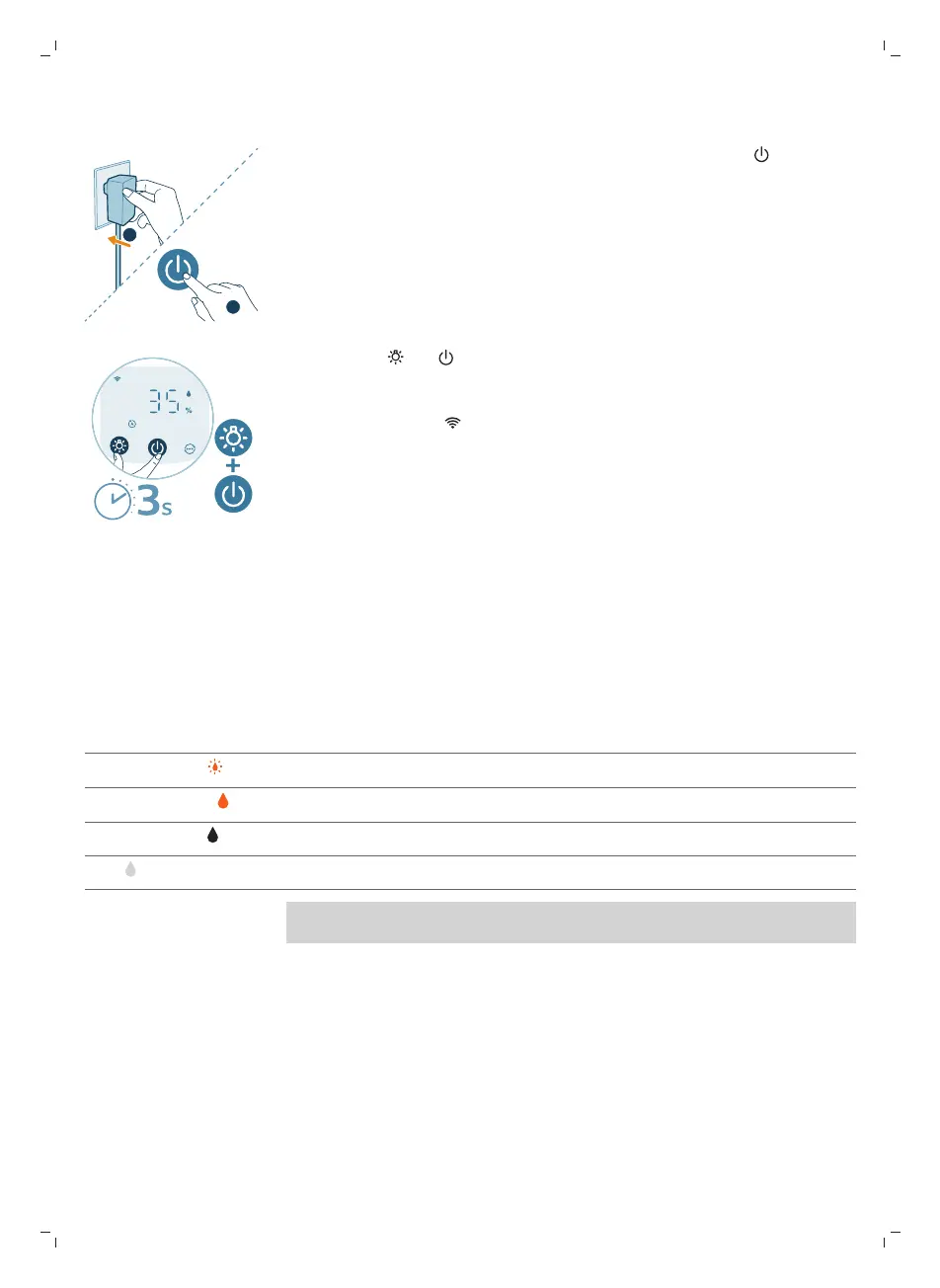
Reset the Wi-Fi connection
1 Put the adapter of the appliance in the power socket and press to turn on
the appliance.
2 Long press and button for 3 seconds at the same time until you hear a
beep.
-
The appliance goes to pairing mode.
-
The Wi-Fi indicator blinks orange.
3 Follow the steps 3-4 in “Setting up the Wi-Fi connection for the first
time”section.
Using the 2-in-1 Air purifier and Humidifier
Understanding the humidification indicator
Relative humidity represents the amount of water vapor in the atmosphere.
The humidification indicator has four status levels:
Humidification indicator status What does it mean?
Blink in orange ( ) The water tank is not properly installed.
Stable in orange ( ) Insufficient water. Please refill the water tank.
Stable in white ( ) The appliance is humidifying the room.
Off ( ) The target humidity has been reached.
Note: The default target humidity is 50%RH, you can set the desired target
humidity in the app.



 To Next Page