- 26 -
Cry Translation
The Cry Translation service, powered by Zoundream
TM
, oers a useful tool
to help you understand your baby’s dierent cries and tells you what they
might mean� However, it is important to remember that this tool is not
meant to replace parental judgment and it is recommended to seek the
advice of a medical professional when necessary�
To activate Cry Translation, please download the Baby Monitor+ app (see
the ''Download the Baby Monitor+ app'' chapter) and follow the steps in
the app to turn it on�
Cry Translation service is available for a 90-day free trial period�
Afterwards you can continue using it by signing up for a subscription
service with Zoundream
TM
� Terms and conditions apply� Usage will be
measured in days, and any activity within a day will be considered as a full
day of usage�
Note: Cry Translation only works when your Baby Unit is connected to
the internet�
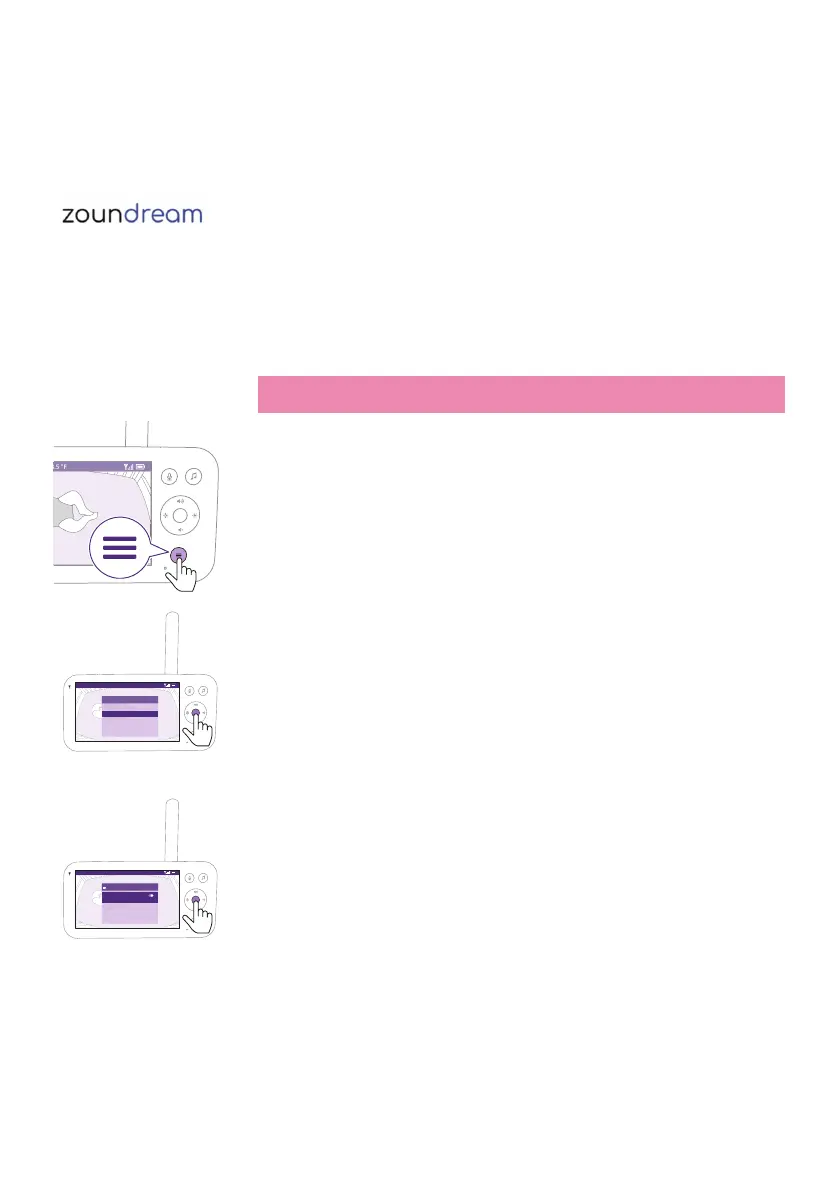
1 Press the menu button on the bottom right of the Parent Unit�
Video 68.5
o
F
>
SenseIQ
Cry translation
Connection to Baby Unit
Nightlight
Zoom
Menu
2 Select ''Cry Translation'' and press the conrm button to access the Cry
Translation feature�
Video 68.5
o
F
On/Off
Enable/disable Cry Translation noti�cations
on this Parent Unit and the app. See app for
more details.
Cry translation
3 Press the conrm button to set the Cry Translation feature on or o.











 To Next Page