User Manual BDL3215E / BDL4225E
8
Elements Name and Functions
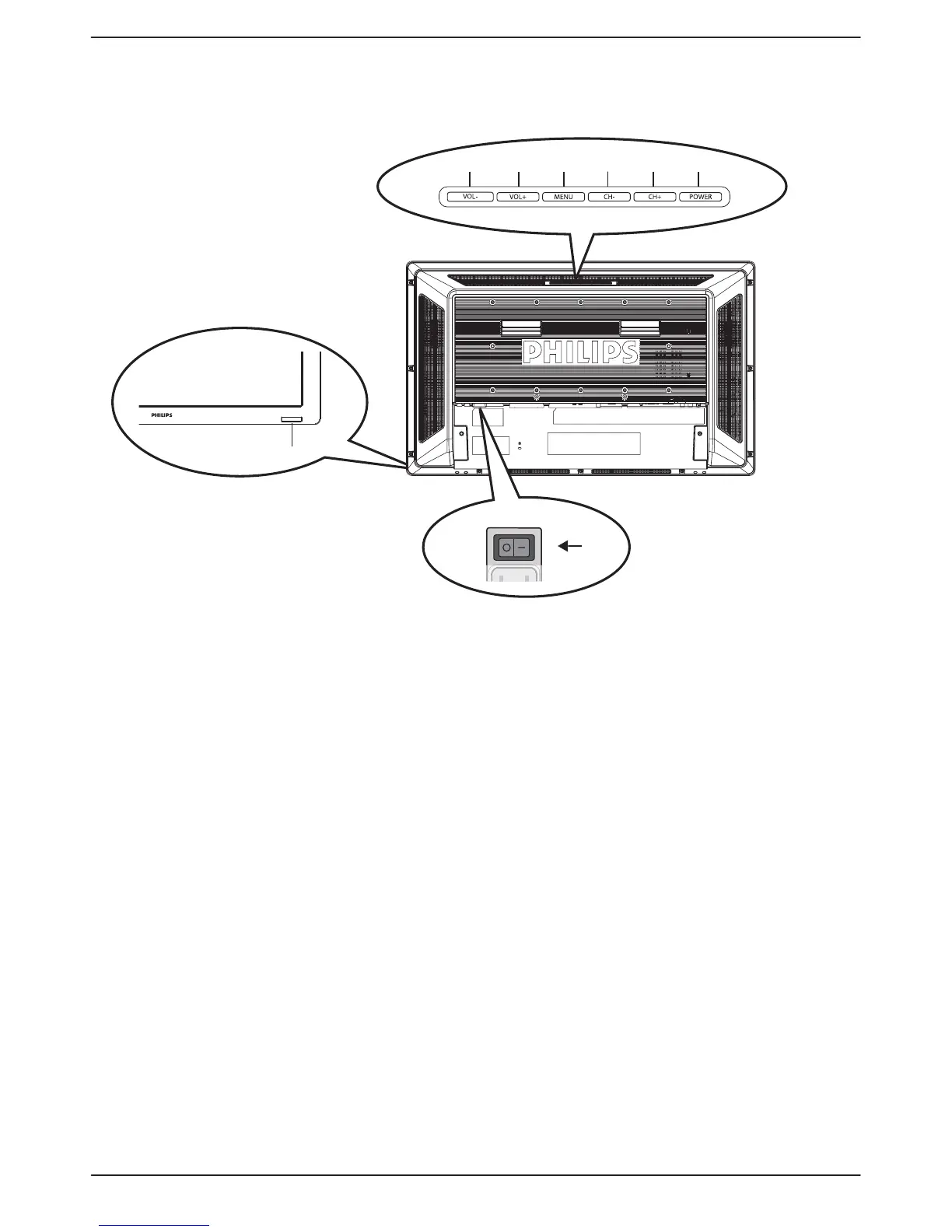
Control Panel
abc
d
ef
g
h
a POWER button (B): To switch the power on/off.
b CH (+) button: To move the highlight bar up to adjust the selected item while OSD menu is on.
c CH (-) button: To move the highlight bar down to adjust the selected item while OSD menu is on.
d MENU button: To return to previous menu while OSD menu is on or to activate the OSD menu when the OSD menu is
off.
e VOL (+) button: To increase the adjustment while OSD menu is on, or to increase the audio output level while the OSD
menu is off.
f VOL (-) button: To decrease the adjustment while OSD menu is on, or to decrease the audio output level while the OSD
menu is off.
g Remote control sensor and Power indicator: To receive the IR signal from the remote control. The indicator would
show blue when the LCD monitor is active, and would turn blank when the LCD is POWER OFF. While in the case of the
system is in power save mode, it would show amber. When SCHEDULE is enabled, it would show blinking blue.
h Main Power Switch: To turn the main power on/off.
NOTE:
Keyboard Control Lock Mode: This function completely disables the access to all Keyboard Control functions. To enable the keyboard
control lock, press both “CH+” and “CH-” buttons and hold down continuously for more than 3 seconds. To recover back to the user
mode, press both “CH+” and “CH-” buttons and hold continuously for three 3 seconds.












 To Next Page