User Manual BDL3215E / BDL4225E
29
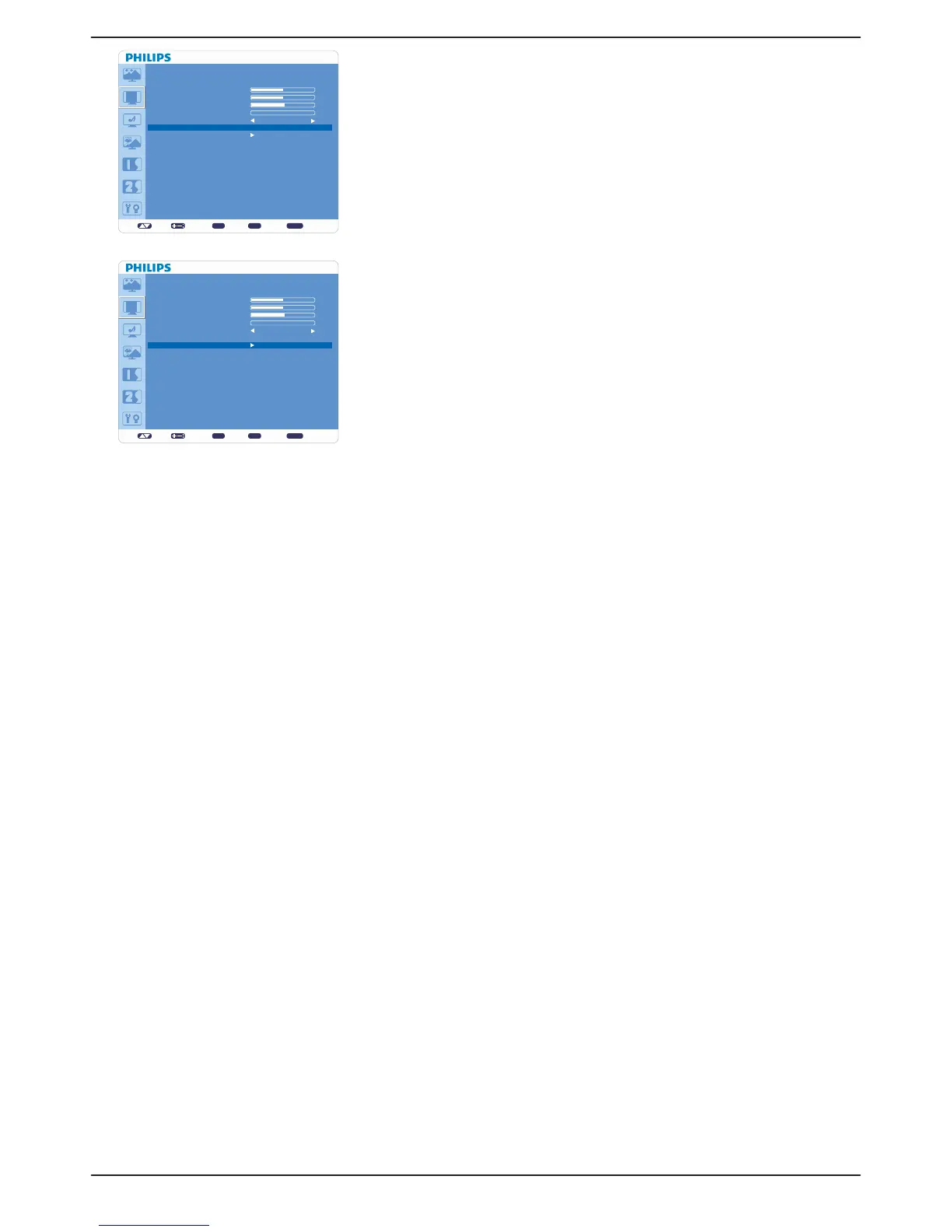
Ê CUSTOM ZOOM
“CUSTOM ZOOM” will be selected when you select “CUSTOM” in ZOOM v
MODE menu.
“ZOOM”: expands horizontal and vertical size simultaneously.v
“HZOOM”: expands the horizontal size only. v
“VZOOM”: expands the vertical size only.v
“H POSITION”: moves to the right with + button and moves to the left with – v
button.
“V POSITION”: moves up with + button and moves down with – button.v
Ê SCREEN RESET
Select SCREEN RESET allows you to reset all OSD settings from “PICTURE” v
setting.
Select “Yes” and press “SET” button to restore the factory preset data.v
Press “EXIT” button to cancel and then return to the previous menu.v
set: exit: menu:
SCREEN
H POSITION
V POSITION
CLOCK
CLOCK PHASE
ZOOM MODE
CUSTOM ZOOM
SCREEN RESET
Sel Adjust Enter BACK Quit
50
50
55
0
FULL
set: exit: menu:
SCREEN
H POSITION
V POSITION
CLOCK
CLOCK PHASE
ZOOM MODE
CUSTOM ZOOM
SCREEN RESET
Sel Adjust Enter BACK Quit
50
50
55
0
FULL










 To Next Page