EasyManua.ls Logo

Philips CD360 - Overview of the Base Station

Philips CD360
42 pages
Print Icon
To Next Page IconTo Next Page
To Previous Page IconTo Previous Page
Loading...
10
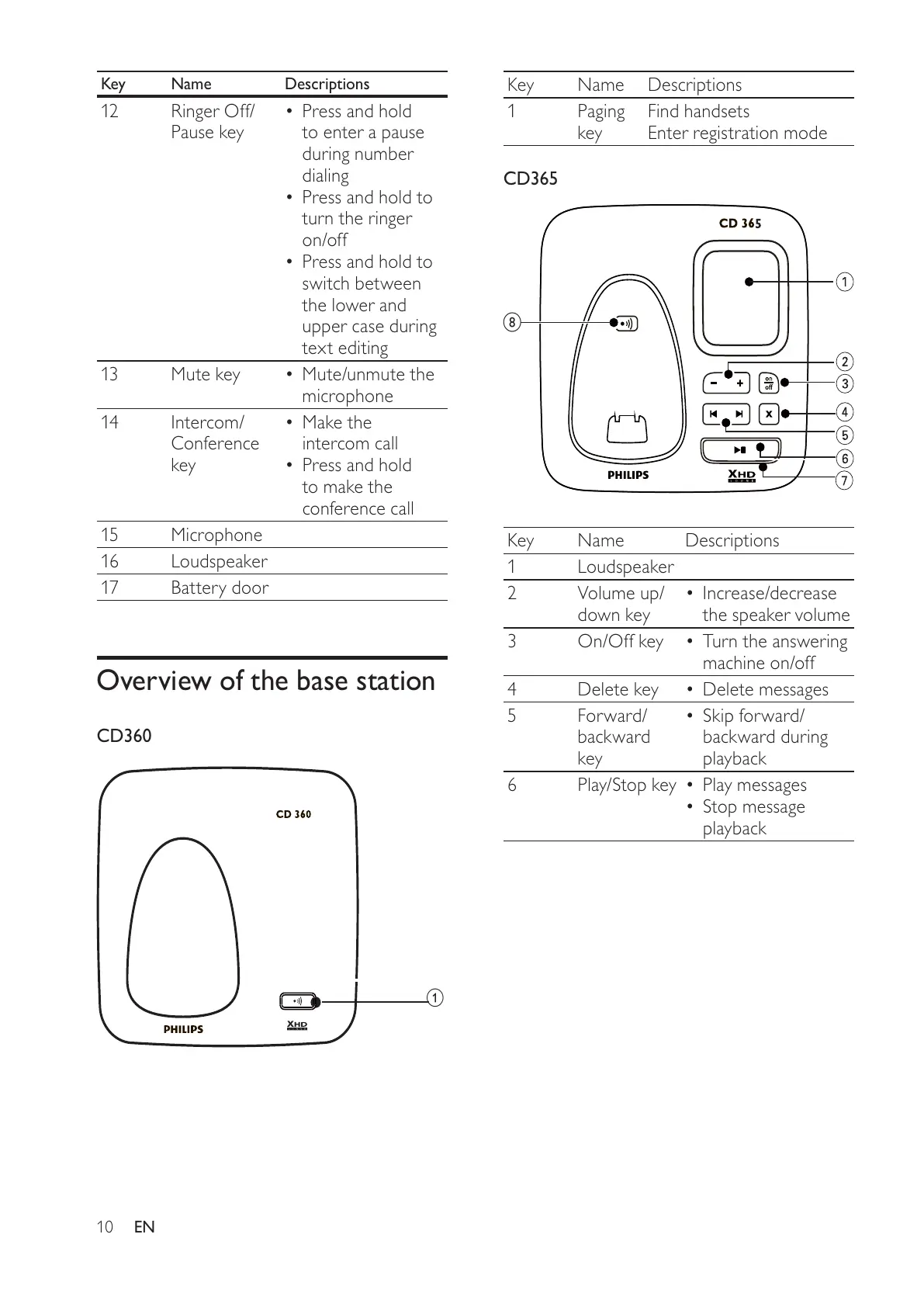
Key Name Descriptions
1Paging
key
Find handsets
Enter registration mode
CD365
Key Name Descriptions
1 Loudspeaker
2 Volume up/
down key
Increase/decrease
the speaker volume
3 On/Off key Turn the answering
machine on/off
4 Delete key Delete messages
5 Forward/
backward
key
Skip forward/
backward during
playback
6 Play/Stop key Play messages
Stop message
playback
h
Key Name Descriptions
12 Ringer Off/
Pause key
Press and hold
to enter a pause
during number
dialing
Press and hold to
turn the ringer
on/off
Press and hold to
switch between
the lower and
upper case during
text editing
13 Mute key Mute/unmute the
microphone
14 Intercom/
Conference
key
Make the
intercom call
Press and hold
to make the
conference call
15 Microphone
16 Loudspeaker
17 Battery door
Overview of the base station
CD360
a
EN
All manuals and user guides at all-guides.com

Table of Contents

Related product manuals