9
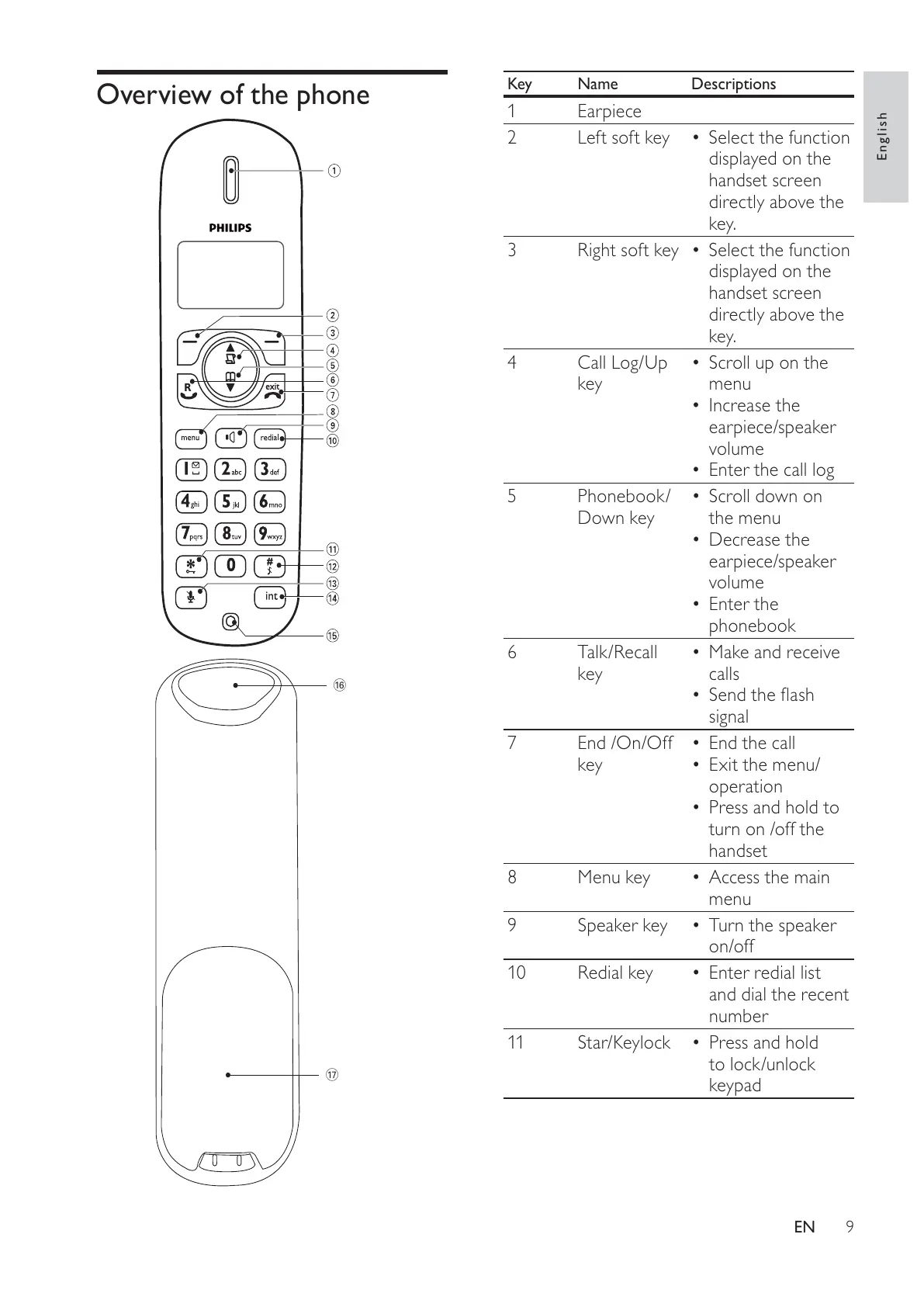
Key Name Descriptions
1Earpiece
2 Left soft key Select the function •
displayed on the
handset screen
directly above the
key.
3 Right soft key Select the function •
displayed on the
handset screen
directly above the
key.
4 Call Log/Up
key
Scroll up on the •
menu
Increase the •
earpiece/speaker
volume
Enter the call log•
5 Phonebook/
Down key
Scroll down on •
the menu
Decrease the •
earpiece/speaker
volume
Enter the •
phonebook
6 Talk/Recall
key
Make and receive •
calls
Send the flash •
signal
7 End /On/Off
key
End the call•
Exit the menu/•
operation
Press and hold to •
turn on /off the
handset
8 Menu key Access the main •
menu
9 Speaker key Turn the speaker •
on/off
10 Redial key Enter redial list •
and dial the recent
number
11 Star/Keylock Press and hold •
to lock/unlock
keypad
Overview of the phone
R
^
&
English
EN



 To Next Page