21
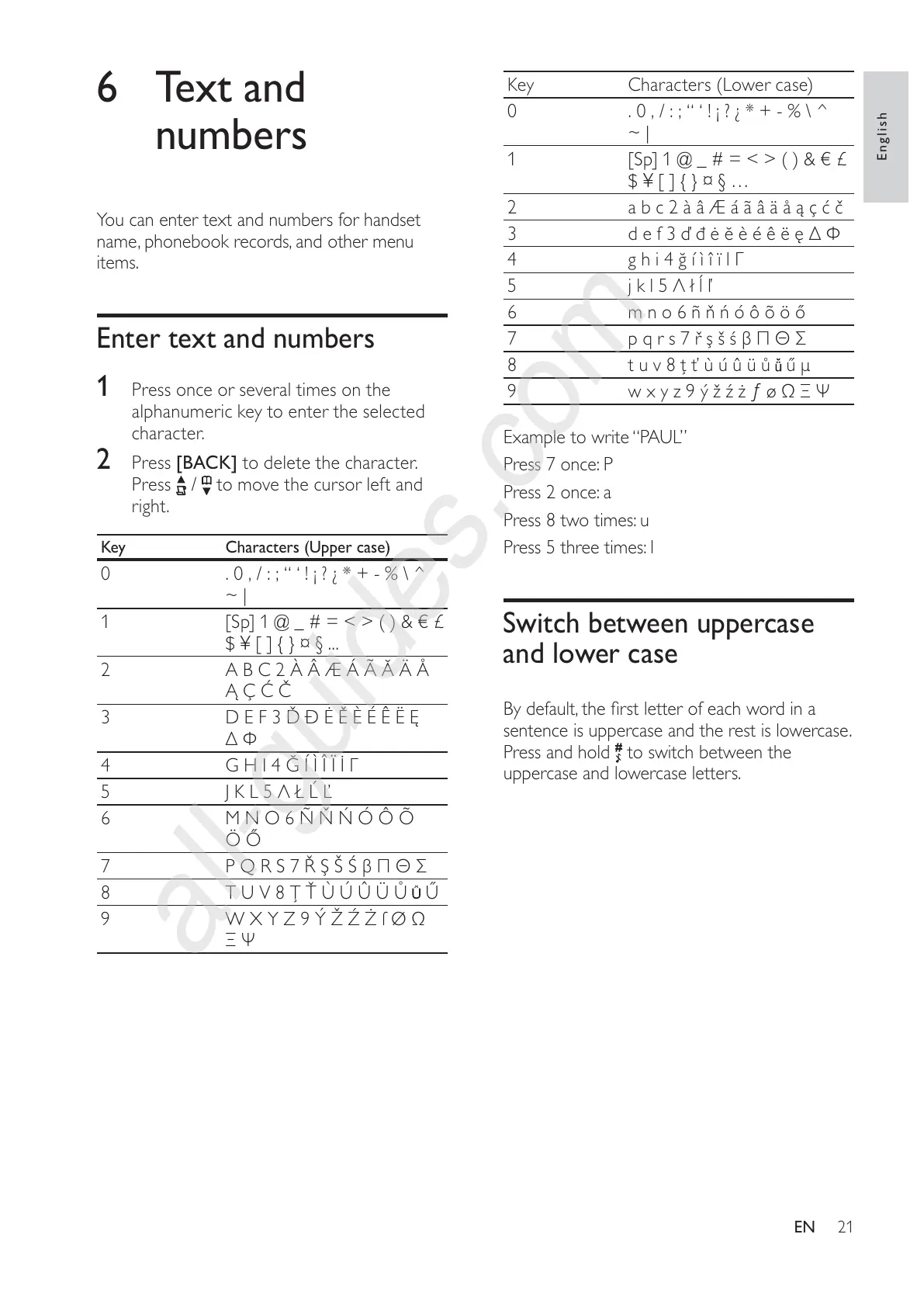
Key Characters (Lower case)
0 . 0 , / : ; “ ‘ ! ¡ ? ¿ * + - % \ ^
~ |
1 [Sp] 1 @ _ # = < > ( ) & € £
$ ¥ [ ] { } ¤ § …
2 a b c 2 à â Æ á ã â ä å ą ç ć č
3 d e f 3 ď đ ė ĕ è é ê ë ę Δ Φ
4 g h i 4 ğ í ì î ï l Γ
5 j k l 5 Λ ł ĺ ľ
6 m n o 6 ñ ň ń ó ô õ ö ő
7 p q r s 7 ř ş š ś β Π Θ Σ
8 t u v 8 ţ ť ù ú û ü ů
ű μ
9 w x y z 9 ý ž ź ż ƒ ø Ω Ξ Ψ
Example to write “PAUL”
Press 7 once: P
Press 2 once: a
Press 8 two times: u
Press 5 three times: l
Switch between uppercase
and lower case
By default, the first letter of each word in a
sentence is uppercase and the rest is lowercase.
Press and hold
to switch between the
uppercase and lowercase letters.
6 Text and
numbers
You can enter text and numbers for handset
name, phonebook records, and other menu
items.
Enter text and numbers
1
Press once or several times on the
alphanumeric key to enter the selected
character.
2 Press [BACK] to delete the character.
Press
/ to move the cursor left and
right.
Key Characters (Upper case)
0 . 0 , / : ; “ ‘ ! ¡ ? ¿ * + - % \ ^
~ |
1 [Sp] 1 @ _ # = < > ( ) & € £
$ ¥ [ ] { } ¤ § ...
2 A B C 2 À Â Æ Á Ã Ă Ä Å
Ą Ç Ć Č
3 D E F 3 Ď Ð Ė Ě È É Ê Ë Ę
Δ Φ
4 G H I 4 Ğ Í Ì Î Ï İ Γ
5 J K L 5 Λ Ł Ĺ Ľ
6 M N O 6 Ñ Ň Ń Ó Ô Õ
Ö Ő
7 P Q R S 7 Ř Ş Š Ś β Π Θ Σ
8 T U V 8 Ţ Ť Ù Ú Û Ü Ů
Ű
9 W X Y Z 9 Ý Ž Ź Ż ſ Ø Ω
Ξ Ψ
English
EN



 To Next Page