1-8-7 E9480DC
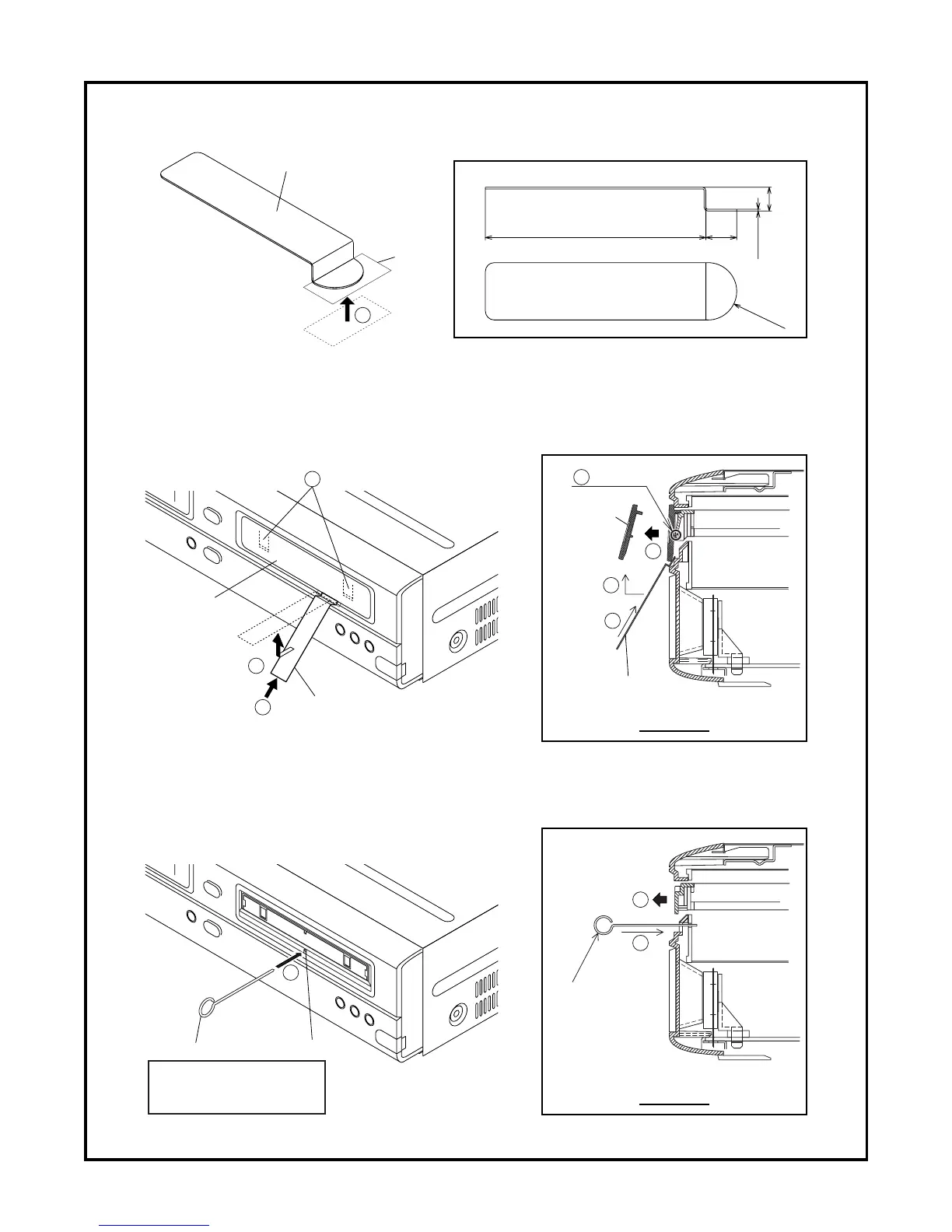
HOW TO EJECT MANUALLY
1. Put tape on the Maintenance Tool. (Please use a metallic plate as shown below as a maintenance tool.)
2. Insert the Maintenance Tool under the Tray Panel as shown.
3. Pull out and raise the Maintenance Tool up as shown to release two locking tabs of the Tray Panel.
4. Remove the Tray Panel.
5. Insert the Ejection Pin straightly into the ejection hole to open the tray.
(Recommended size of the Ejection Pin: diameter; 1.2 mm, length; more than 50mm)
Maintenance Tool
Size
Tape
50mm 7mm
0.4mm
5.4mm
R6.5mm
1
Maintenance Tool
Side view
Maintenance Tool
Tray Panel
Tray Panel
2
3
2
3
Release two Locking Tabs
3
Release3
4
Side view
5
5
5
Ejection Pin
Ejection hole
Ejection Pin
Recommended size:
- Diameter: 1.2 mm
- Length: more than 50 mm



 To Next Page