3
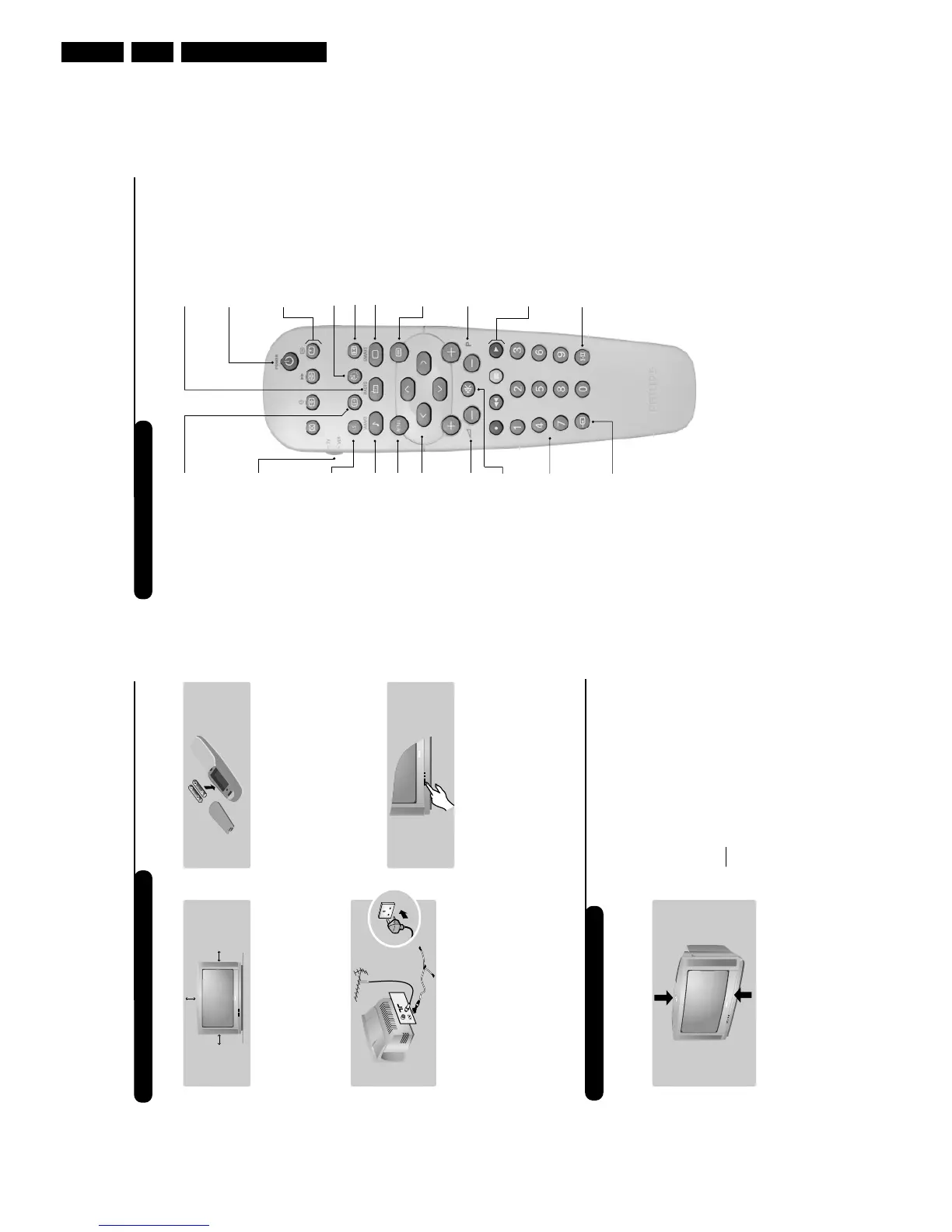
Remote control keys
To display / clear the program
number, name (if it exists), time,
audio mode and time remaining for
the sleep feature. Press the key for
5 seconds to activate permanent
display of the number.This key is
also used to exit from the menu.
Screen information / permanent no.
VCR key (p.11)
Incredible Surround
(only available on certain versions)
To activate / disable the
Incredible Surround feature. In
stereo, the speakers appear
further apart. In mono, a pseudo-
spatial stereo effect is obtained.
Pre-set sound
Used to access a series of stored
settings:
Speech, Music, Theatre
and return to Personal.
Menu
To call up or exit the menus.
Volume
To adjust the sound level
Cursor
These 4 keys are used to move
around the menus or provide
direct access to the different 16:9
formats (p.9).
Number keys
Direct access to the programmes.
For a 2 digit program, enter the
2nd digit before the dash
disappears.
Selection of EXT socket
Press several times to select
EXT1, EXT2, S-VHS and AV.
Radio / TV mode
To switch the TV set to radio or
TV mode (for versions equipped
with radio).
Standby
Lets you place the TV set on
standby.To turn on the TV, press
P
@@
,
b
,
0
to
9
(or Â).
Teletext keys (p. 8), VCR keys
(p.11) and list of radio stations
ı
(p. 5)
Sleep
To select an automatic standby after a
preset time (from 0 to 240 minutes).
16:9 modes (p. 9)
Pre-set image
Used to access a series of stored
settings:
Bright, Natural, Soft,
Multimedia and return to Personal.
Mute
To mute or restore the sound.
Program selection
To access the next or previous
programme.The number, (name)
and sound mode are displayed for
a few moments.
For some programs, the title of the
program will be displayed at the
bottom of the screen.
Sound mode
Used to force programmes in
Stereo to Mono or, for bilingual
programs, to choose between
Dual
I
or Dual II. For TV sets equipped
for Nicam reception, depending on
the programmes, you can force the
Stereo Nicam sound to Mono or
select between
Nicam Dual I,
Nicam Dual II and Mono.
The
Mono indication is red when in
forced position.
Teletext (p. 8)
Teletext keys (p.8)
or VCR keys (p.11)
2
The television set has 4 keys which are located
on the front or the top of the set depending
on the model.
The VOLUME - + (-
”
+) keys are used to
adjust sound levels.The PROGRAM - + (- P +)
keys are used to select the required programmes.
To access the menus, simultaneously hold down
the
”
- and
”
+ keys.The PROGRAM - +
keys may then be used to select an adjustment
and the -
”
+ keys to make that adjustment.
To exit from the menus, hold down the 2
”
-
and
”
+ keys.
Note: when the Child Lock function is activated,
these keys are unavailable (refer to
Features
menu on page 7).
&
Positioning the television set
Place your TV on a solid, stable surface, leaving
a space of at least 5 cm around the appliance.
To avoid accidents, do not put anything on the
set such as a cloth or cover, a container full of
liquid (vase) or a heat source (lamp).The set
must not be exposed to water.
é
Connections
• Insert the aerial plug into the : socket at
the rear of the set.
• For the versions equipped with a radio:
insert the radio aerial socket into the FM
ANT socket using the adapter supplied.
If you are using an indoor aerial, reception may be
difficult in certain conditions.You can improve
reception by rotating the aerial. If the reception
remains poor, you will need to use an external aerial.
• Insert the mains plug into a wall socket (220-
240 V / 50 Hz).
“
Remote control
Insert the two R6-type batteries (supplied)
making sure that they are the right way round.
Check that the mode selector is set to TV.
The batteries supplied with this appliance do
not contain mercury or nickel cadmium. If you
have access to a recycling facility, please do not
discard your used batteries (if in doubt,
consult your dealer).When the batteries are
replaced, use the same type.
‘
Switching on
To switch on the set, press the on/off key.
A red indicator comes on and the screen
lights up. Go straight to the chapter Quick
installation on page 4.
If the television remains in standby mode,
press P
#
on the remote control.
The indicator will flash when you use the
remote control.



 To Next Page