2-2
2-2
Dismantling the 5DTC Mechanism, SD-5.0SA_CH, DAC and P-Scan (only MX5900SA) boards
1) Loosen 1 screws E and 2 catches C3 to remove the
Mains board as per figure 4.
2) Loosen bracket (pos 254) by turning a catch, sliding
towards the outside and lifting it upwards as per figure 5.
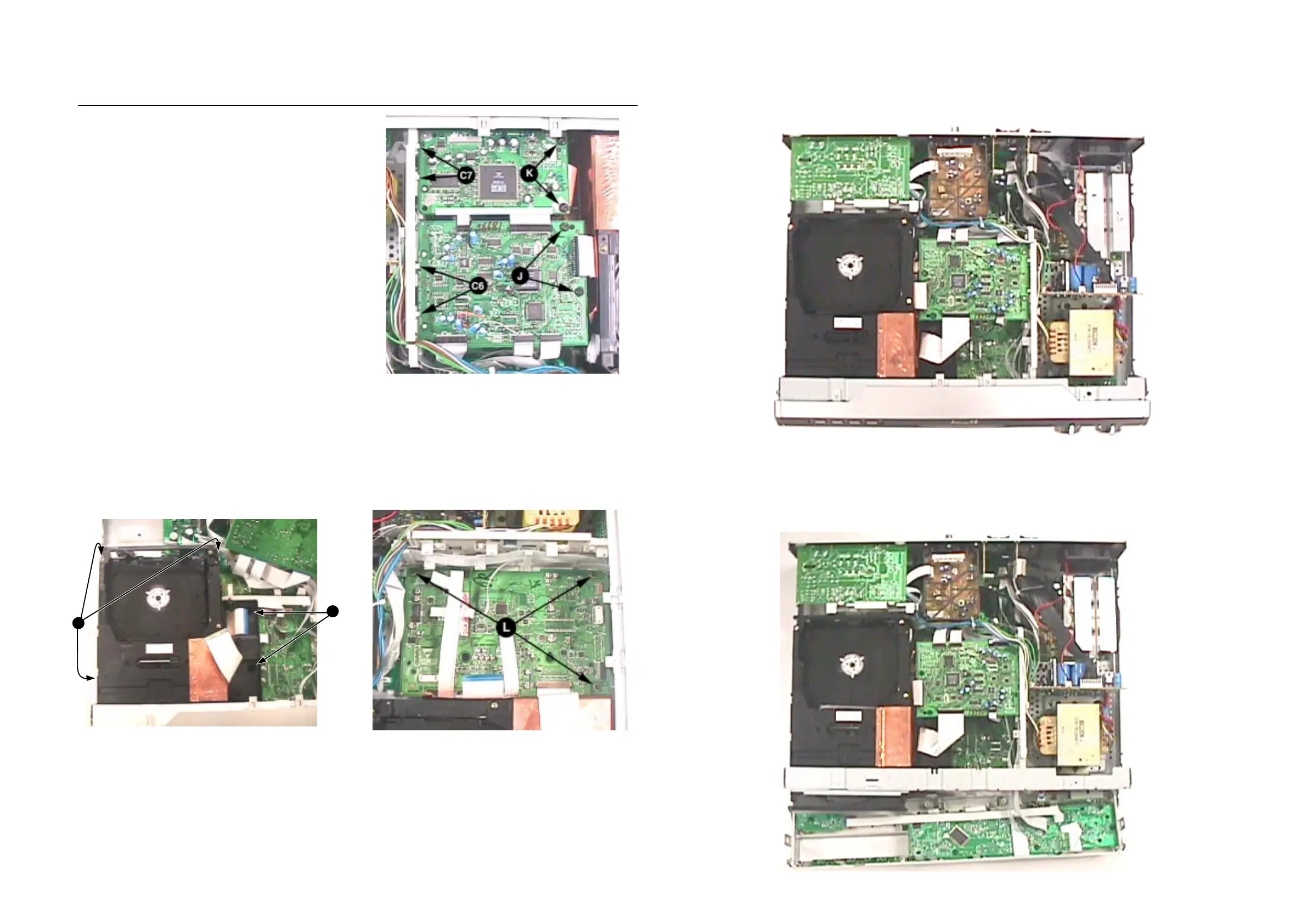
3) Loosen 2 screws J and 2 catches C6 to remove the DAC
board (pos 1103-B) as per figure 7.
4) Loosen 2 screws K and 2 catches C7 to remove the P-
Scan board (pos 1107) as per figure 7 - applicable for
MX5900SA only.
5) Loosen 2 screws H to remove the bracket (pos 260) as
per figure 8.
6) Loosen 3 screws L to remove the SACD (SD-5.0SA_CH)
board (pos 1103-C) as per figure 9.
7) Loosen 3 screws G, lift up the 5DTC Module's (pos 1103-
A) rear and pull the module out towards the rear as per
figure 8.
Service position A (Top cover removed)
Service positions
Service position B (Front Panel loosen)
Figure 7
H
G
Figure 8
Figure 9


 To Next Page