Introduction 3
Introduction
Dear customer
Thank you for purchasing this projector.
We hope you enjoy this product and the many
functions it offers!
About this user manual
The quick start guide supplied with this product
allows you to start using this product quickly
and easily. Detailed descriptions can be found
in the following sections of this user manual.
Read the entire user manual carefully. Follow
all safety instructions in order to ensure proper
operation of this product (see General safety
information, page 4). The manufacturer
accepts no liability if these instructions are not
followed.
Symbols used
Notice
Troubleshooting
This symbol indicates tips that will help
you in using this product more effectively
and easily.
DANGER!
Danger of personal injury!
This symbol gives warning of danger
of personal injury. Physical injury or
damage can result from improper
handling.
CAUTION!
Damage to the product or loss of data!
This symbol gives warning of damage
to this product and possible loss of
data. Damage can result from improper
handling.
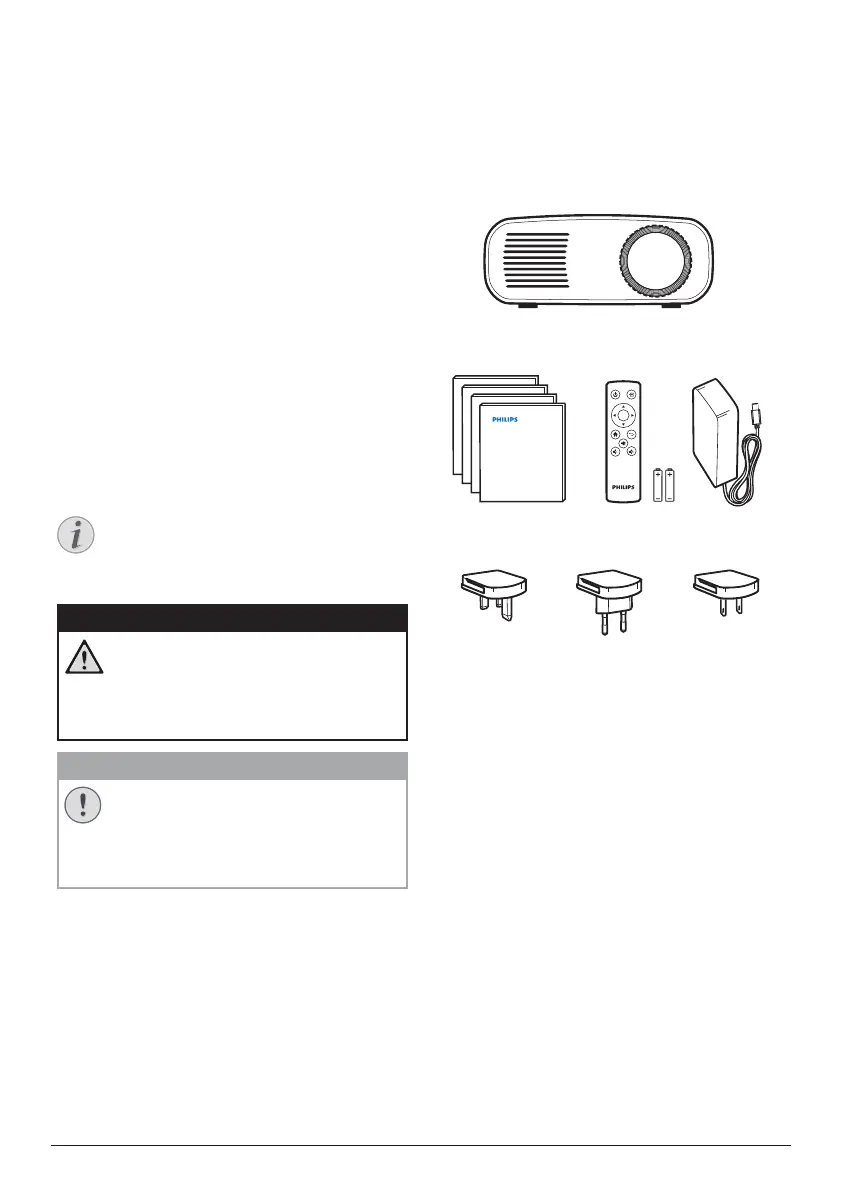
What’s in the box
a
NeoPix Start projector (NPX240)
b
A/C power adapter
c
Remote control with 2 AAA batteries
d
Quick Start Guide
e
Power plugs (EU, UK, US)
a
Quick Start
Guide
Quick Start
Guide
Quick Start
Guide
Quick Start
Guide
OK
b
e
cd












 To Next Page