6 Philips · PicoPix Max One
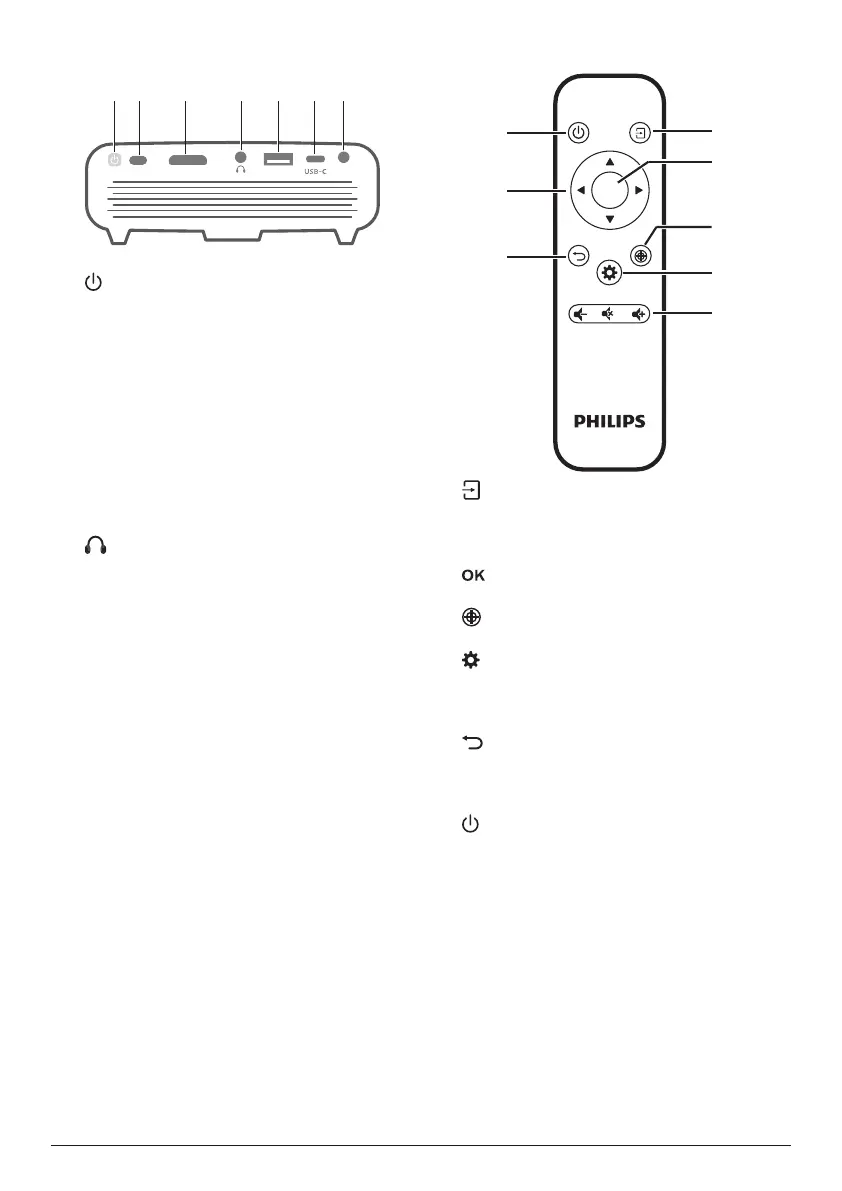
Rear view
HDMI USB
DC
a
• Press and hold for one second to switch
the projector on or off.
• When the projector is switched on, the
LED turns white. When the projector is
switched off, the LED turns off.
• When charging the projector, the LED
turns red regardless of the projector
switching on or off.
b
IR sensor
c
HDMI port
Connect to the HDMI output on a playback
device.
d
3.5 mm audio output; connect to external
speakers or headphones.
e
USB-A port
Connect to power USB devices like Amazon
Fire TV stick®, Roku® streaming stick (not
for mass storage or media player).
f
USB-C
• Connect to the USB-C video output on
a playback device.
• Charge a USB-C device like a
smartphone.
g
DC
Connect to the power supply.
Remote control
OK
a
• Quick access and select an input
source.
• Access the settings menu.
b
Confirm a selection or entry.
c
Activate focus adjustment.
d
Access the settings menu.
e
Volume control
Increase, decrease or mute volume.
f
Return to a previous menu screen.
g
Navigation buttons
Navigate menu options.
h
Press and hold for one second to switch the
projector on or off.















 To Next Page