EasyManua.ls Logo

Philips PM3350A - Page 69

Philips PM3350A
109 pages
Print Icon
To Next Page IconTo Next Page
To Previous Page IconTo Previous Page
Loading...
4-36
4
APPLICATIONS
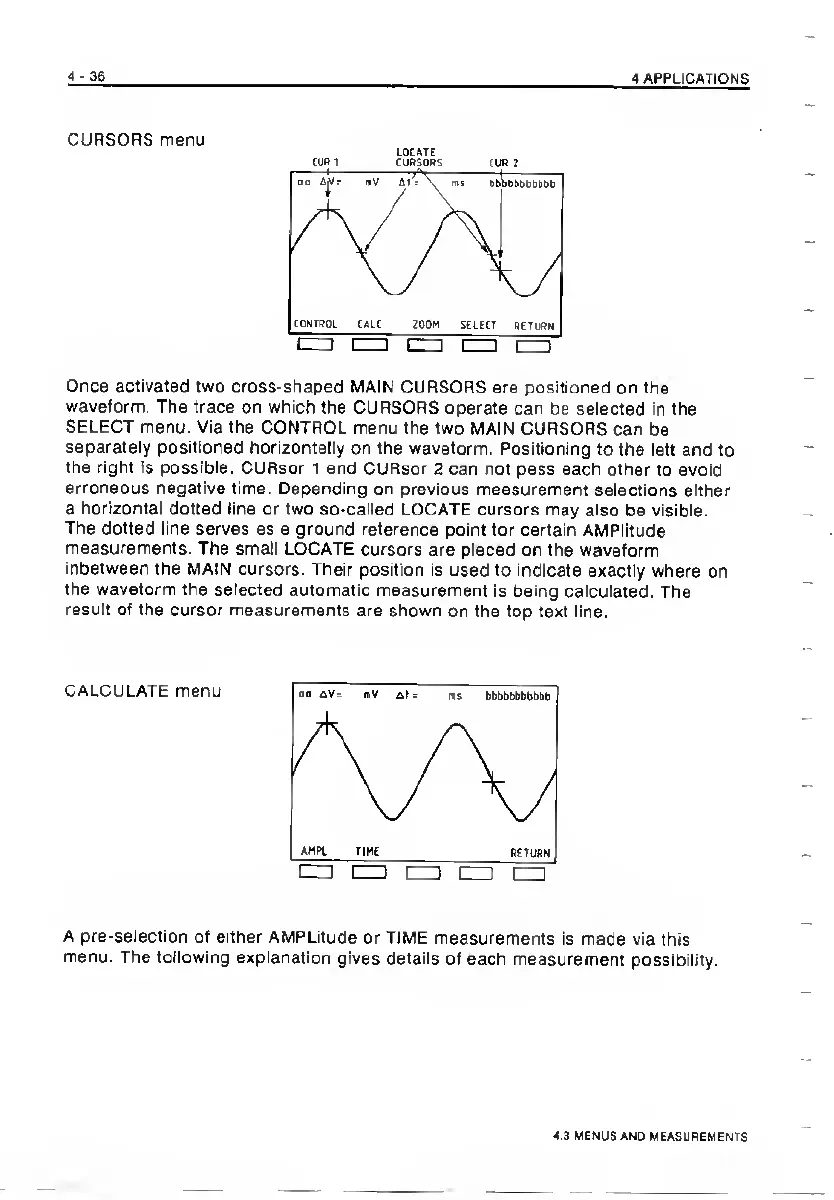
CURSORS
menu
LOCATE
COP
1
CJPCOPS
CUP
i
Once
activated
two
cross-shaped
MAIN
CURSORS
are
positioned
on
the
waveform.
The
trace
on
which
the
CURSORS
operate
can
be
selected
in
the
SELECT
menu.
Via
the
CONTROL
menu
the
two
MAIN
CURSORS
can
be
separately
positioned
horizontally
on
the
waveform.
Positioning
to
the
left
and
to
the
right
is
possible.
CURsor
1
and
CURsor
2
can
not
pass
each
other
to
avoid
erroneous
negative
time.
Depending
on
previous
measurement
selections
either
a
horizontal
dotted
line
or
two
so-called
LOCATE
cursors
may
also
be
visible.
The
dotted
line
serves
as
a
ground
reference
point
for
certain
AMPiitude
measurements.
The
small
LOCATE
cursors
are
placed
on
the
waveform
inbetween
the
MAIN
cursors.
Their
position
is
used
to
indicate
exactly
where
on
the
waveform
the
selected
automatic
measurement
is
being
calculated.
The
result
of
the
cursor
measurements
are
shown
on
the
top
text
line.
CALCULATE
menu
A
pre-selection
of
either
AMPLitude
or
TIME
measurements
is
made
via
this
menu.
The
following
explanation
gives
details
of
each
measurement
possibility.
4.3
UEN
JS
AND
MEASLSEMENTS

Related product manuals