12
SimplyGo User Manual
Charging the Battery with the AC Power Supply
Important: The rst time you charge the battery, be sure to charge it fully� Do
not use the DC power cord to do so; instead use AC power�
Note: The battery will begin charging whenever you connect the device to an
AC outlet, even if you’re using it�
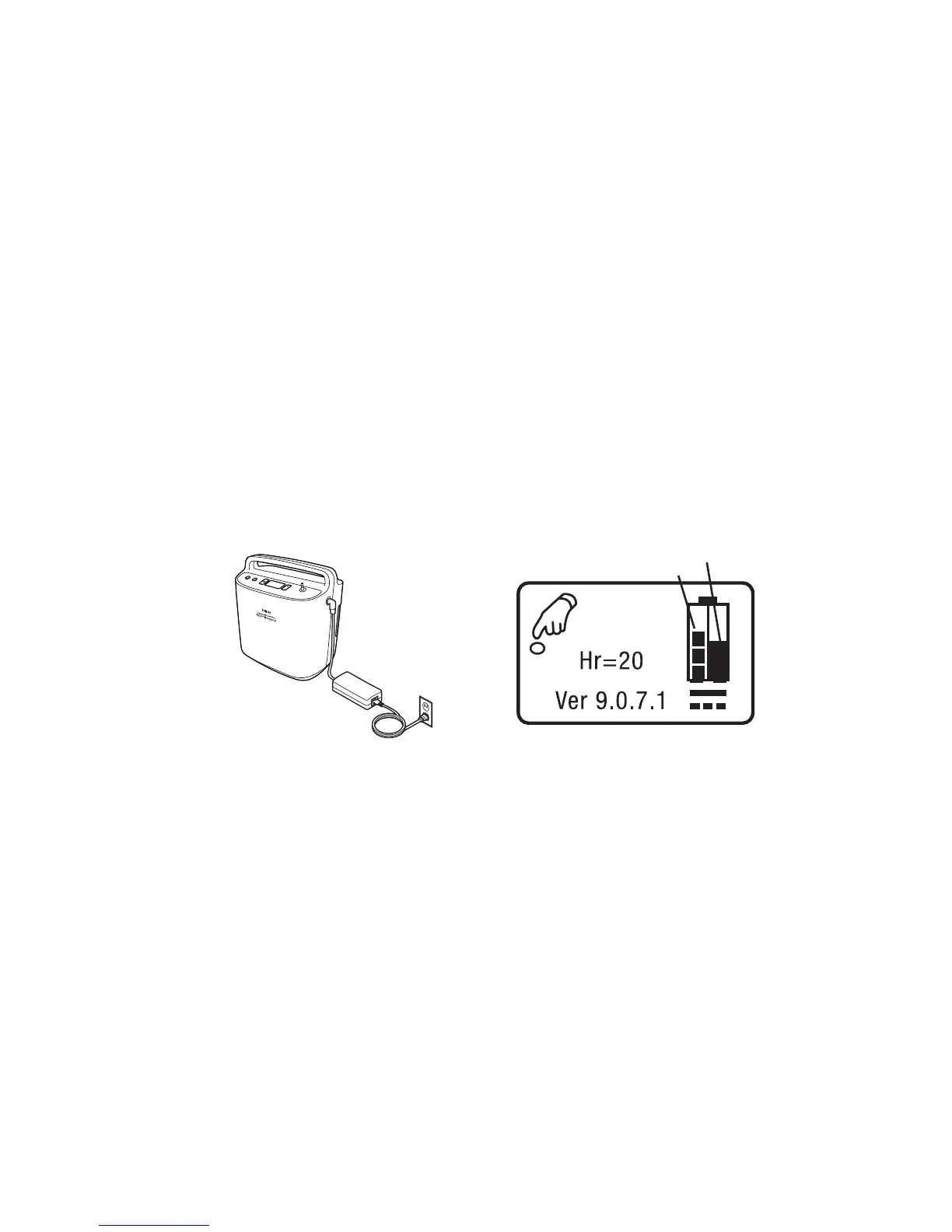
To charge the battery using the AC Power Cord provided with your system,
follow these steps�
1� Connect the AC Power Supply’s output cable to the SimplyGo power
input connector�
2� Connect the AC Power Cord’s connector into the AC power supply�
3� Connect the AC Power Cord’s plug into an AC outlet installed to meet
national or regional electrical code�
Note: As soon as you connect the device to an energized AC power source,
the light on the AC Power Supply lights up and the cooling fan turns on�
This is normal� The fan will run the entire time it is charging to keep the
battery cool�
4� When charging is complete (this takes four hours or less), disconnect
the AC Power Supply and store it with the AC Power Cord for future
use�
Note:Replacementandsparebatteriesareavailableseparately.For
information, contact your home care provider�
Note: An optional SimplyGo Smart Battery Charger/Recalibrator (sold
separately)isavailableforyoursystem.Formoreinformation,contact
your home care provider�
Indicates Charging
Indicates Battery Level



 To Next Page