EN 53
English
7 Play mode
In the main menu, press “ ” or “ ” to select“voice
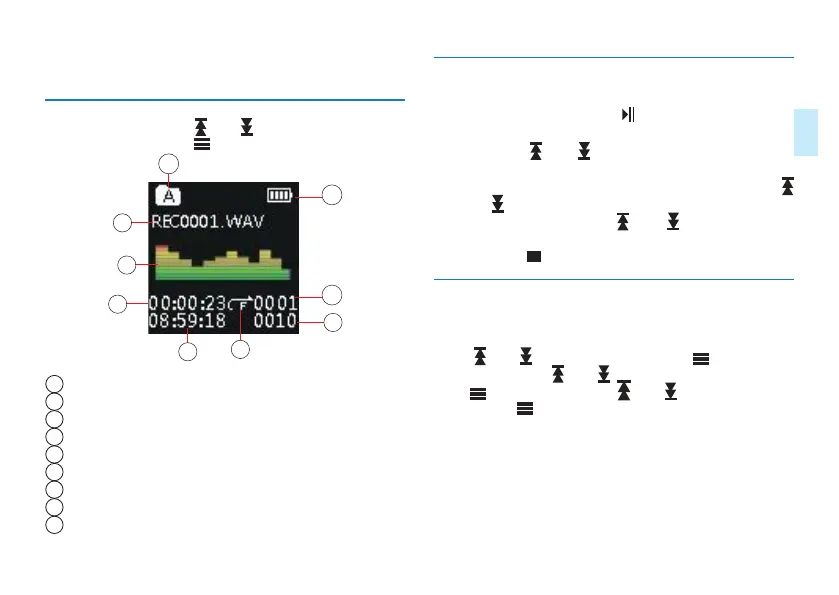
mode”,then short press “ ” to enter, as shown below:
2
3
1
4
5
6
9
7
8
1
Recording File Name
2
Audible Spectrum
3
Current Play Time
4
Total Time
5
Loop Mode
6
Total Files
7
Current File Number
8
battery
9
Current Folder
7.1 Voice play
(1)While in play,short press “ ” to pause,press again to
resume playing.
(2)Short press “ ” or “ ” to select previous track or next
track.
(3)Short press“Vollume”to display volume icone,then press “
” and “ ” to adust vollume,press “Vollume” again to exit.
(4)While in play, long press “ ” or “ ” to fastrewind or
fastforward the current audio file.
(5)Short press “ ” to stop and return to the main menu.
7.2 Playback mode
The device supports loop playback mode.In the main menu,
press “ ” or “ ” to select“settings”,press “ ” to enter
settings,then press “ ” or “ ” to select “voice settings”,
press“ ” to enter,then press “ ” or “ ” to select“loop
mode”,press “ ” to enter loop mode as shown below:














 To Next Page