OPERATING AND INSTALLATION MANUAL HEAT PUMP COMBI UNIT PKOM4 PAGE 13
USER
GENERALSPECIALIST PERSONNEL
8.1.1 Date and time
8.1 START MENU
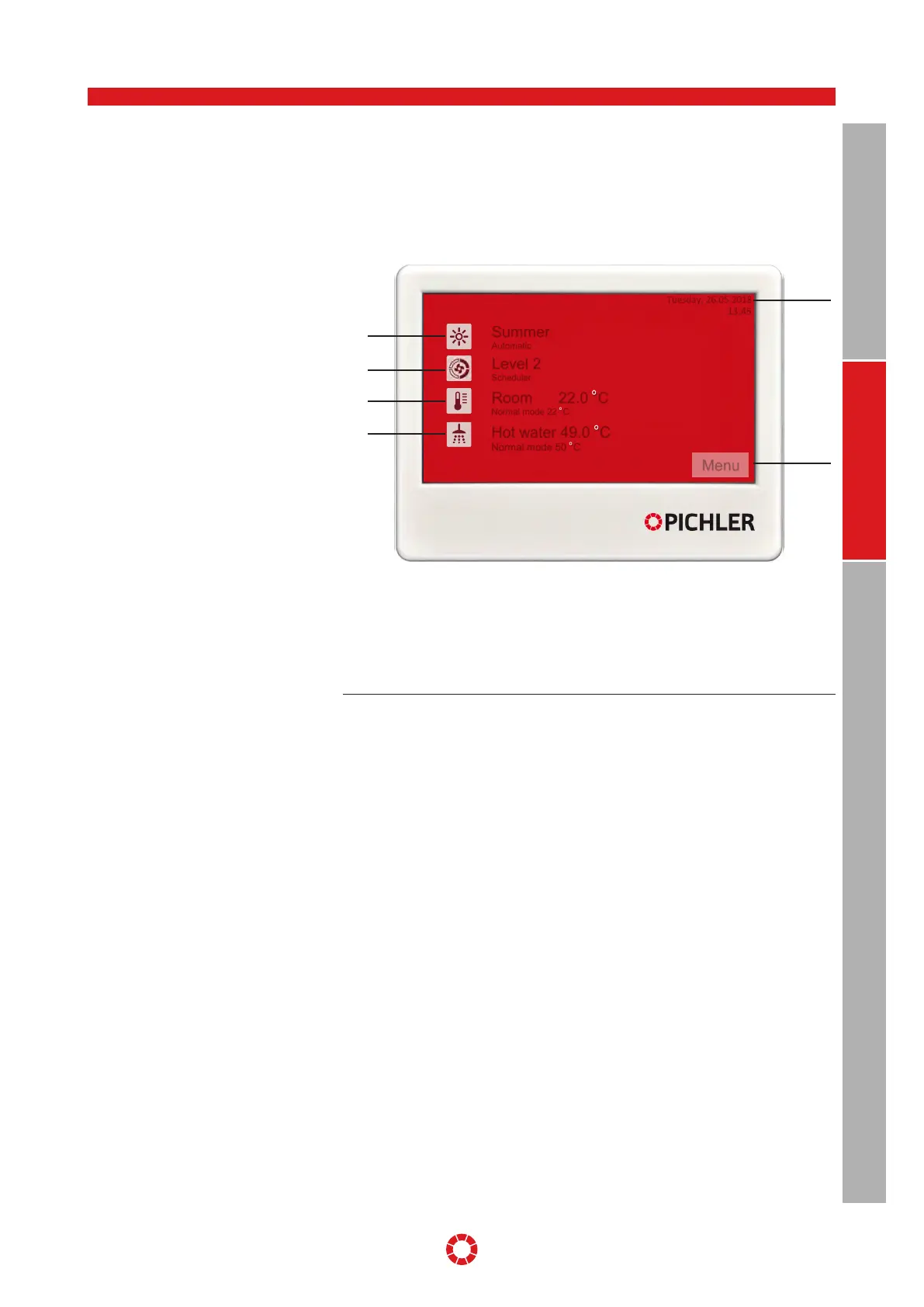
All heat pump combi units PKOM
4
are pre-
configured by the factory and can generally
be commissioned without changing the
settings. The top level is always the start
menu. Here, the most important informa-
tion are shown at a glance.
Date and time are updated in the menu
[Settings] > [Date and time], see Section
8.2.2, page 20.
The change-over between summer and
winter time is carried out automatically.
8. TOUCH control unit
Illustration: Control unit - start menu
1 Date and time
2 Operating mode
3 Ventilation level
4 Room temperature
5 Hot water temperature
6 Menu
Tuesday, 26.05.2018
13:45
Summer
Automatic
Level 2
Scheduler
Room 22.0 °C
Normal mode 22 °C
Menu
Hot water 49.0 °C
Normal mode 50 °C
1
2
3
4
6
5


 To Next Page