Page 44Page 43
Your PinGo GPS App
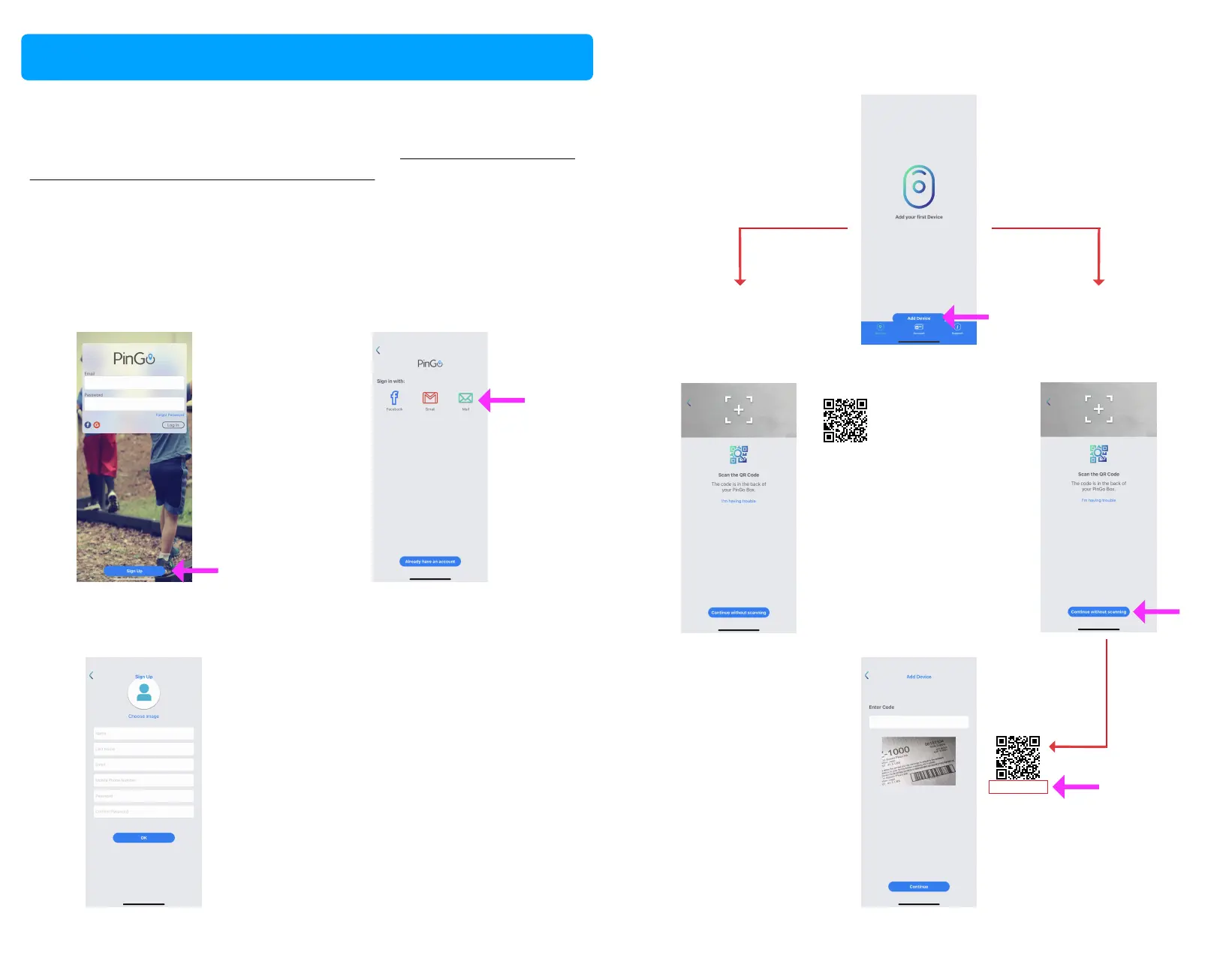
Sign Up for the PinGo GPS App
PinGo GPS App is part of the Service Plan offered by PinGo. Download and
install the App in your smartphone as described in Set up and register your
PinGo in the app PinGo GPS with a smartphone in this manual. We
suggest having your PinGo Watch turned on when you register it.
1. Tap on the Sign up buon 2. Choose an opon to create
your account
3. If you chose with your email,
fill in your data and accept
4. Add your PinGo Watch
Android
5. Scan the QR code
of your PinGo Watch
iOS
5. Tap on Connue
without scanning
Example
123456789098765
REG CODE
5.1. Type the
QR code number of
your PinGo Watch
Example
123456789098765
REG CODE
Add your PinGo Watch
Set up and get started



 To Next Page