40
Once the app is installed, carry out the following steps to make
settings on your Smart.Shift box:
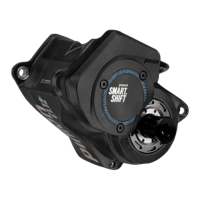
→ Turn on your Smart.Shift: turn on your e-bike or connect
your rechargeable battery to the wiring harness. Shift once
to wake up Smart.Shift.
→ Enable Bluetooth pairing: immediately after activation,
your Smart.Shift is in pairing mode for 2 minutes and can
be found by the app. Once this time has elapsed, you can
reactivate pairing mode manually for 2 minutes. To do this,
press the rear trigger button (without the Pinion logo) for 3
seconds and then release it. The LED on your Smart.Shift
now flashes blue.
→ Connect device: now, go to the “Device List” tab in the
Pinion Smart.Shift app and tap “Add Device” to find your
Smart.Shift.
Once your Smart.Shift has been added, you can give it a
customised name, which is only stored locally on your
smartphone.


 To Next Page