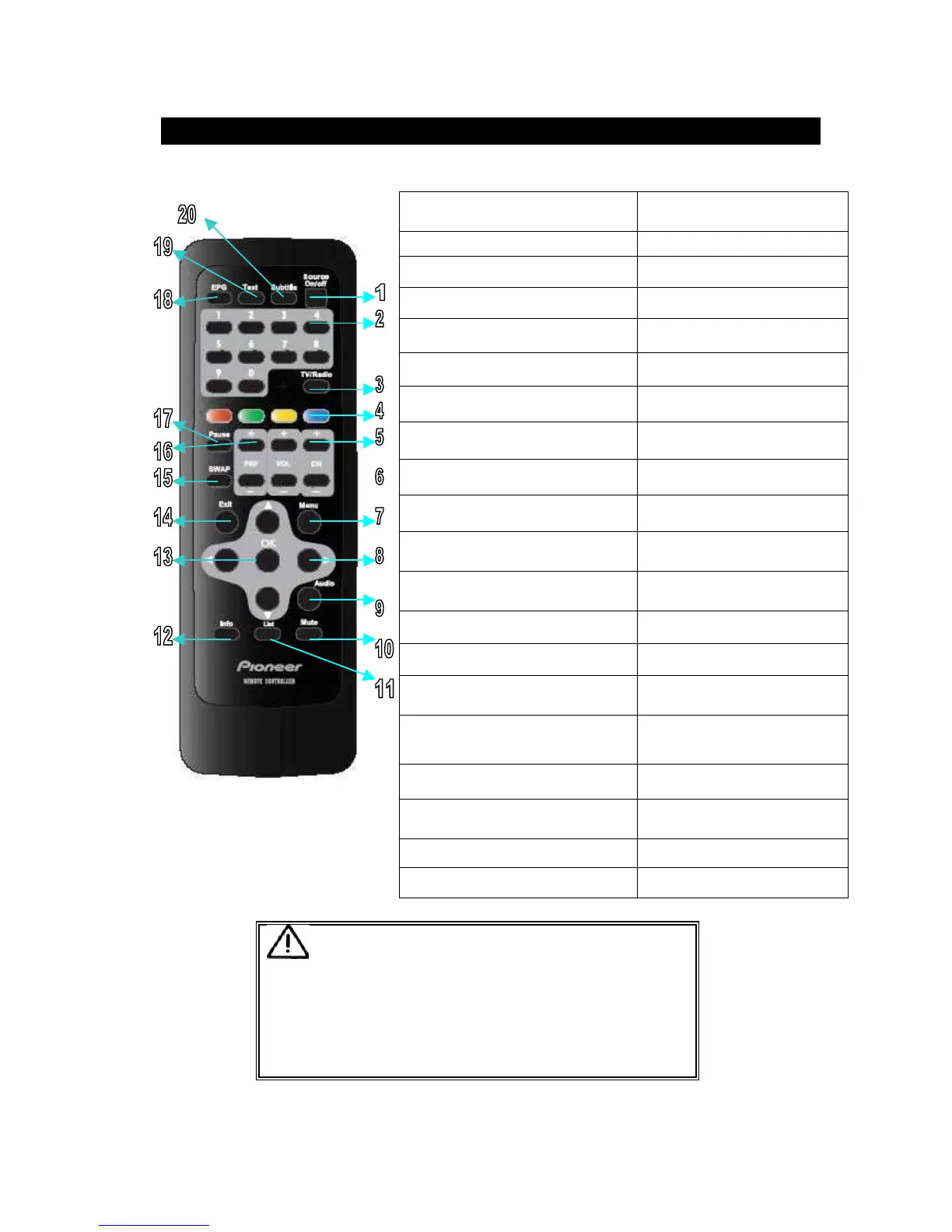
4.BLUE, YELLOW, GREEN, RED
Function keys for text
5.CH+/CH-
Select channels
6.VOL+/VOL-
Increase/decease volume
7.MENU
Open the menu option
8
Move the cursor
9.AUDIO
Select audio language
10.MUTE
Activate/deactivate muting
11.LIST
Display the list of channel available
on TV or Radio
12.INFO
Show/hide information of current
channel
13.OK
Confirm selection
14.EXIT
Back to previous menu
15.SWAP
Switch back and fort between the
current and previous channels
16.PRF+/PRF-
(used for favorite channels)
Select next/previous list of favorites
channels
17.PAUSE
Activate/deactivate FREEZE
18. EPG
Turn electronic program guide
on/off
19. TEXT
On/off the TELETEXT
20.SUBTITLE
Select subtitle language
Even if operation mode was done to ''OFF'' by the SOURCE key of a Remote-
controller, this product is operating.
In order to stop operation of this product, you need to change to ''OFF'' posit



 To Next Page