29
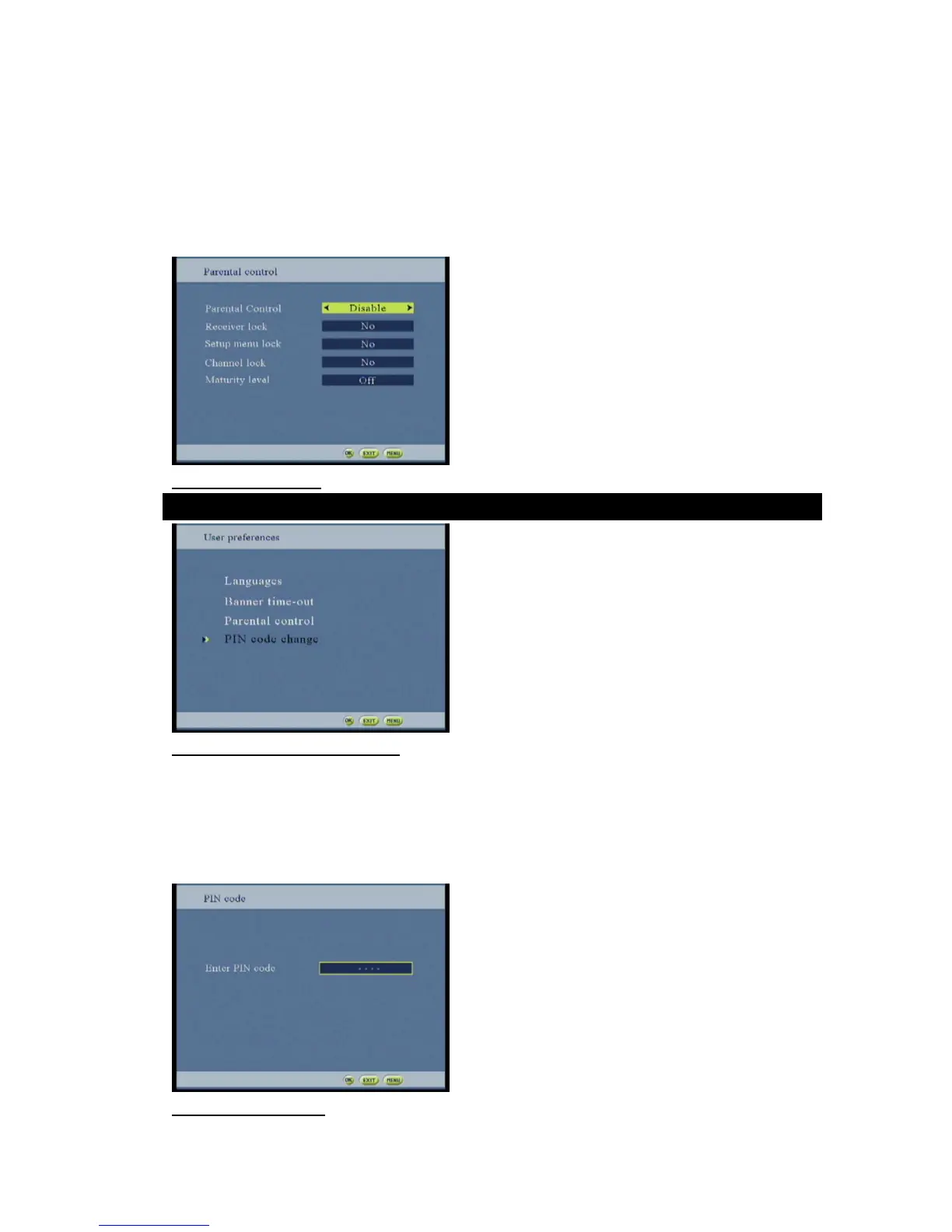
The service lock allows the user to lock a specific service (the PIN code is requested when the user zaps to the
locked services). To lock / unlock a service, see paragraph 3.6).
A parental rating (between 0 and 18 years) is available. In this case, all services which are not in the age limits
become inaccessible unless enter the PIN code (The setting value is compared with the parental rating broadcasted
in the EIT of stream).
The activation item allows enabling or disabling the locking management. If the activation item is disabled then all
locking are deactivated, else the locking are applied according to the user choice.
Figure 39: Parental screen
Figure 40:Pin code change option screen
When entering locked menus or service, or in “PIN code change” screen, the user is requested to enter the current
PIN code.
There is no limit of tries for entering the PIN code. If the user doesn’t know the PIN code, he can go to the
previous screen, canceling this pop-up.
A secret key sequence exists to reset the PIN code to “0000”. This feature is available only when the
“PIN code access popup is displayed”. It consists of a sequence of 6 color keys.
Figure41: PIN code pop-up



 To Next Page