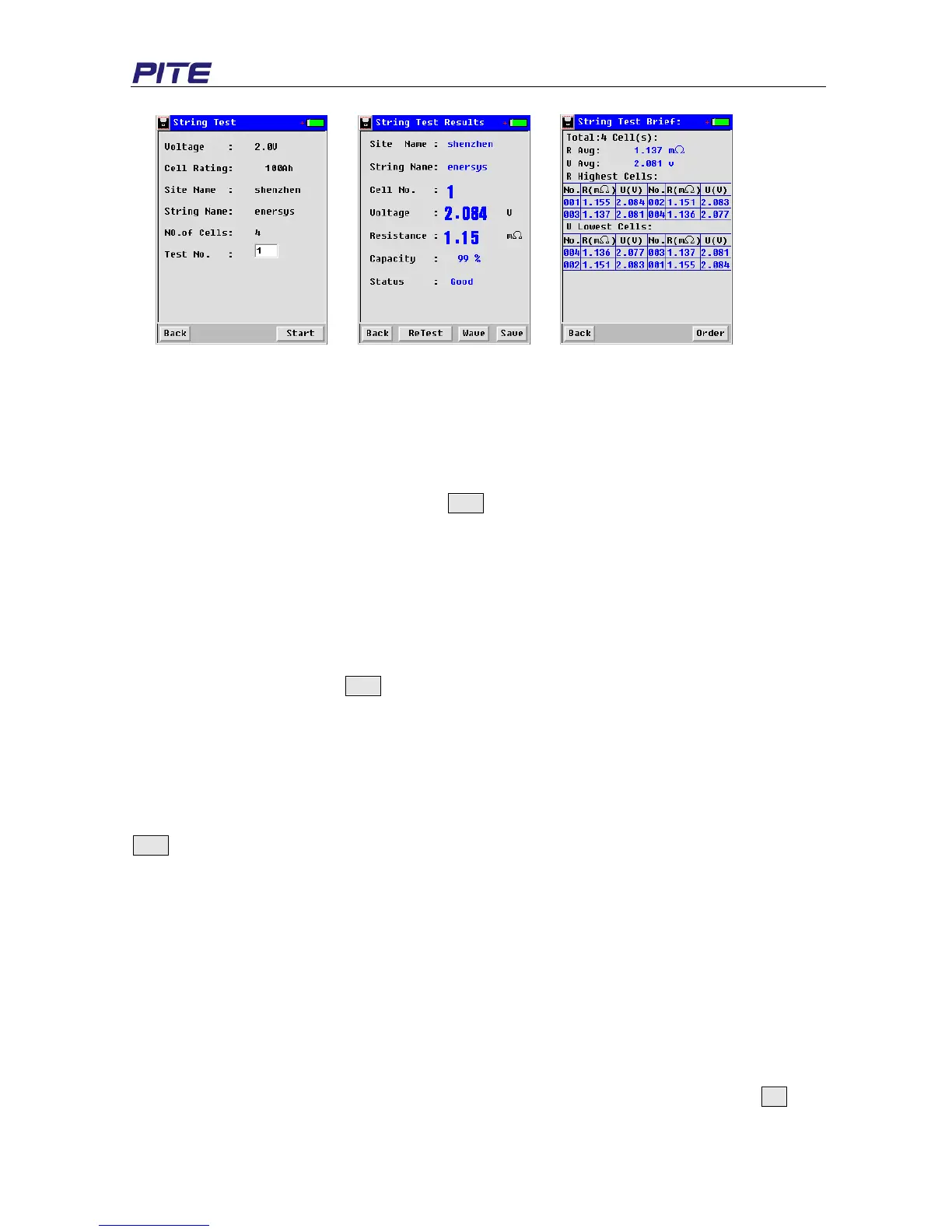
Fig. 3.2.2.3 Fig. 3.2.2.4 Fig. 3.2.2.5
“Site Name”: user-defined, input the number or letter of site for convenient data recording
“String Name”: user-defined to distinguish it from other strings
“No. of Cell” indicates the total number of cells in one string.
If you need to specify your own reference value, do in the same way like the setting in single cell test
(Fig. 3.2.2.2). After the above settings, click Start to go to the next step. “Test No.” (Fig. 3.2.2.3)
indicates the cell to begin the test in the string. For example, if total cells are 3 and “Test No.” 1, that
means it will begin the test from the first (No. 1) cell.
NOTE: If you need to retest certain cell (e.g. first cell in a string of 3) or cells after the whole string test,
just input the cell number (in Fig. 3.2.2.3) to begin the test. In PITE DataView software, new testing
result will automatically overwrite the previous record.
After the above setting, click Start to begin the measurement. Testing result of the first cell will
displayed like Fig 3.2.2.4 when you hear the sound “Beep”. Then disconnect the testing clips, testing
data of the first cell will be automatically saved with another “Beep”. Then clamp the testing clips on the
next cell, wait for a few seconds before the testing automatically begins. Do in the same way until the
last cell.
During string testing, you could just put the tester in the PITE carrying bag after clicking the button
Start. This is very convenient for testing and only one personnel is needed to handle string testing in a
short time.
When measurement of all batteries in the same string are finished, you will hear the longer sound
Beep and get the testing result as Fig. 3.2.2.5. String summary with all batteries ranking and average
values will be displayed. To review detailed data, please refer to 3.3 Data Management.
Set average value as reference:
This function is only for battery string. In this measurement, there is no reference value at the
time of setting. After the testing of the whole string, it will automatically take the average
resistance as the reference value of the whole string. Please do as below:
In the exemplified screen of Fig. 3.2.2.1, you just select the voltage type, click the button Set,
finish the setting of other parameter as usual and continue the measurement. For


 To Next Page