3.4.3 System Update
PITE 3915 enjoys free software update from PITE TECH. INC. The update is done by direct
connection with USB drive. You have two optional ways to update it:
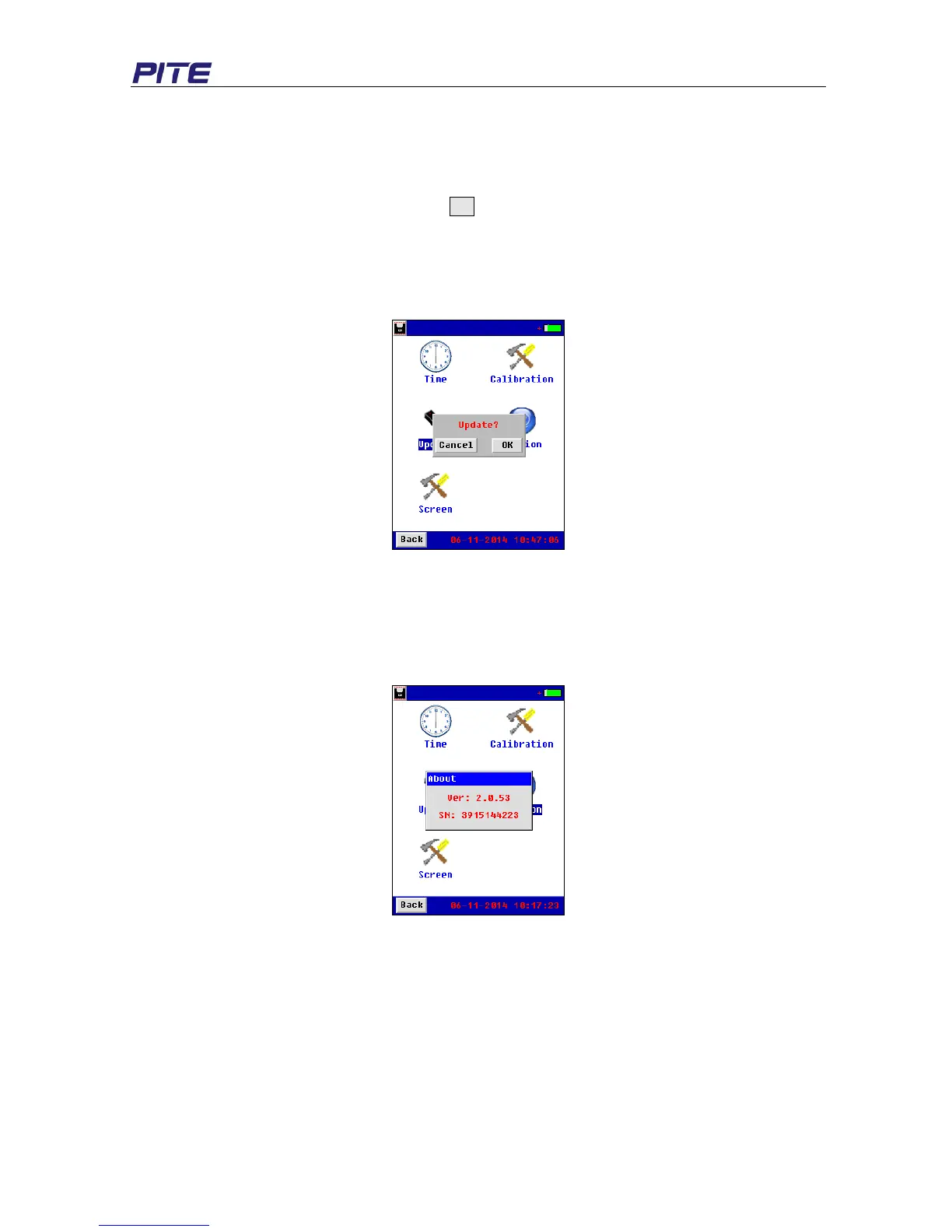
1. Save the new software in the root directory of USB drive, connect the USB drive with main unit,
click “Update” under “System” and select OK (see Fig 3.4.3) You will see the process for update
on screen. After update is done, screen will automatically to the starting screen.
2. Connect the USB drive with main unit and restart the unit. You will see the process screen for
update. After update is done, screen will automatically to the stating screen.
Both ways have the same effect for update.
Fig 3.4.3
3.4.4 Version Information
Software version will change as update is done. To view the current version and serial number of the
tester, click “Version” and you will see screen as below: (see Fig 3.4.5)
Fig 3.4.4
4. PITE DATAVIEW SOFTWARE
All testing data are saved in PITE 3915 main unit and it could be transferred to computer for data view.
The following software should be well installed to enable the data analyzing. This software will help
you know battery health status comprehensively. Application Software is included in the attached USB
drive. This software will comply with Operation Systems of Windows XP and Win 7.


 To Next Page