resistance and lowest voltage.
Average resistance and lowest resistance in the string could be used as self-defined reference
value.
3.4 System Management
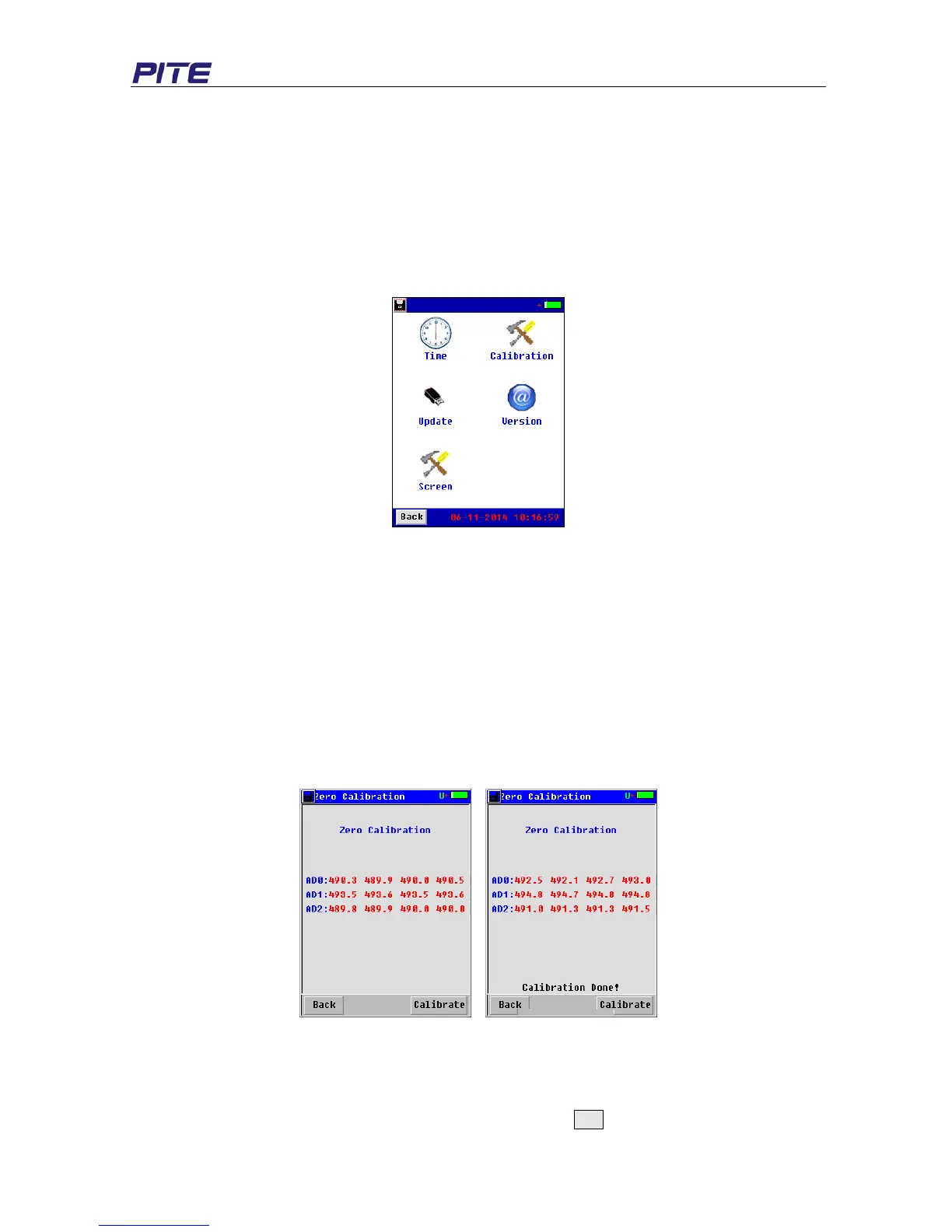
Click “System” in the main menu, and then you will see the following screen for system management
(see Fig 3.4). For detailed instruction, please check the text below.
Fig. 3.4
3.4.1 Instrument Calibration
This section only includes basic information for calibration of the unit. For the whole process of
calibration, you will require some specific facilities and a more detailed instruction from PITE. Please
contact your supplier if you need this.
3.4.1.1 Zero Calibration
Zero calibration is used for more reliable measurements by way of adjusting the zero values of
resistance-range and voltage-range. Before calibration, please remove the connection with any battery.
To begin it on screen, click “Zero-Cali” and go to the next screen as below (see Fig 3.4.4.1.1). Just
click the button “Calibrate” and wait for a few seconds until the screen displays “Calibration Done!”
Fig 3.4.4.1.1
3.4.1.2 Voltage Calibration
Voltage Calibration is used to calibrate voltage of a single cell. This testing requires connection with
cells. Click “Volt-Cali” to enter into the screen of calibration. Select the cell type for the first cell for
testing, input the actual value in “Real V1” and click the button Cali. After the first cell is calibrated,


 To Next Page