operation, make sure that the USB drive is well connected.
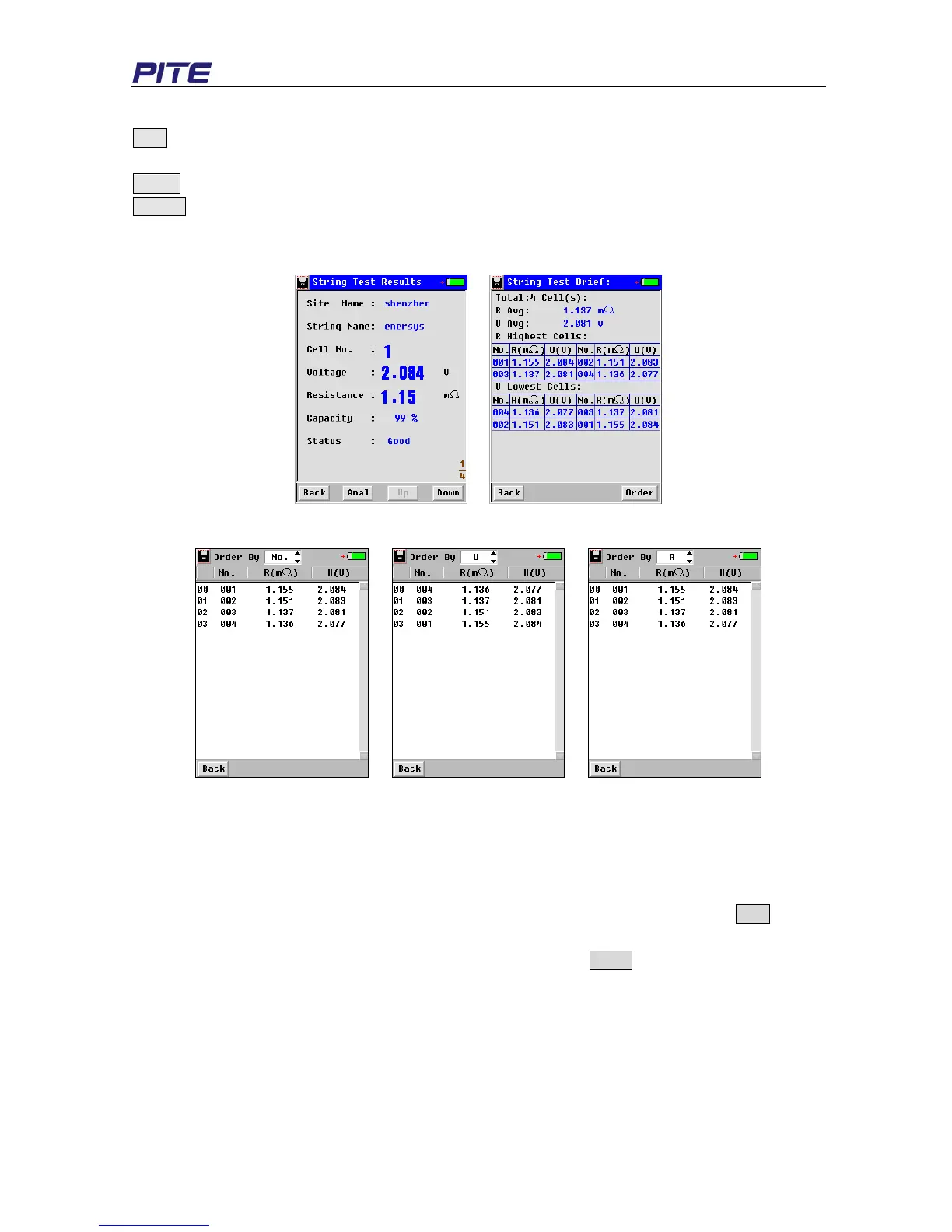
Anal : Click this button to have a string summary with all batteries ranking and average values will be
displayed.
Delete: Select the desired item and click this button to delete the record.
Format: It is used to format all testing records.
NOTE: Please make sure that you have kept them properly before deleting or formatting the records.
Once deleted or formatted, the data could not be recovered.
Fig. 3.3.4 Fig. 3.3.5
Fig. 3.3.6 All cells Fig. 3.3.7 Voltage ranking Fig. 3.3.8 Resistance ranking
String Summary
String summary will help you judge the general health status of batteries in the same series. Reference
values could be picked up from the summary.
To view string summary, please open relative record of string (e.g. Fig. 3.3.4) and click Anal to view
the string test summary. It will list average resistance, average voltage, 8 cells with highest resistance
and 8 cells with lowest voltage in the whole string (Fig.3.3.5). Click Order to further ranking of voltage
and resistance for the whole string like Fig. 3.3.6- Fig. 3.3.8. Voltage will be ranked from low to high,
and resistance will be ranked from high to low.
NOTE:
To enhanced testing accuracy, the highest and lowest values in the battery string are excluded in
the calculation of average resistance and voltage.
If there are no more than 8 cells in the string that you have tested, all cells will be listed in highest


 To Next Page