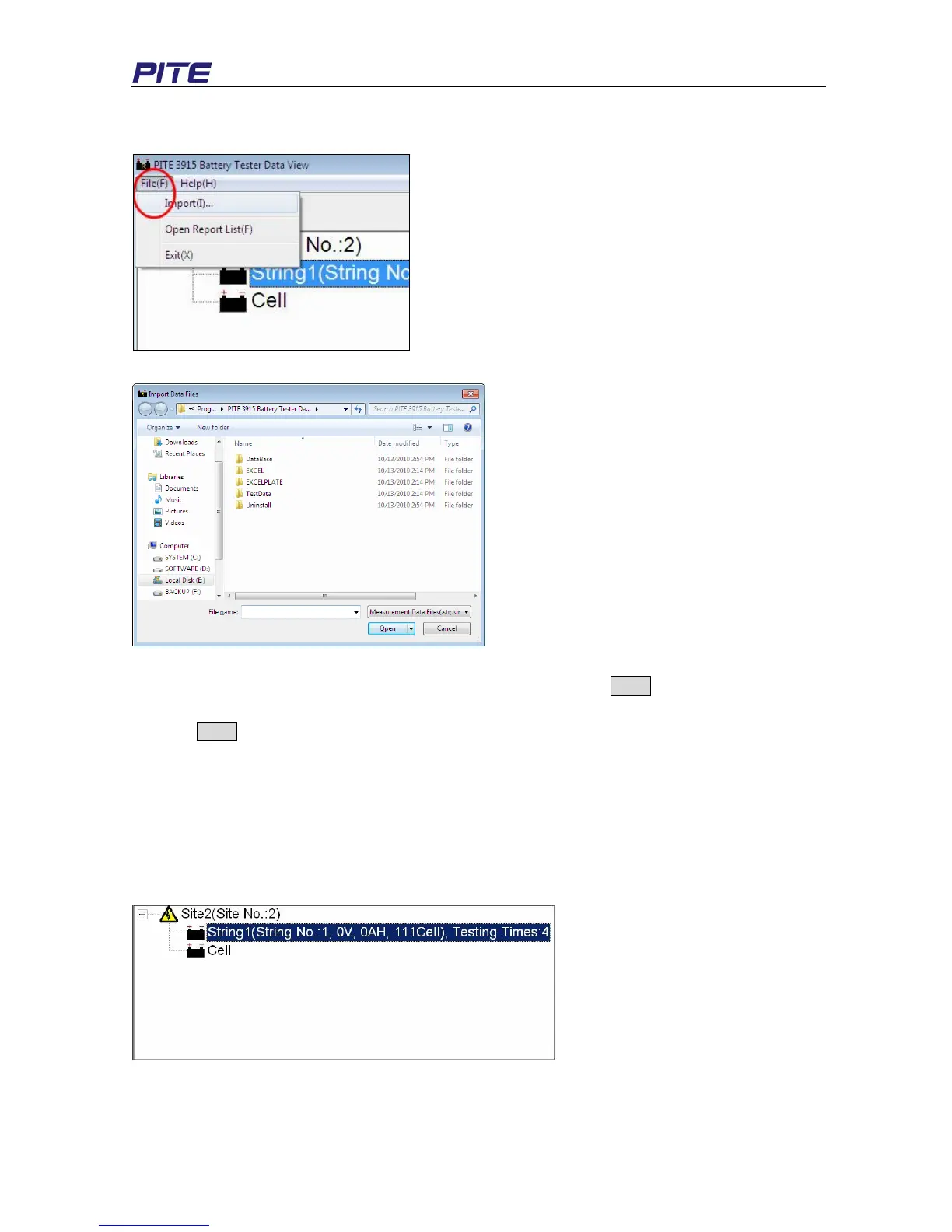
Click “File” and then “import”, a box will pop up like Fig 4.2.1.2
Fig 4.2.1.1
Fig 4.2.1.2
Select relevant testing data that are already saved in the PC and click Open to import.
NOTE: To import several files simultaneously, you could use keys like Ctrl or Shift for multi-selection
and click Open to import.
4.2.2 View & Delete Data
The imported data is showed on the main screen like Fig 4.2.2.a. It includes the information for site,
string test and cell test. Site number and string numbers are in accordance with the numbers
predefined in PITE 3915 main unit. All testing data will be grouped in different sites with string and cell
testing data below.
String includes string number, voltage, capacity, cell quantity and testing times.
Fig 4.2.2.a
Select site or string item and click right; you could carry out functions of Add, Modify and Delete. See
Fig 4.2.2.b and Fig 4.2.2.c


 To Next Page