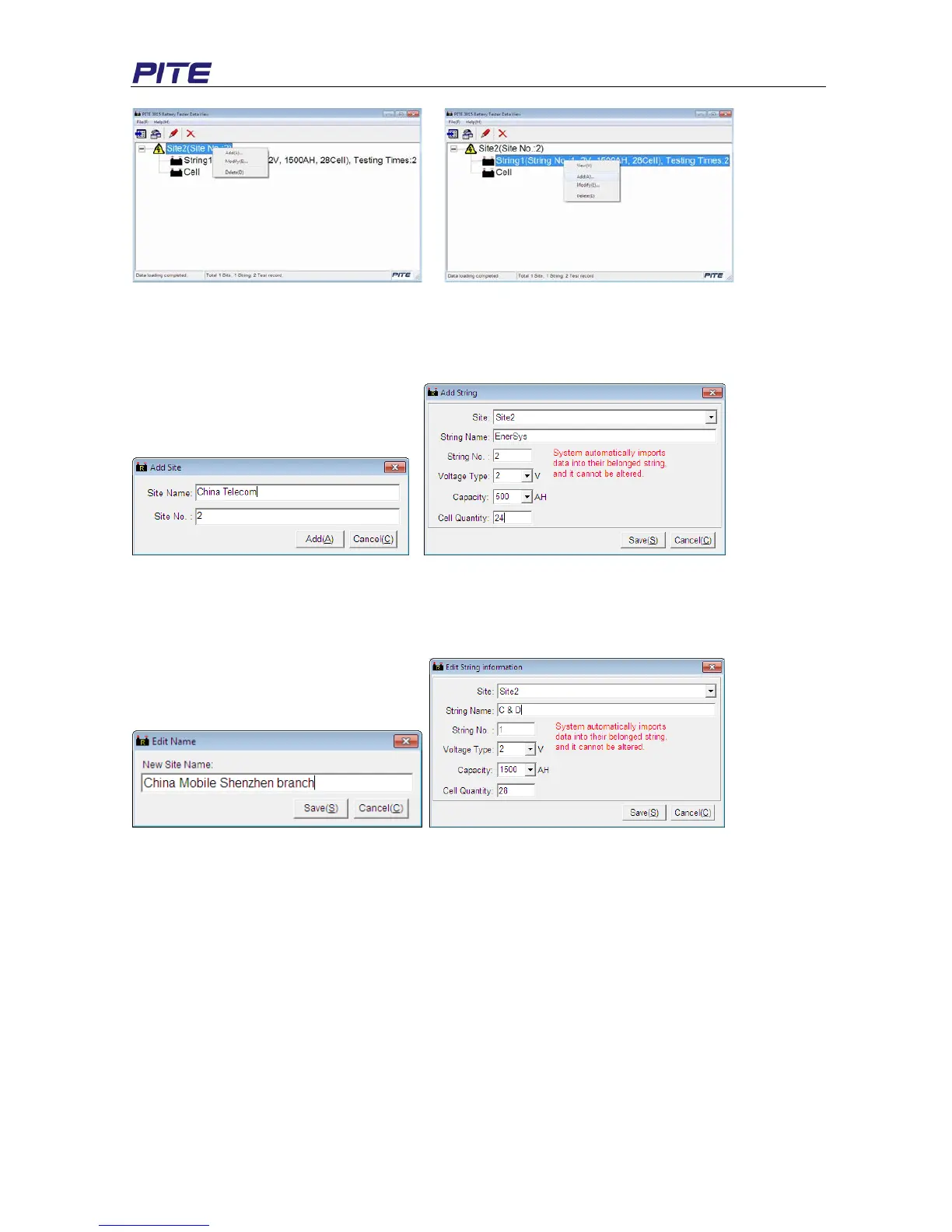
Fig 4.2.2.b Fig 4.2.2.c
Add: You can add new information for another site or string as figures (example) below. Testing result
imported in the future will be grouped accordingly based on the setting for same site number and string
number.
Fig 4.2.2.d Add Site Fig 4.2.2.e Add String
Modify: This function is used to rename sites and strings. This will help users remember each site and
string easily. As this information is changed, relative information will be changed accordingly in the test
report. We will introduce this later. See modify screen on the following Fig 4.2.2.f and Fig 4.2.2.g
Fig 4.2.2 For Site Fig 4.2.2.g For String
Delete: You could delete the testing data if necessary. Before delete it, make sure you have kept the
record properly.
4.2.2.1 View String Data
1) View Data
Double click string item and you will see the string data box on the screen. It displays the detailed
testing data for strings in different time. The testing data includes test time, string voltage, resistance,
capacity and status. Percentage of each battery status will also be displayed on the top with different
colors.


 To Next Page