Using presets and advancing the date
Create presets to store a group of commonly-used settings. Presets
can store settings such as a postage class, an account and a graphic.
The maximum number of presets you can have is 21. This includes the
default preset.
Creating presets for printing postage
Create presets to store a group of commonly-used settings. Presets
can store settings such as a postage class, an account and a graphic.
The maximum number of presets you can have is 21. This includes the
default preset.
1. Tap Envelope Printing or Print on Envelopes on the Home
screen.
2. Tap Class, select the class and any special services, messages or
graphics.
3. Verify the settings on the Envelope Printing or Print on Envelopes
screen.
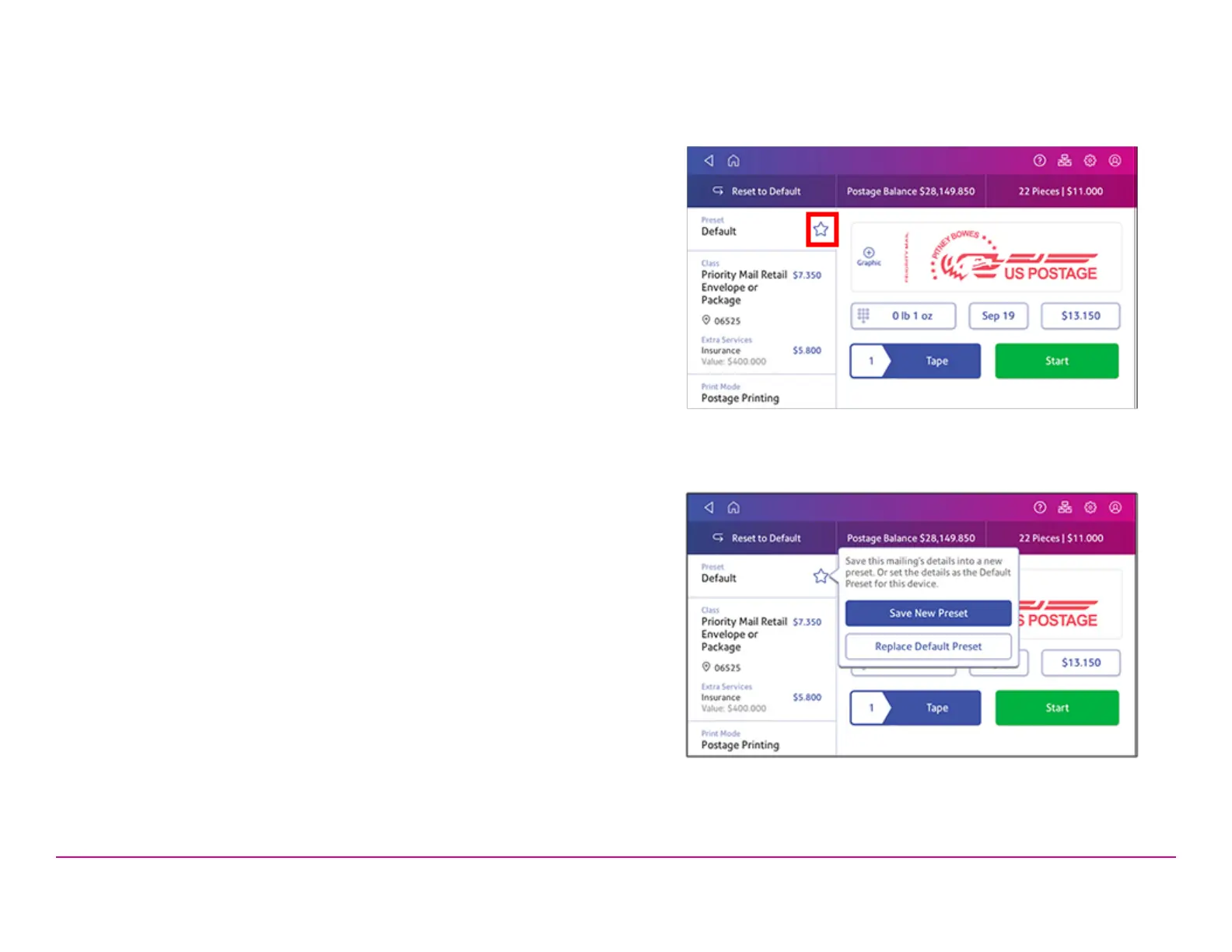
4. Tap the star in the Preset box.
Important: You must modify something in the Envelope Printing or
Print on Envelopes screenfor the Preset star to appear.
5. Tap Save New Preset to save it. If you wish to save it and replace
the default setting, tap Replace Default Preset.
6. For a new preset, enter a name, then tap Save.
Pitney Bowes Quick ReferenceGuide December 08,2020 Page 14 of 18












 To Next Page