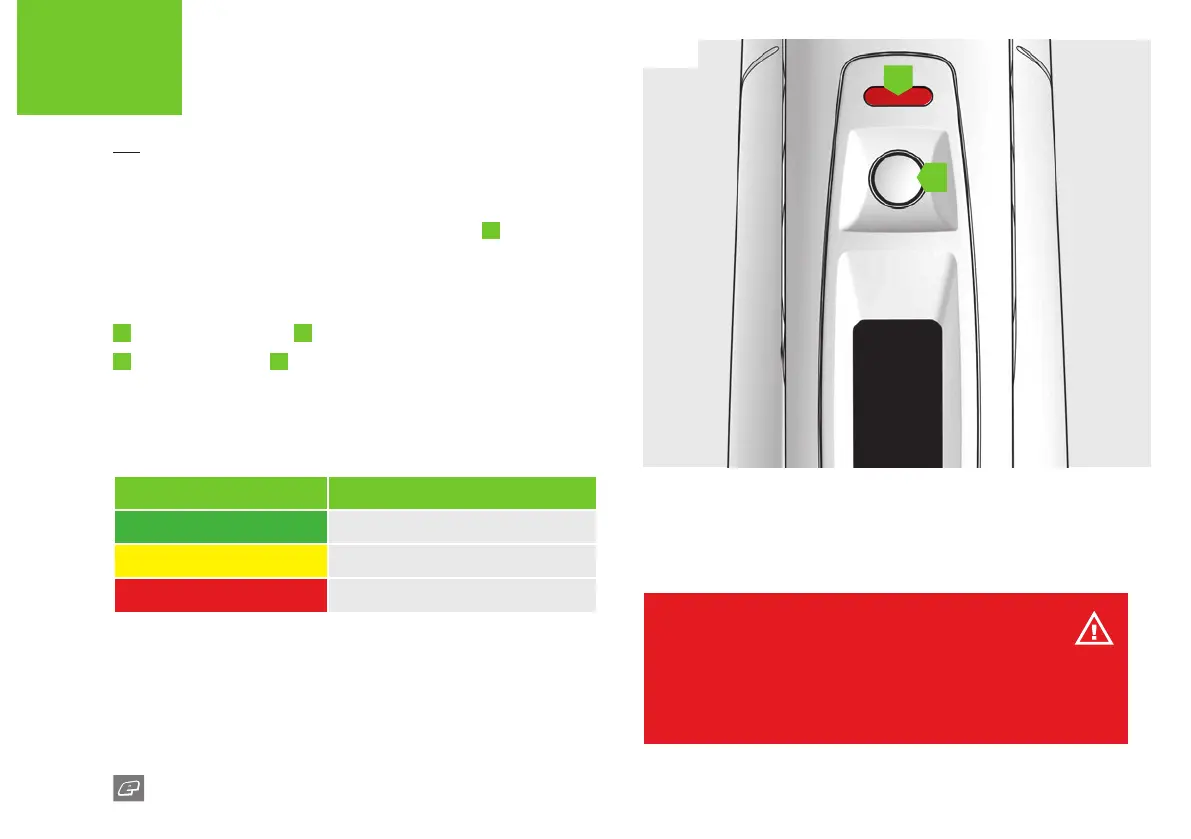
FIG-1
11
GTEK170R
A
B
FIG-1
Periodically, every 6 seconds or so, the LED indicator
B
will show the
battery status with a steady colour for 1 second.
You can also check the battery status at any time when the marker is
switched on:
1
Tap the Select button
A
.
2
The LED indicator
B
will turn a steady colour for 1 second.
Table 2 (below) shows each LED colour and its relevant battery status.
TABLE 2
LED COLOUR BATTERY STATUS
GREEN Battery level is good.
YELLOW Battery level is low.
RED Replace the battery.
The LED also indicates the various marker parameter settings.
See pages 22-23 for marker parameter LED indicators.
Firing the 170R
Pull the trigger to re the 170R. If the marker is able to re then it will
do so.
WARNING!
When the battery indicator is being displayed the marker is still on and will
re if the trigger is pulled - depending on the BS status.
Do not dry re/shoot the marker without paintballs. Prolonged dry ring may
lead to damage/wear of the internal components of the marker.
QUICK START
LED INDICATORS














 To Next Page