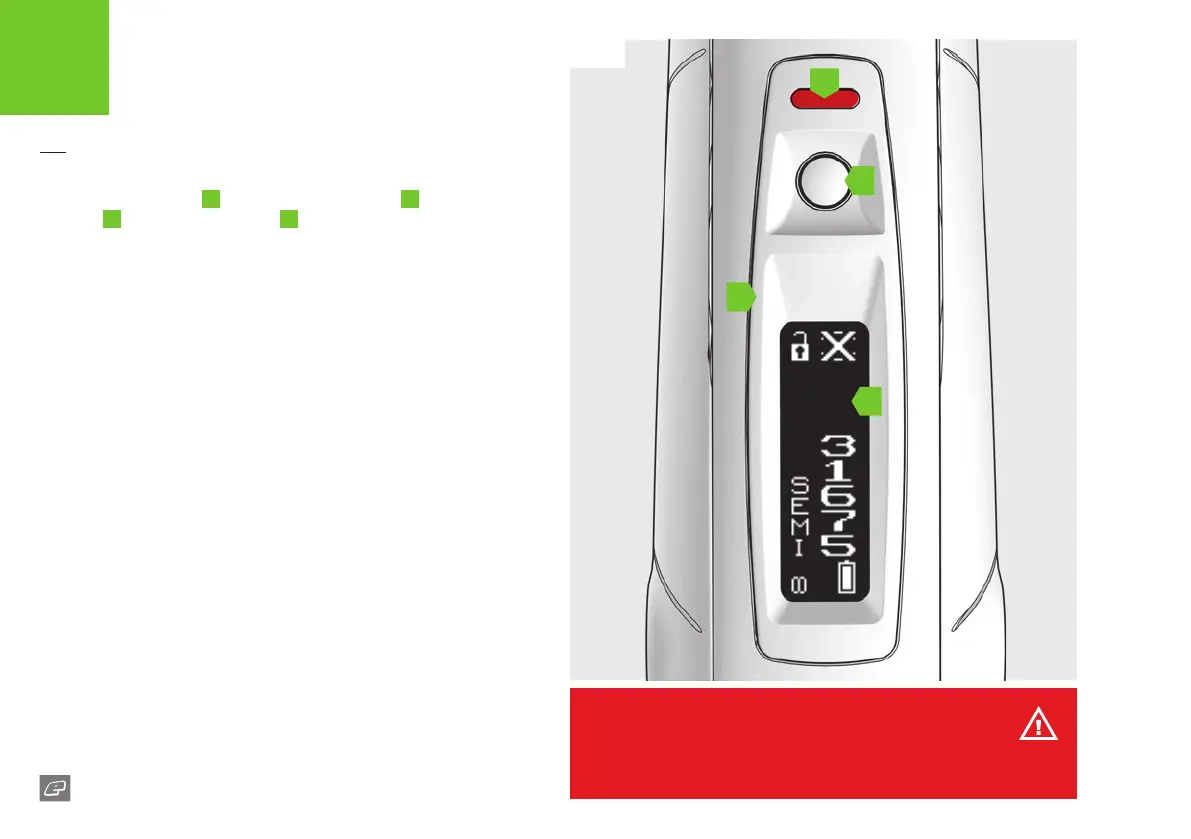
FIG-1
08
GTEK170R
The navigation console
A
houses the Select button
B
the LED
indicator
C
and the OLED display
D
. Use the console to switch the
170R On/O and change the marker settings.
The LED indicator provides secondary functionality in the event of any
OLED board issues you may have (see pages 22-23).
FIG-1
Switching on the 170R
Press and hold the Select button. Release the Select button when the
OLED display and LED light up and your 170R will begin its power up
sequence.
1,2
Firing the 170R
Pull the trigger to re the 170R. If the marker is able to re then it will
do so.
Switching o the 170R
Press and hold the Select button until the display shows GOODBYE
and the LED turns red. Release the Select button.
1 When the 170R is turned on, the breech sensor is automatically enabled.
2 The LED colours displayed during the power up sequence may vary depending on
where the marker was originally purchased.
QUICK START
SWITCHING THE 170R ON/OFF
B
A
C
D
WARNING!
Do not dry re/shoot the marker without paintballs. Prolonged dry ring may
lead to damage/wear of the internal components of the marker.















 To Next Page