IP-based 8-port Switched Power Manager with 2 Cascaded Ports
IPM-8221
- 20 -
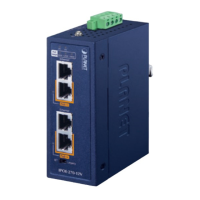
Step 2: After you have logged in to the PDU successfully, the Socket Access/Connection page will
appear:
Figure 3-2-2 Default Main Page
After logging in, the top panel of the page provides the following options for PDU operations: Home
Page, Control, Statistics, Settings, and About. Click the corresponding TAB to select, set, and view the
functions provided on the corresponding page.
Step 3: Network Configuration
To configure the network, perform the following operations:
1. Click the Setting TAB.
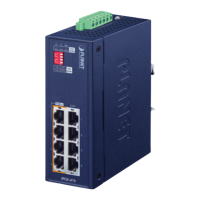
2. The device configuration page is displayed. A screen similar to the following should appear:
Figure 3-2-3 Configuration Page
3. Please fill in the field data according to the information provided in the device setting instructions of
Network Setting.
Step 4. Change of administrator Log-in
To change the default user name and password of the administrator, perform the following operations:
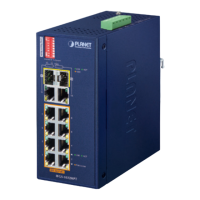
1. Click the User List in the User Management button at the top of the screen. The User List screen in
Figure 3-2-4 appears. A list of users is listed on the left side of the user administrator page, with
their more detailed information displayed on a large block in the center.
2.
Figure 3-2-4 User List Page












 To Next Page