18
2. Check whether the ber-optic cable type matches the SFP+ transceiver
model.
To connect to 10GBASE-SR SFP+ transceiver, use the multi-mode ber
cable with one side being the male duplex LC connector type.
To connect to 10GBASE-LR SFP+ transceiver, use the single-mode ber
cable with one side being the male duplex LC connector type.
Connectingthebercable
1. Attach the duplex LC connector of the network cable to the SFP+ trans-
ceiver.
2. Connect the other end of the cable to a device like a switch with SFP+
installed, ber NIC on a workstation or a Media Converter.
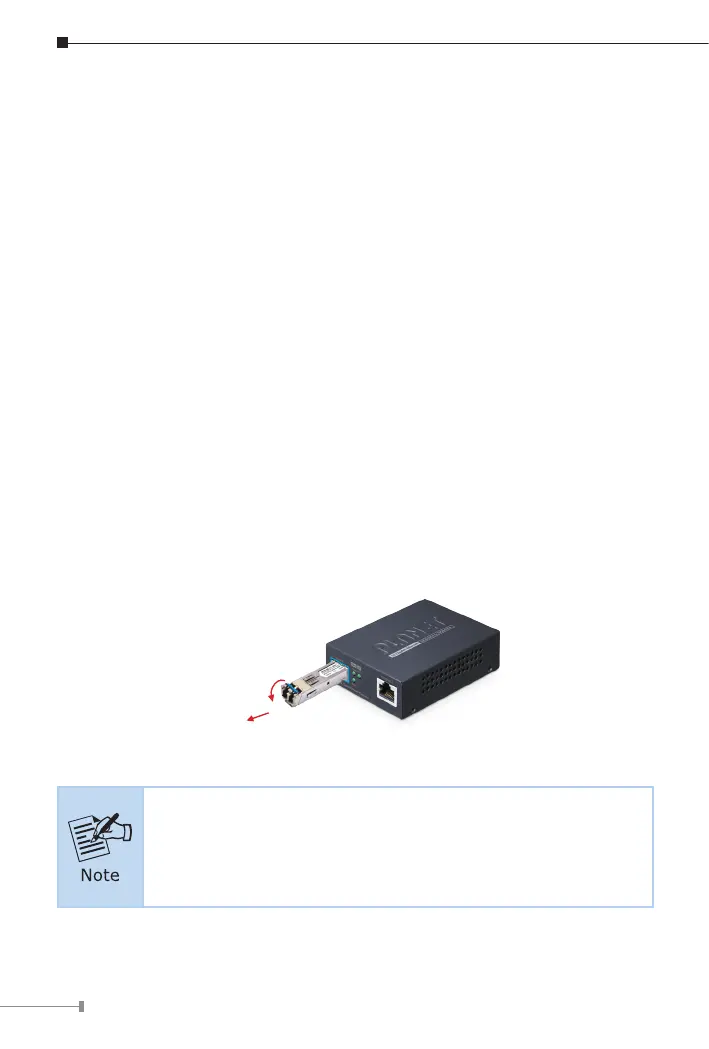
Removing the Transceiver Module
1. Make sure there is no network activity by consulting or checking with the
network administrator. Or through the management interface of the switch/
converter (if available), disable the port in advance.
2. Remove the ber optic cable gently.
3. Turn the lever of the MTB module to a horizontal position.
4. Pull out the module gently through the lever.
Series
1
Figure 3-3: Pulling Out from the SFP+ Transceiver
Never pull out the module without pulling the lever or the push
bolts on the module. Directly pulling out the module with effort
could damage the module and SFP+ module slot of the Media
Converter.


 To Next Page