17
en
Phonebook
Entering Text from Your Dial Pad
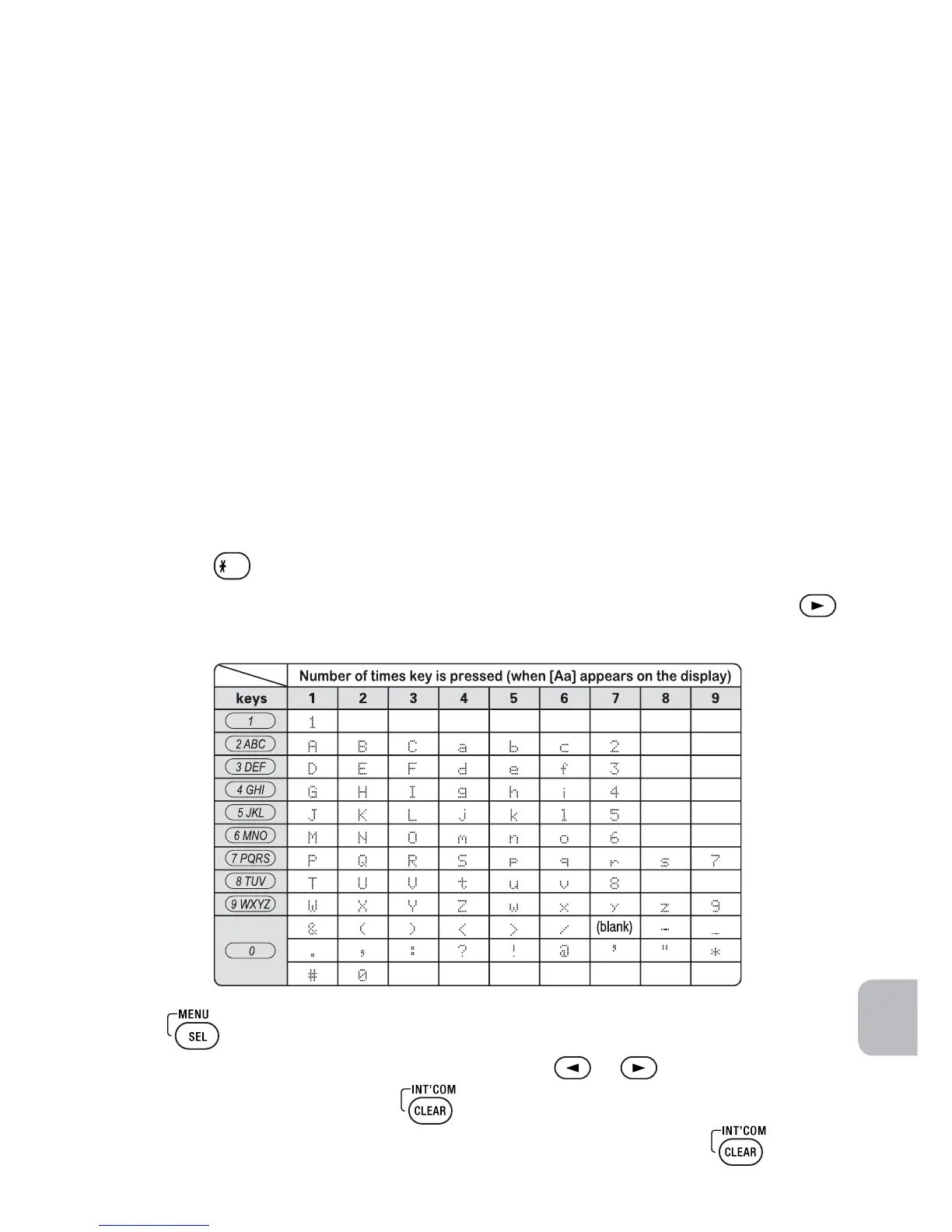
You can use the number keypad on your dial pad to enter text by referring to the
letters printed on each number key.
When you press the number key in a text entry field, the phone displays the first
letter printed on the number key.
Press the number key twice to display the second letter and three times to display
the third.
When [Aa] appears on the display, capital letters are displayed first, then
lower case letters, and then the number on the key.
When [aA] appears on the display, lower case letters are displayed first, then
the number on the key, and then capital letters.
When you input the first letter or a letter after a blank space, the default
mode is [Aa]. From the next letter, the mode changes to [aA] automatically.
You can switch back and forth the mode manually between [Aa] and [aA].
Press
; the case (small/capital) of the letter entered changes also.
If two letters in a row use the same number key, enter the first letter, then use
to move the cursor to the next position to enter the second letter.
Press
to end your text entry.
If you make a mistake while entering a name, use or
to move the cursor
to the incorrect character. Press
to erase the wrong character, and then
enter the correct character. To delete all characters, press and hold .



 To Next Page